Copyright© Orphée SA. All Rights Reserved.
If USB key is available, result will be stored at the end of the sample run.
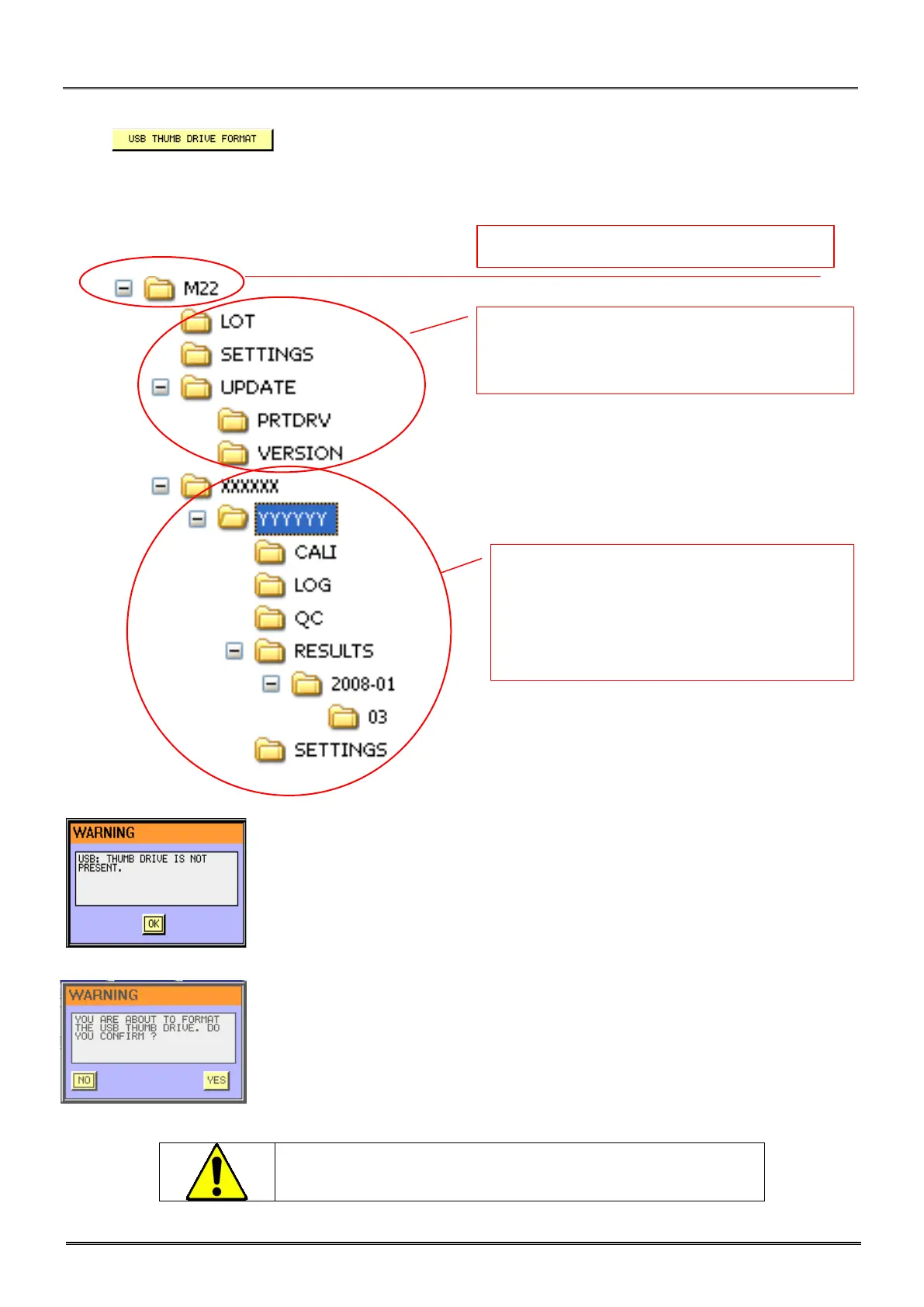
Press to format USB key. The system will format the USB Key and build specific
directories for Mythic management.
Overview of the main tree of the USB key:
The serial number of the
Mythic 22 is coded as : xxxxxx-yyyyyy
These two groups of 6 digits will be used to create private folders, only usable on one instrument.
- This prompt appears if none USB key is available.
- Press yes if you agree to format the USB key. It is mandatory to format the
USB key on the Mythic before to use it.
All the previous information contained
erased.
Root folder for Mythic 22 analyser.
Common folders. The content of this part can be
used on all Mythic 22 instruments.
All of these folders and data contained in
these folders are dedicated to the instrument
and can’t be transfer to another instrument.
Each folder is automatically created by the
Mythic 22.



 To Next Page