102
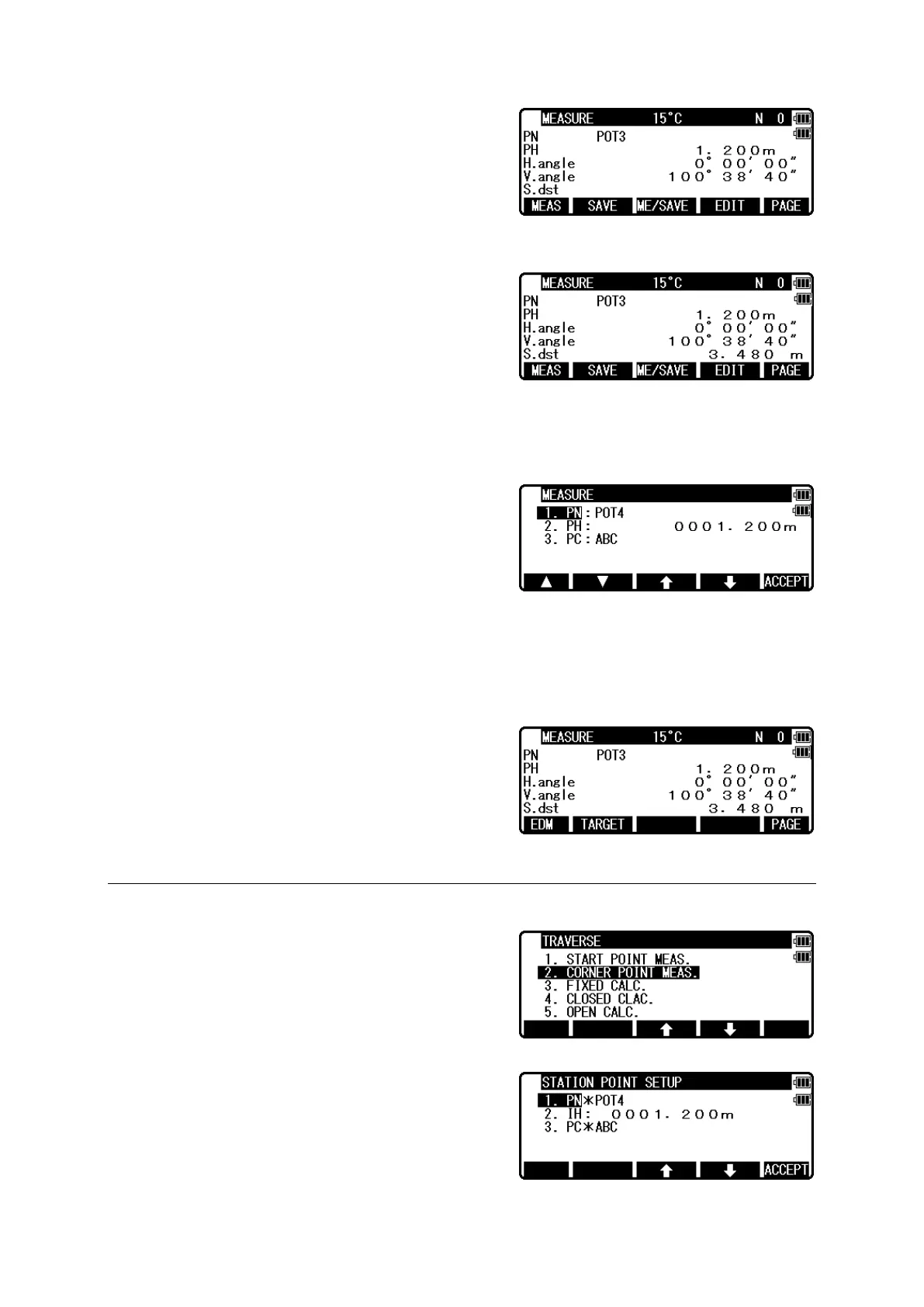
Aim at the reference point and press [ENT] to view
the MEASURE screen.
Measuring
Aim at the Target point and press [F1][MEAS] to
measure the distance.
Press [F3][ME/SAVE] to measure and save the
measured data as sideshot point.
Press [F2][SAVE] to save the measured data as sideshot point.
When no PN is input, no survey data is saved.
Press the [F4][EDIT] to edit the PN, Point Name,
PH, Prism Height and PC, Point Code.
Press [ENT] to view each input window by pressing
the up or down arrow key, and input your desired
point name or prism height or point code. Press
[F5][ACCEPT], if the current PN, PH and PC are acceptable.
Press the [ENT] to save the measured data as corner point. If [ENT] is pushed more than
twice at the one station, the last [ENT] point becomes next corner point.
NOTE: Please use [SAVE] [ME/SAVE] and [ENT]
properly by sideshot and corner point.
Press [F5][PAGE] to view another menu.
11.2 Corner point measuring
Select 2.CORNER POINT to start measuring at
corner point.
And press [ENT] to view the STATION POINT
SETUP screen.


 To Next Page
 Loading...