All-New Event Presentation Switching Solutions
User Manual
Home screen
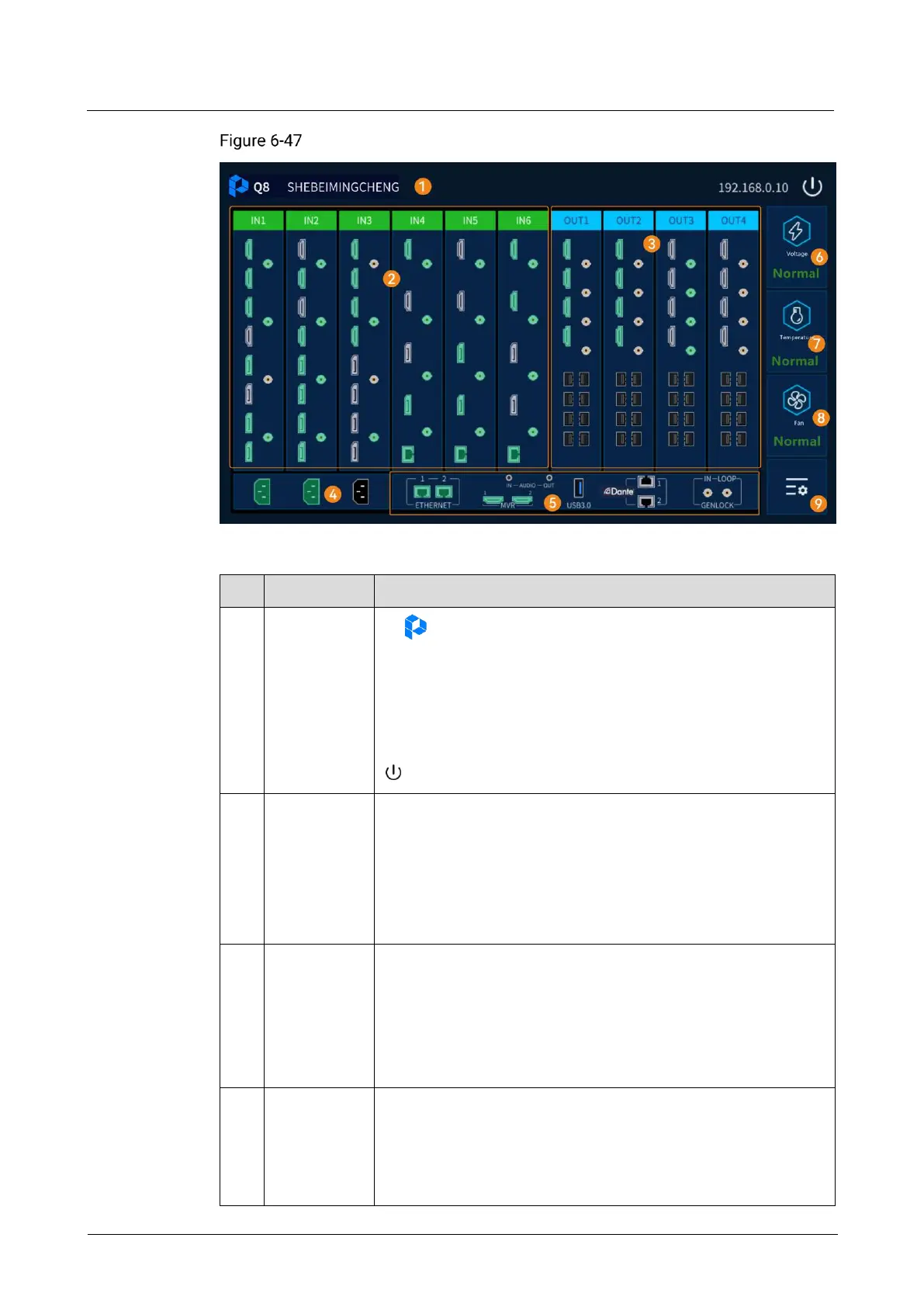
Table 6-2 Home screen description
: Device manufacturer logo.
Q8: Device model.
SHEBEIMINGCHENG: Device name, which can be modified on
the control computer.
192.168.0.10: Device IP address, which can be modified on
the device LCD or the control computer.
: Turn off LCD display.
Show the input card and its connector status.
Green: The connector is accessed with a source and the
source is normal.
White: The connector is not accessed with source.
Gray: The connector is unavailable.
Orange: The connector’s accessed source is abnormal.
Show the output card and its connector status.
Green connector: The connector is connected to the backend
device.
White connector: The connector is not connected to the
backend device.
Gray connector: The connector is unavailable.
Show the power supply connection status.
Green: The connector is connected with a power supply and
the power is supplied.
White: The connector is not connected with a power supply
and the power is not supplied.



 To Next Page