All-New Event Presentation Switching Solutions
User Manual
− Maximum frame rate: 120 Hz
− EDID management (support for standard resolutions and custom resolutions)
− HDCP 2.2 compliant and downward compatible
12G-SDI
− Support for ST-2082 (12G), ST-2081 (6G), ST-424 (3G), ST-292 (HD)
− Maximum resolution: 4096×2160@60Hz
− Maximum frame rate: 60 Hz
− Support for interlaced input signal
HDMI 1.3
− Maximum resolution: 1920×1080@60Hz/2048×1080@60Hz
− Minimum resolution: 800×600@60Hz
− Maximum width: 2048 pixels (2048×1080@60Hz)
− Maximum height: 2048 pixels (1080×2048@60Hz)
− Maximum frame rate: 120 Hz
− EDID management (support for standard resolutions up to 2048×1152@60Hz
and custom resolutions)
− HDCP 1.4 compliant and downward compatible
Q8 Hardware Introduction
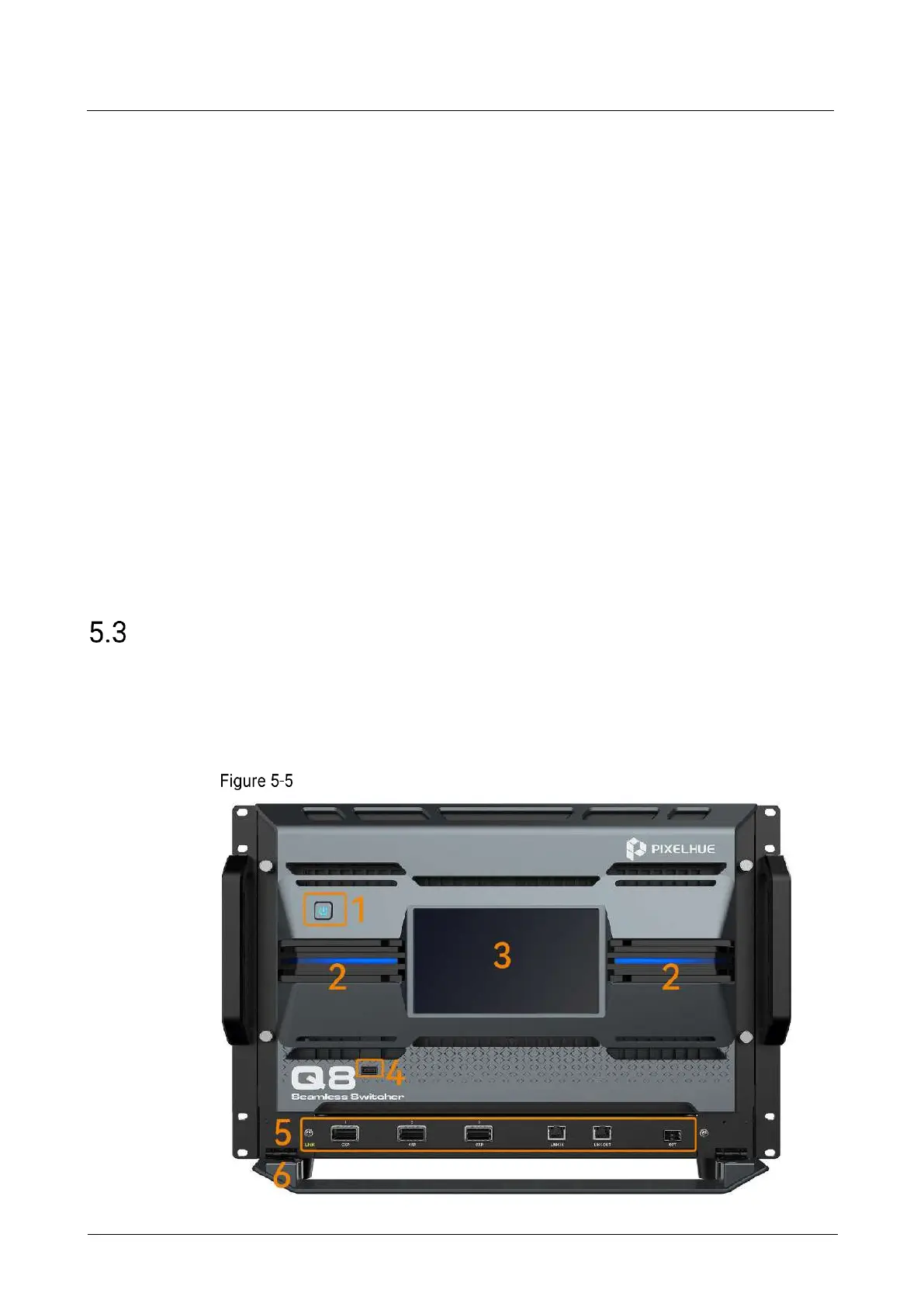
5.3.1 Front Panel
The Q8 front panel is designed with a 7-inch touchscreen, a power button, and two
LED strips. A LINK port is provided on the front panel to link a second Q8.
Q8 front panel



 To Next Page