EasyManua.ls Logo

PIXELHUE P20 - Page 159

Default Icon
210 pages
Print Icon
To Next Page IconTo Next Page
To Previous Page IconTo Previous Page
Loading...
7 Event Management Software PixelFlow
www.pixelhue.com
153
Main screen: Drag an input source to the screen. If the device model is Q8, you
can also drag the PGM from other screens to the current screen.
AUX screen: Drag an input source in the input list or a PGM in the screen list to the
AUX screen.
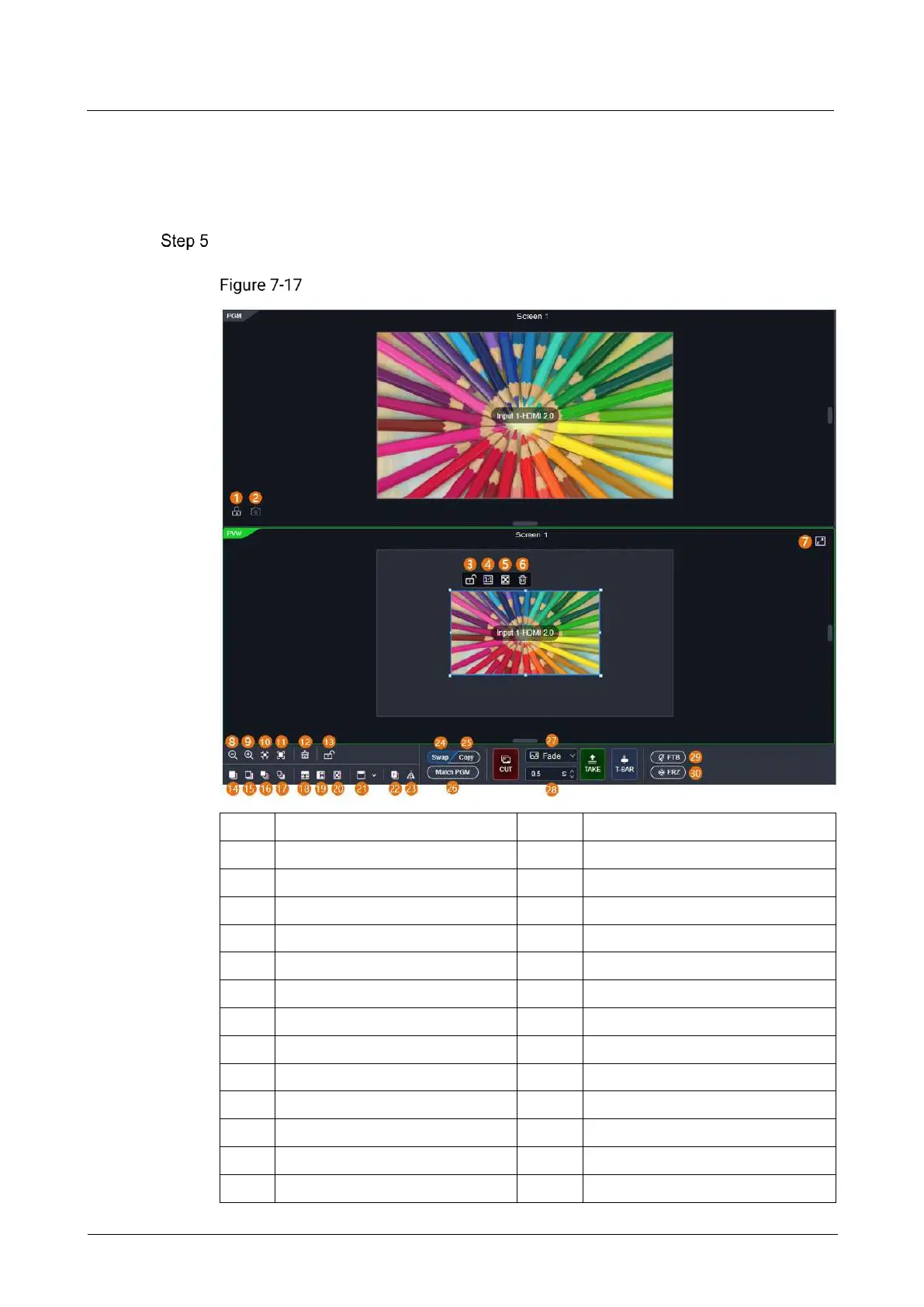
Perform the desired layer operations as required.
Layer operations

1
Lock/Unlock PGM
16
Bring to front
2
Capture PGM
17
Send to back
3
Lock/Unlock layer
18
Fill horizontally
4
1:1 display
19
Fill vertically
5
Maximize display
20
Fill screen
6
Delete
21
Align
7
Maximize/Restore
22
Copy
8
Zoom out
23
Mirror horizontally
9
Zoom in
24
Swap PVW and PGM
10
Zoom to selected
25
Copy PVW to PGM
11
Auto fill
26
Match PVW with PGM
12
Clear
27
Transition effect
13
Lock/Unlock PGM and PVW
28
Transition duration
14
Bring forward
29
FTB

Table of Contents