RealPresence Collaboration Server (RMX) 1500/1800/2000/4000 Getting Started Guide
Polycom®, Inc. 50
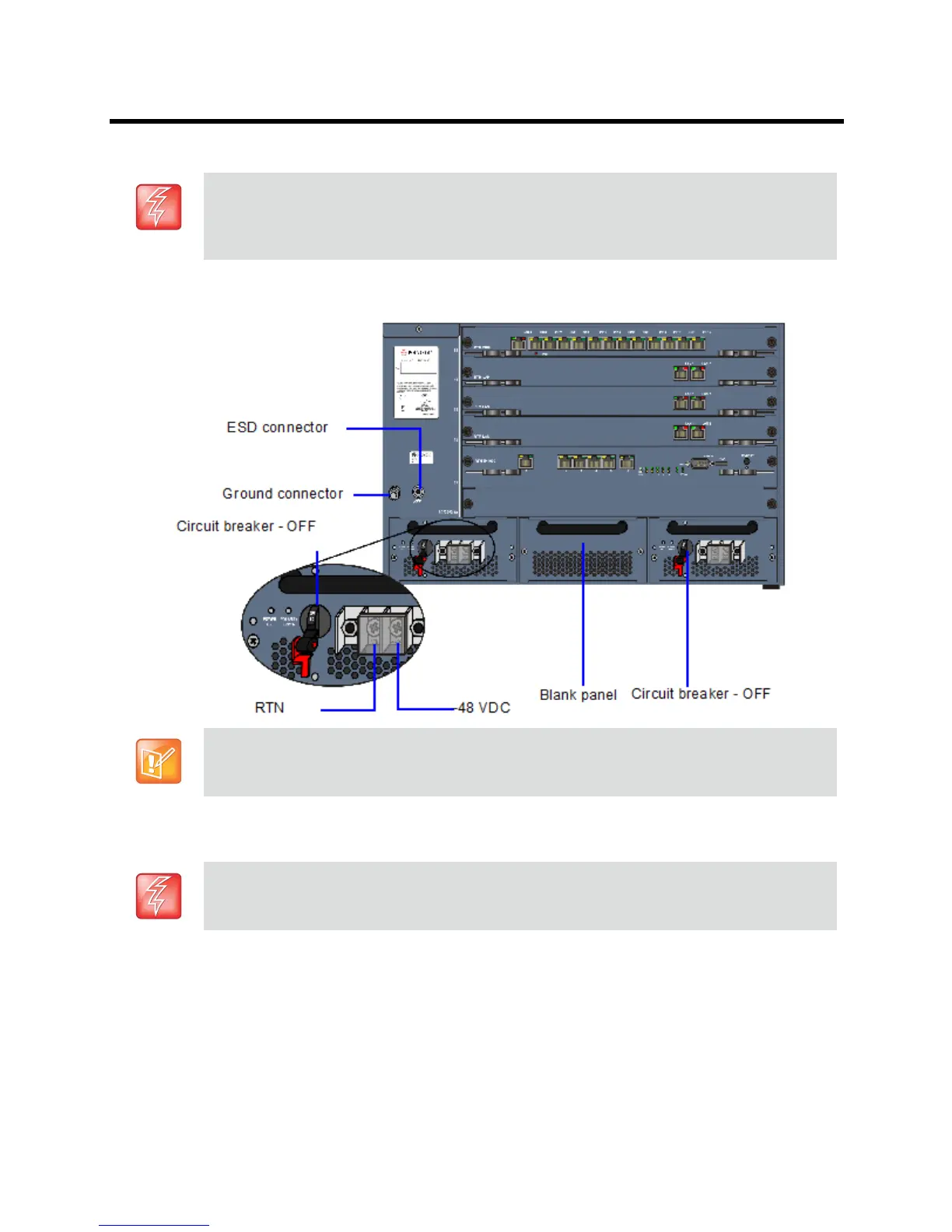
Using the two wires of a 10 AWG cable running from the DC power distribut ion unit, connect the black wire into the -48VDC terminal block and the red wire to the RTN terminal block.
5 Connect the green or green-yellow wire to the system single-point M6x15 “Ground” bolt
.
If the unit is rack mounted, the single-point ground on the MCU must be connected to the rack with a
single conductor and fixed as to prevent loosening. When using bare conductors, they must be
coated with an appropriate antioxidant compound before crimp connections are made. Tinned,
solder-plated or silver plated connectors do not have to be prepared in this manner.
6 Replace the transparent plastic caps on the terminal block.
7 Turn ON the Main that supplies power to the Collaboration Server.
• A 10 AWG cable must be used to connect the mains with the RealPresence Collaboration Server
(RMX) 4000 DC Power Rail Model.
• The supply wires for DC version must be terminated using quick connectors.
• Extension cords may not be used.
The center PRM slot/module is fitted with a blank panel and the slot cannot be used on a system
with DC Voltage.
The rating of the protective earthing conductor should be a minimum of 10AWG.














 To Next Page