RealPresence Collaboration Server (RMX) 1500/1800/2000/4000 Getting Started Guide
Polycom®, Inc. 70
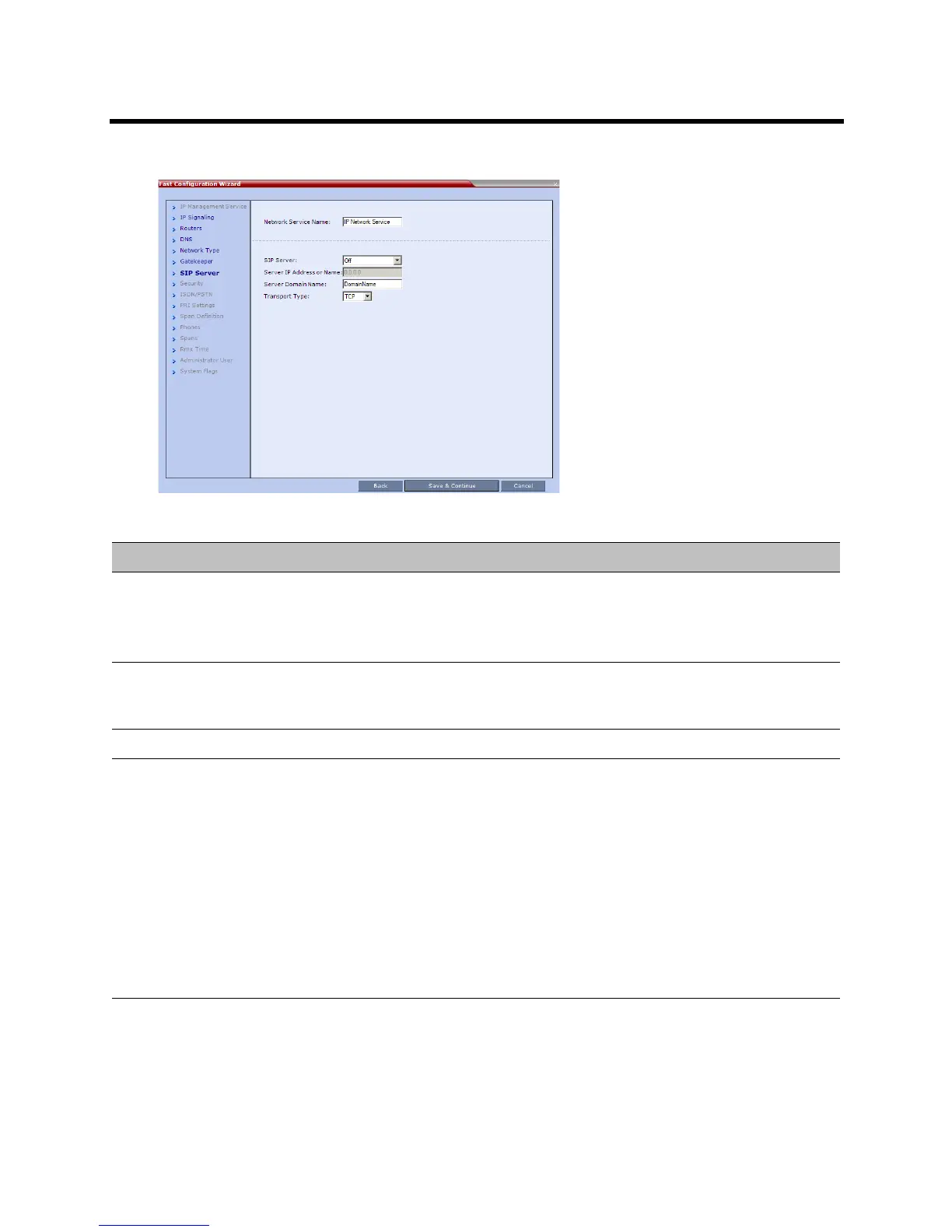
13 Enter the required SIP Server information in the dialog box.
14 Click Next.
Fast Configuration Wizard – SIP Server
Field Description
SIP Server Select:
•Specify – to manually configure SIP servers.
•Off – if SIP servers are not present in the network.
SIP Server IP Address or
Name
Enter either the IP address of the preferred SIP server or its host name (if a DNS
server is used).
Server Domain Name Enter the name of the SIP domain.
Transport Type Select the transport type and protocol that is used for signaling between the MCU
and the SIP Server or the endpoints according to the protocol supported by the SIP
Server:
•UDP – Select this option to use UDP for signaling.
•TCP – Select this option to use TCP for signaling.
•TLS – The Signaling Host listens on secured port 5061 only and all outgoing
connections are established on secured connections. Calls from SIP clients or
servers to non secured ports are rejected.
The following protocols are supported:
• TLS 1.0
• SSL 2.0
• SSL 3.0.














 To Next Page