RealPresence Collaboration Server (RMX) 1500/1800/2000/4000 Getting Started Guide
Polycom®, Inc. 78
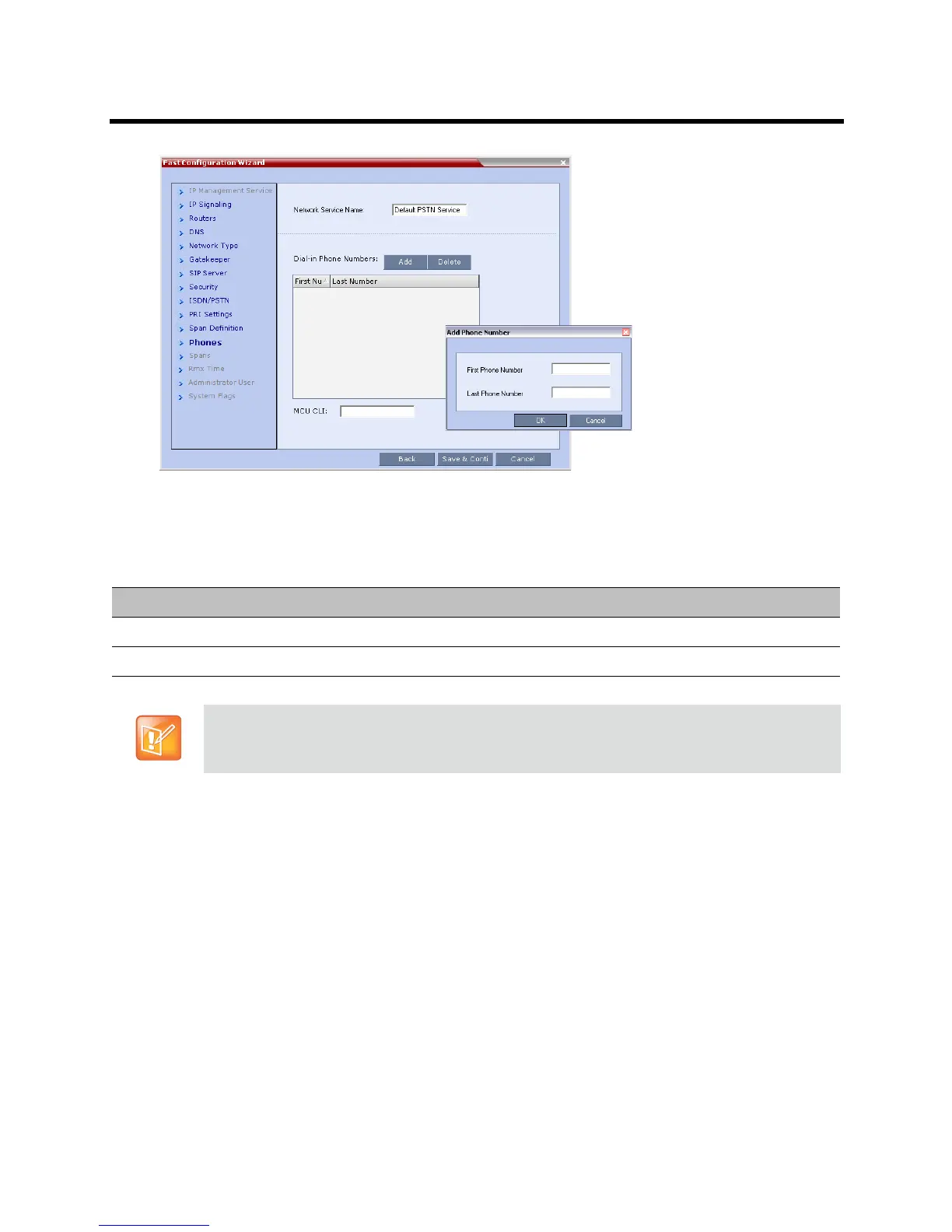
24 Click Add to define dial-in number ranges.
The Add Phone Number dialog box opens.
25 Define the following parameters:
26 Click OK.
The new range is added to the Dial-in Phone Numbers table.
27 Optional. Repeat steps 24 to 25 to define additional dial-in ranges.
28 In the Phones tab enter the MCU CLI (Calling Line Identification).
With dial-in connections, the MCU CLI indicates the MCU’s number dialed by the participant. In a
dial-out connection, indicates the MCU (CLI) number as seen by the participant.
29 Click Save & Continue.
After clicking Save & Continue, you cannot use the Back button to return to previous configuration
dialog boxes.
The ISDN/PSTN Network Service is created and is added to the ISDN/PSTN Network Services list.
If the system cannot create the ISDN/PSTN Network Service, an error message is displayed
indicating the cause and allowing you access the appropriate dialog box in the Fast Configuration
Wizard for corrective action.
Fast Configuration Wizard – Add Phone Numbers
Field Description
First Number The first number in the phone number range.
Last Number The last number in the phone number range.
• A range must include at least two dial-in numbers.
• A range cannot exceed 1000 numbers.














 To Next Page