Advanced Features
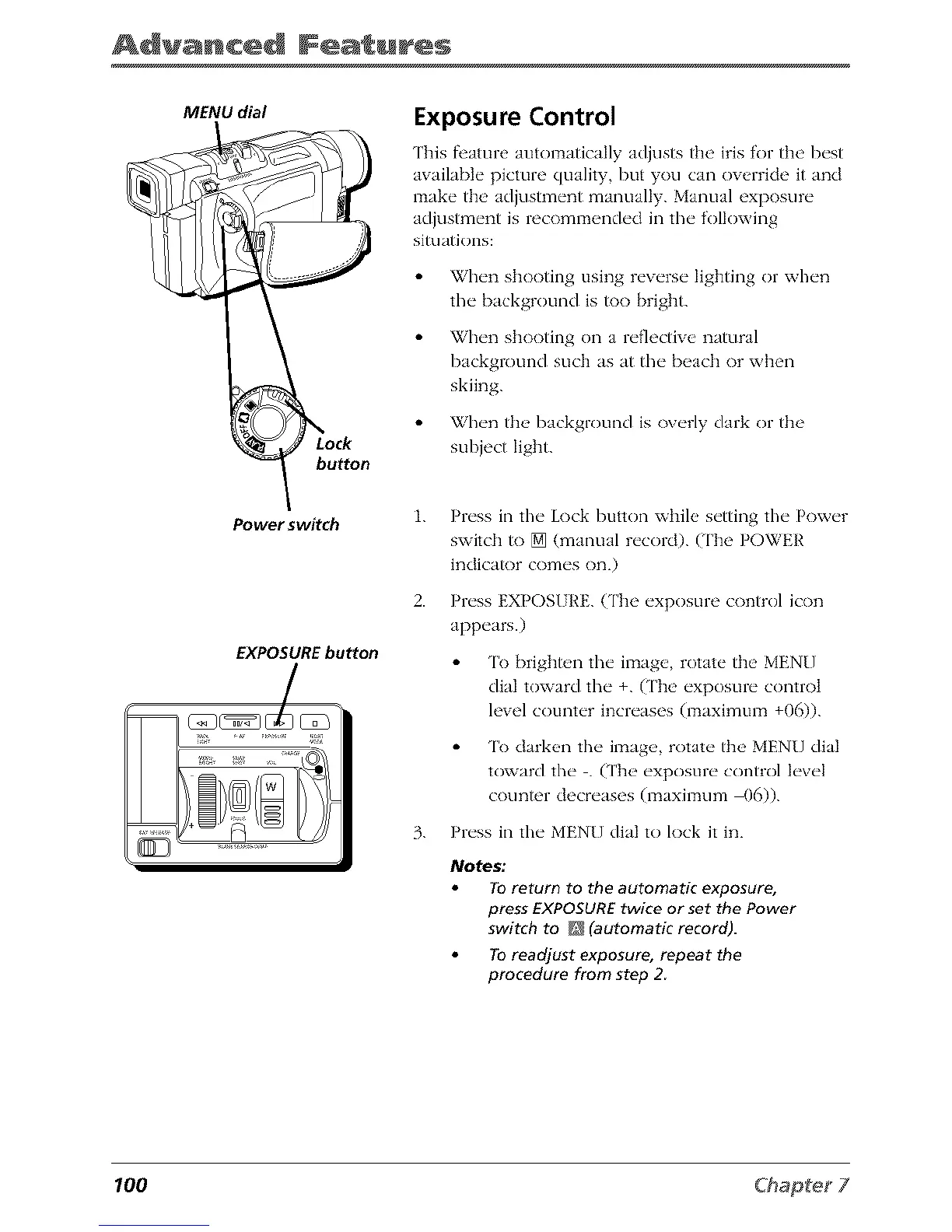
MENU dial
button
Power switch
EXPOSURE button
Exposure Control
This f_'ature automatically adjusts tile iris for the best
awfilable picture quality, but you can override it and
make the adjustment manually. Manual exposure
adjustment is recommended in the following
situations:
When shooting using reverse lighting or when
the background is _)o bright.
When shooting on a reflective natural
background such as at the beach or when
skiing.
When the background is overly dark or the
subject light.
1.
2.
Press in tile Lock button while setting tile Power
switch to [] (manual record). (The POWER
indicator comes on.)
Press EXPOSI RE.(The exposure control icon
appears.)
'lk) brigbt_,n the image, rotate the MENU
dial toward tim +. (['be exposure control
level counter increases (maximum +06)).
'lk) darken the image, rotate the MENU dial
toward tim . (['be exposure control level
counter decreases (maximum _16)).
3. Press in the MENU dial to lock it in.
Notes."
To return to the automatic exposure,
press EXPOSURE twice or set the Power
switch to _ (automatic record).
To readjust exposure, repeat the
procedure from step 2
100



 To Next Page