Di@i a Camera
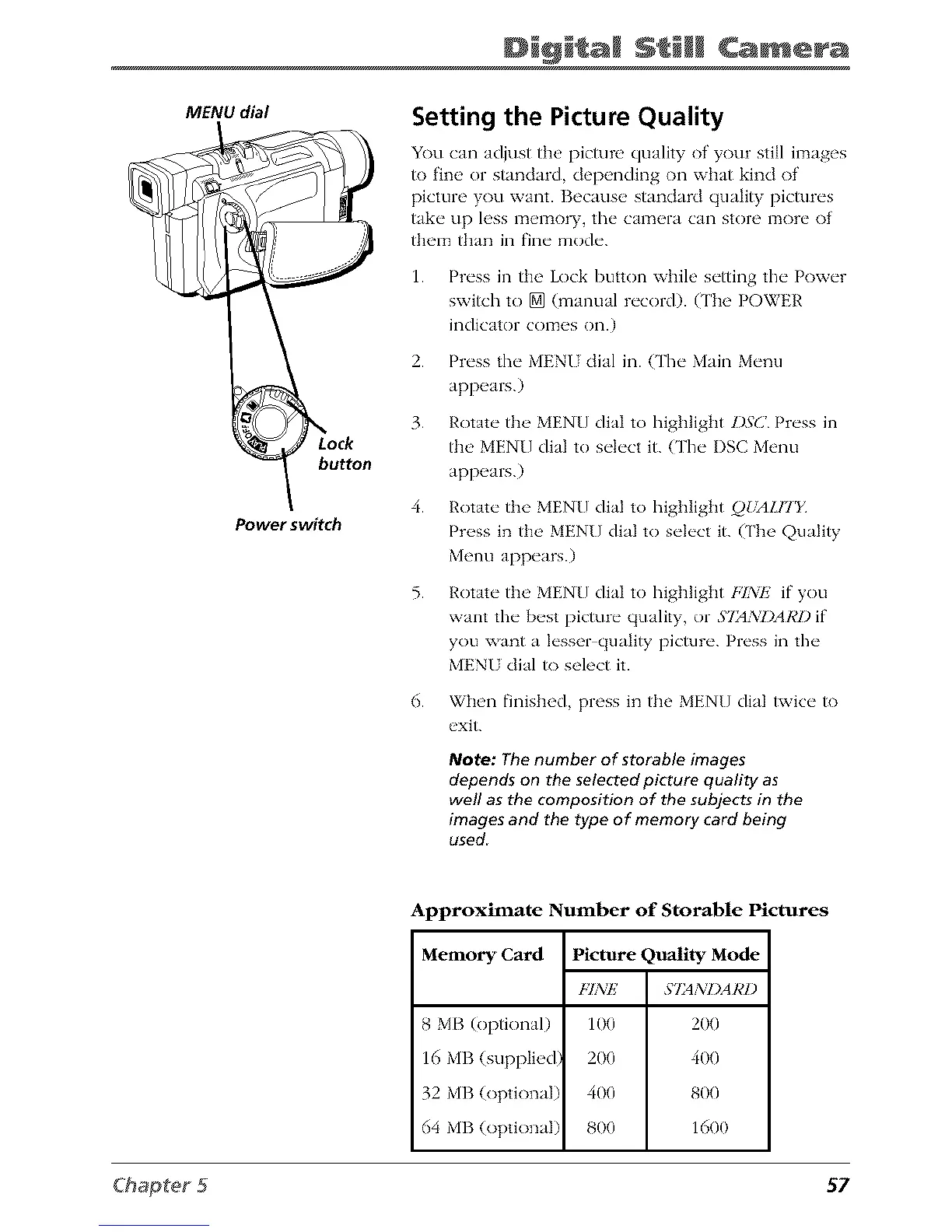
MENU dial
button
Power switch
Setting the Picture Quality
You can adjust the picture quality of your still images
to fine or standard, depending on what kind of
picture you want. Because standard quality pictures
take up less memory, the camera can store more of
them than in fine mode.
1.
2.
3.
4.
5.
6.
Press in the Lock button while setting the Power
swish to [] (manual record). (The POWER
indicator comes on.)
Press the MENI dial in. (The Main Menu
appears.)
Rotate the MENU dial to highlight l)S(] Press in
the MENU dial to select it. (The I)SC Menu
appears.)
Rotate the MENU dial to highlight QbALH'Y
Pr(_ss in th(>MENU dial to svh, ct it. (The Quality
Menu appears.)
Rotate the MENU dial to highlight FINP2 if you
want the best picture quality, or S721XDAA'I)if
you want a lesser quality picture. Press in the
MENU dial to select it.
When finished, press in the MENU dial twice to
exit.
Note: The number of storable images
depends on the selected picture quality as
well as the composition of the subjects in the
images and the type of memory card being
used
Approximate Number of Storable Pictures
Memory Card Picture Quality Mode
FINE S72dNI)ARl)
8 MB (optional) 100 200
16 MB (supplied) 200 400
32 MB (optional) 400 800
64 MB (optional) 800 1600
57



 To Next Page