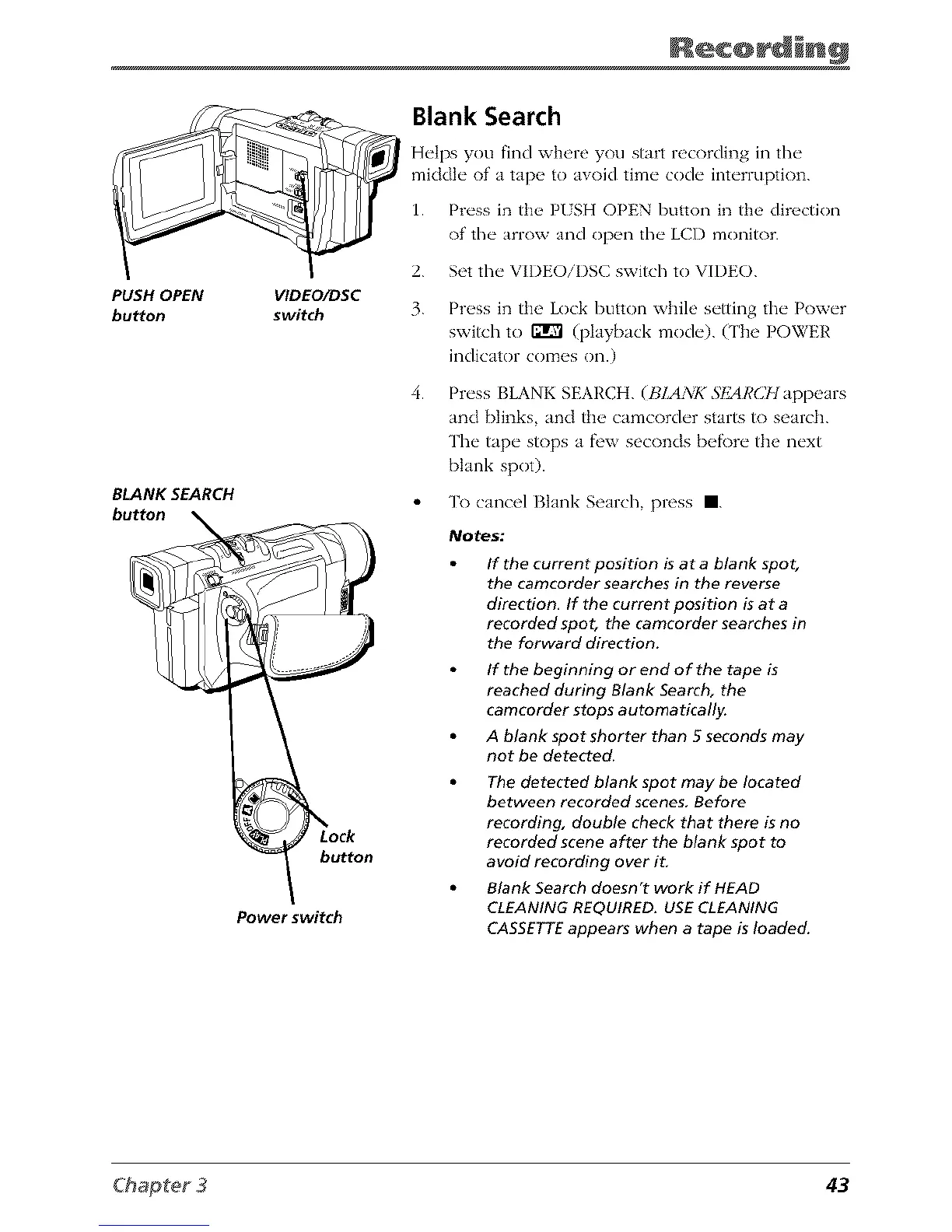
PUSH OPEN
bu_on
BLANK SEARCH
button
VlDEO/DSC
switch
button
Power switch
Blank Search
Helps you find wh_>re you start recording in the
middk" of a tap_, to avoid time code interruptk)n.
1. Press in ttw PISH OPEN button in the direction
of the arrow and op_ql the LCI) monitor.
2. Set flw VIDEOiDSC switch to VIDEO.
3.
4.
Press in the Lock button while setting the Power
switch to _ (playback mode). (The POWER
indicator comes on.)
Press BLANK SEARCH. (BLANK SFAI,'CIt appears
and {)links, and the camcorder starts to search.
The tape stops a fi'w seconds befbre the next
blank spot).
To cancel Blank Search, press I.
Notes:
If the current position is at a blank spot,
the camcorder searches in the reverse
direction, If the current position is at a
recorded spot, the camcorder searches in
the forward direction.
If the beginning or end of the tape is
reached during Blank Search, the
camcorder stops automatically.
A blank spot shorter than 5 seconds may
not be detected.
The detected blank spot may be located
between recorded scenes, Before
recording, double check that there is no
recorded scene after the blank spot to
avoid recording over it,
Blank Search doesn't work if HEAD
CLEANING REQUIRED, USE CLEANING
CASSETTEappears when a tape is loaded.
43



 To Next Page