TV or VCR
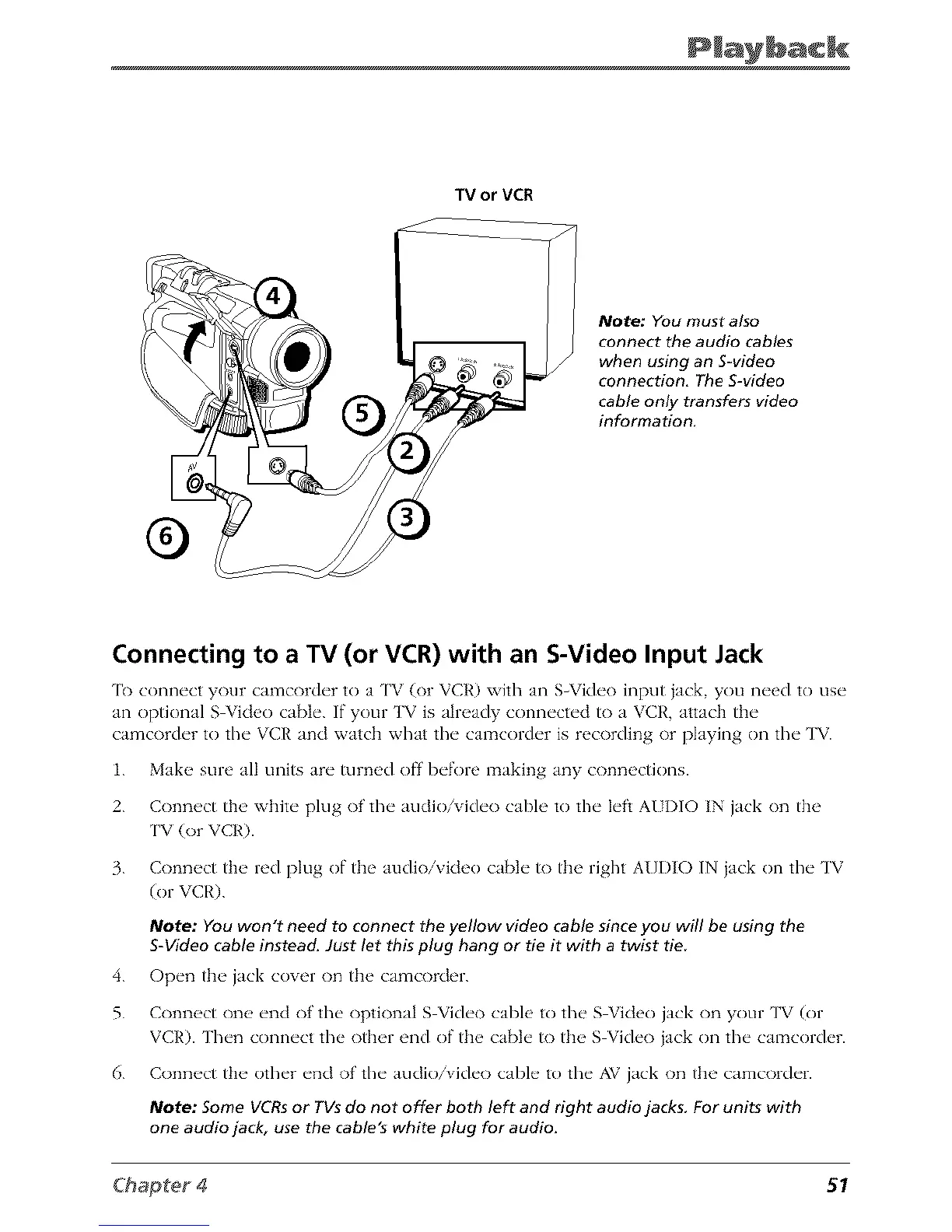
Note; You must also
connect the audio cables
when using an S-video
connection. The S-video
cable only transfers video
information.
®
Connecting to a TV (or VCR) with an S-Video Input Jack
'l_) connect your camcorder to a TV (or VCR) with an S_Video input jack you need to use
an optional S Vkteo cable. If"your TV is aln_ady connected to a VCR, attach the
camcorder to the VCR and watch what the camcorder is recording or playing on the TV.
1. Make sure all units are turned off before making any connectkms.
2. Connect the white plug of' the audk)/video cable to the left AI I)IO IN jack on the
TV (or VCR).
3. Connect the red plug of the audio/video cable to the right A{]I)IO IN jack on the TV
(or VCR).
Note: You won't need to connect the yellow video cable sinceyou will be using the
S-Video cable instead. Just let this plug hang or tie it with a twist tie
4. Open tb__jack cover on tb__camcorder.
5. Conn_ct one' end of the optional S Video cable to the S Vkleo jack on your TV (or
VCR). Then connect the other end of the cable to the S Video jack on the camcorder.
6. Connect the other end of' the audio/video cable to the AV jack on the camcorder.
Note: Some VCRsor TVsdo not offer both left and right audio jacks. For units with
one audio jack, use the cable's white plug for audio.
51



 To Next Page