¢@nnec @ns Setup
MENU dial
button
Power switch
0
41-
Setting the Date and Time
You need to set tile date and time bef\)re it can be
displayed.
Date and time infk)rmation is recorded onto tl_e tape
at all times, but i_ display can be _lrned on or off
during playback (s_!_!pa_ 105)
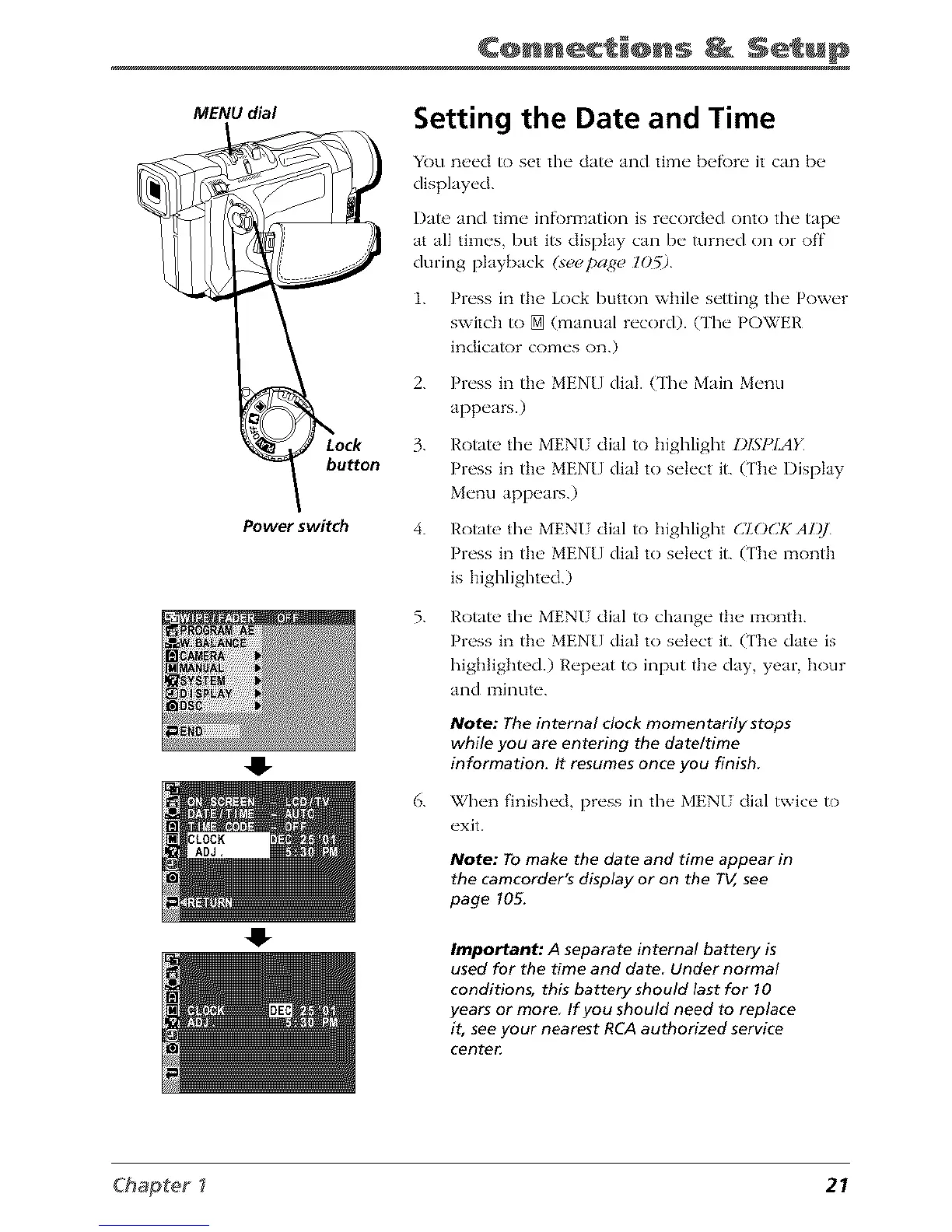
1. Press in the Lock button while setting tile Power
switch to [] (manual record). O'he POWER
indicator comes on.)
2. Press in the MEN[] dial. (The Main Menu
appears.)
3. Rotate the MENU dial to highlight DISPIAK
Press in tim MEN[] dial to select it. (The Display
Menu appears.)
4. Rotate the MENU dial to highlight CZOCKAL)]_
Press in the MENU dial to select it. (The month
is highlighted.)
5.
Rotate the MENU dial to change tim montt_.
Press in the MENU dial to select it. (['he date is
highlighted.) Repeat to input the day, year, hour
and minute.
Note: The internal clock momentarily stops
while you are entering the dateltime
information. It resumes once you finish
6. When finished, press in the MENU dial twice to
exit.
Note: To make the date and time appear in
the camcorder's display or on the TV, see
page 105.
Important; A separate internal battery is
used for the time and date Under normal
conditions, this battery should last for 10
years or more If you should need to replace
it, see your nearest RCA authorized service
cente_
Chapter _ 21



 To Next Page