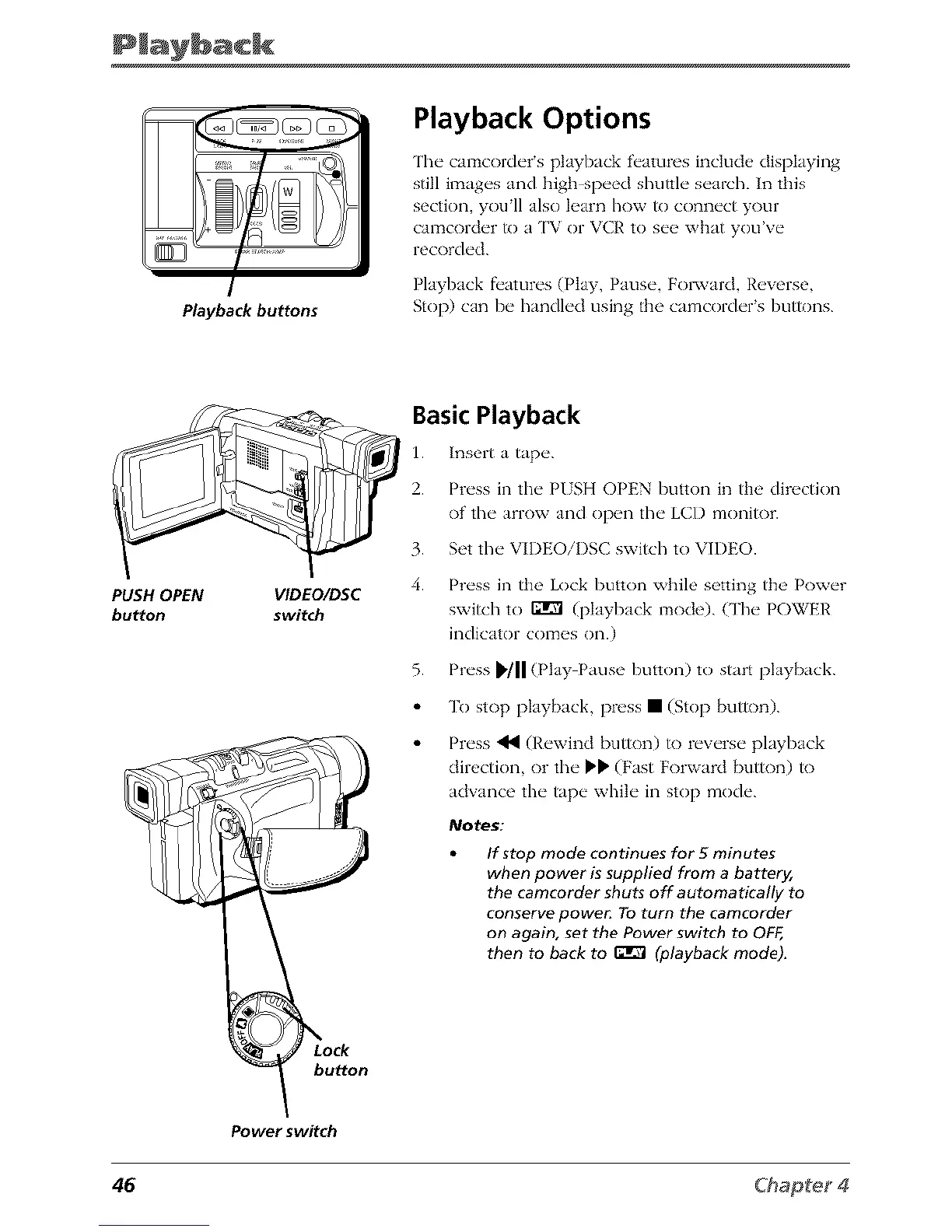
Playbackbuttons
Playback Options
The camcorder s playback f_'atures include displaying
still images and high speed shuttle search. In this
section, youll also learn how R) connect your
camcorder R) a ['V or VCR to see what you've
recorded.
Playback f_'atures (Play, Pause, Fol_,vard, Reverse,
Stop) can be handled using the camcorder's buttons.
PUSH OPEN VIDEO/DSC
button switch
Basic Playback
1. Insert a tap_'.
2. Pr_'ss in the" PISH OPEN button in the direction
of the" arrow and op_ql the" LCI) monitor.
3. Set the"VIDEOiDSC switch to ¥'H)EO.
4. Pn'ss in the Lock button while setting th_>Pow_'r
switch to r_rvl (playback mode). (The" POWEI,'
indicator comes on.)
5. Press _'/ll (Play Pause button) to start playback.
To stop playback, press • (Stop button).
Press _1_ (Rewind button) to reverse playback
direction, or the _ (Fast Forward button) to
adwmce the tape while in stop mode.
Notes:
If stop mode continues for 5 minutes
when power issupplied from a battery,
the camcorder shuts off automatically to
conserve powe_ Toturn the camcorder
on again, set the Power switch to OFF,
then to back to _ (playback mode).
button
Power switch
46



 To Next Page