Advanced Features
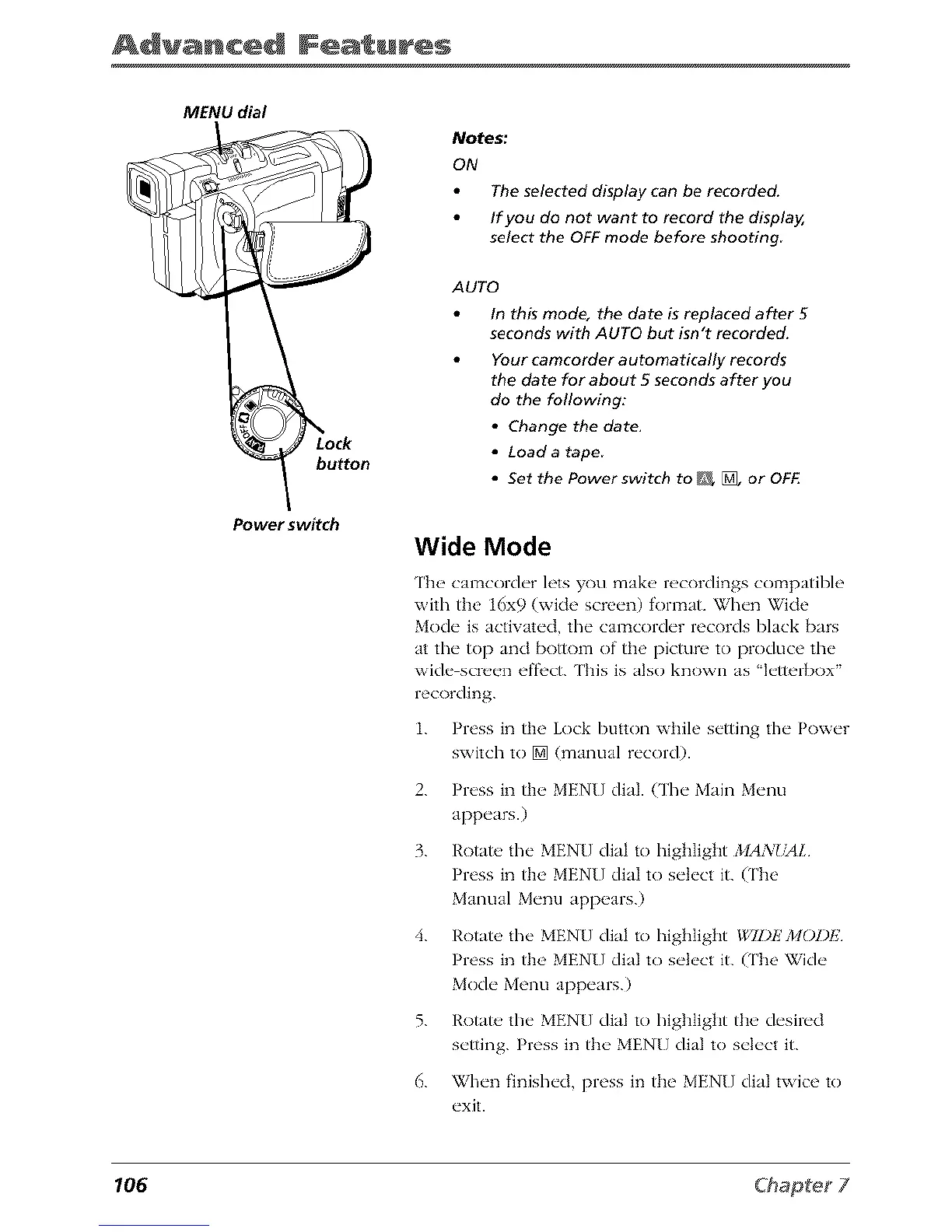
MENU dial
button
Power switch
Notes:
ON
The selected display can be recorded.
If you do not want to record the display,
select the OFF mode before shooting
AUTO
In this mode, the date is replaced after 5
seconds with AUTO but isn't recorded.
Your camcorder automatically records
the date for about 5 seconds after you
do the following:
• Change the date.
• Load a tape
• Set the Powerswitch to _ [], or OFF.
Wide Mode
The camcorder lets you make recordings compatible
with the 16x9 (wide screen) format. When Wide
Mode is activated, the camcorder records black bars
at tim top and bottom of the picmre to produce the
wide screen effi'ct. ['his is also known as qetterbox"
recording.
1. Press in the Lock button while setting the Power
switch to [] (manual record).
2. Press in the MENU dial. (The Main Menu
appears.)
3. Rotate, the MENU dial to highlight MANdriL
Press in tlm MENU dial to select it. (The
Manual Menu appears.)
4. Rotate the MENU dial to highlight *g,TDEMOI)I;
Press in the' MENU dial to s_'k'ct it. (The Wi&"
Mo&" Menu app_'ars.)
5. Rotate, the MENU dial to highlight the desired
setting. Press in the MENU dial to select it.
6. When finished, press in the MEN[] dial twice to
exit.
106



 To Next Page