¢@nnec_i@ns _ Setup
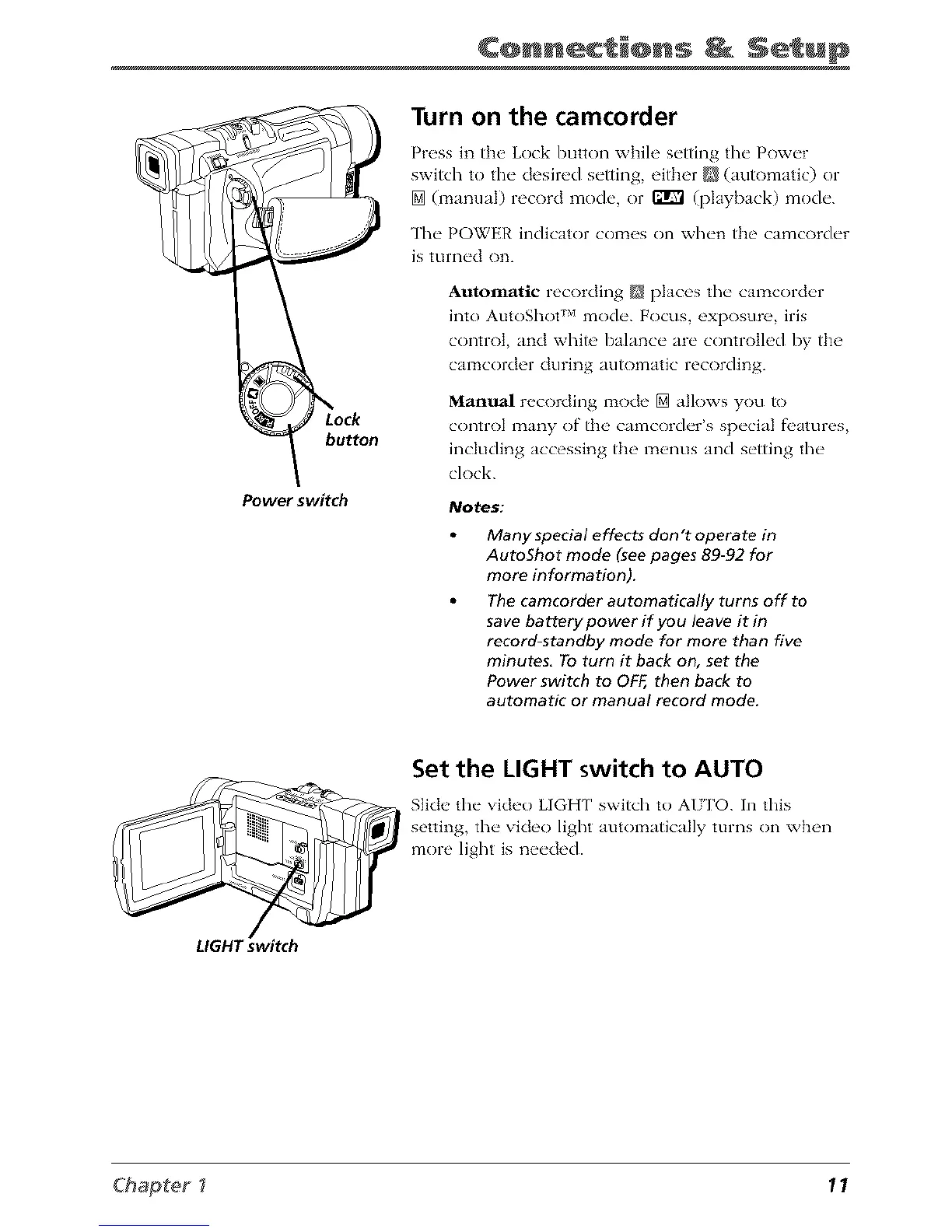
button
Power switch
Turn on the camcorder
Press in the Lock button wi_ile setting the Power
switch to the desired setting, either _ (automatic) or
[] (manual) record mode, or ffrVl (playback) mode.
The POWER indicator comes on when the camcorder
is turned on.
Automatic recording _ places the camcorder
into AutoShot TM mode. Focus, exposure, iris
control, and whi_ balance are controlled by the
camcorder cluring au_)matic recording.
Manual recording mode [] allows you to
control many of the camcorder's special features,
including accessing the menus and se_ing the
clock.
Notes:
Many special effects don "t operate in
AutoShot mode (see pages 89-92 for
more information).
The camcorder automatically turns off to
save battery power if you leave it in
record-standby mode for more than five
minutes. To turn it back on, set the
Power switch to OFF, then back to
automatic or manual record mode.
Set the LIGHT switch to AUTO
Slide the" video LIGH [' switch to AU'FO. In this
setting, th(" vich'o light automatically turns on when
more light is n_'_'ch'd.
LIGHT switch
Chapter _ 11



 To Next Page