Dubbing to Another Digital Video Camcorder
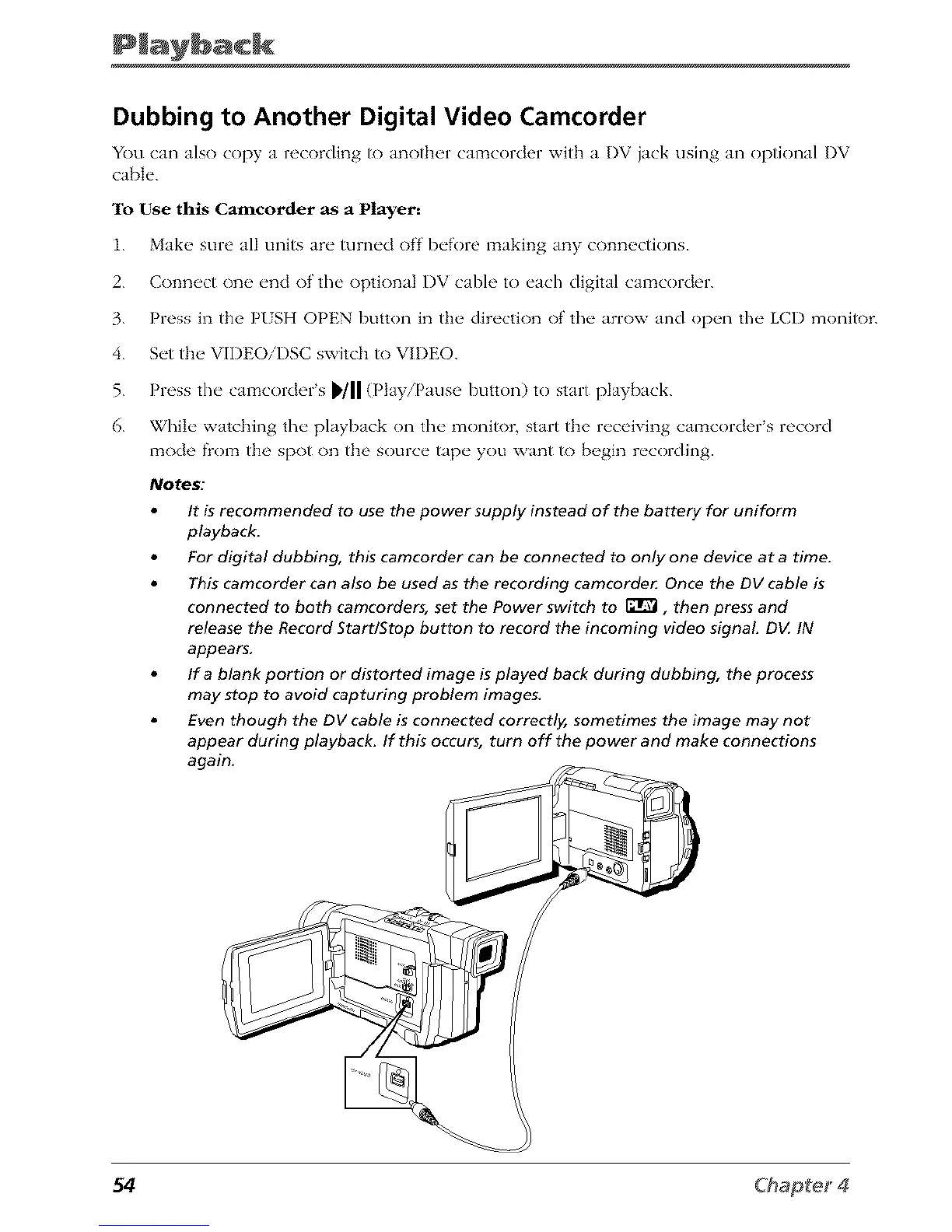
You can also copy a recording to anotb_,r camcorder wRb a DV jack using an optional DV
caN<
To Use this Camcorder as a Player:
1. Make sure all units are turned off before making any connections.
2. Connect one end of' the optional I)V cable to each digital calz_corder.
3. Press in the P/SH OPEN button in the direction of' the arrow and open the LCD monitor.
4. Set tlm VII)EOiDSC switch to VIDEO.
5. Press the camcorder's _'/11 (Play/Pause button) to start playback.
6. While watching the playback on the monik)r, start the receiving camcorder's record
mode fiom the spot on the source tape you want to begin recording.
It is recommended to use the power supply instead of the battery for uniform
playback.
For digital dubbing, this camcorder can be connected to only one device at a time.
This camcorder can also be used as the recording camcorde_ Once the DV cable is
connected to both camcorders, set the Power switch to _r_ , then press and
release the Record Start/Stop button to record the incoming video signal D_ IN
appears,
If a blank portion or distorted image is played back during dubbing, the process
may stop to avoid capturing problem images,
Even though the DV cable is connected correctly, sometimes the image may not
appear during playback. If this occurs, turn off the power and make connections
again.
54



 To Next Page