Still Camera
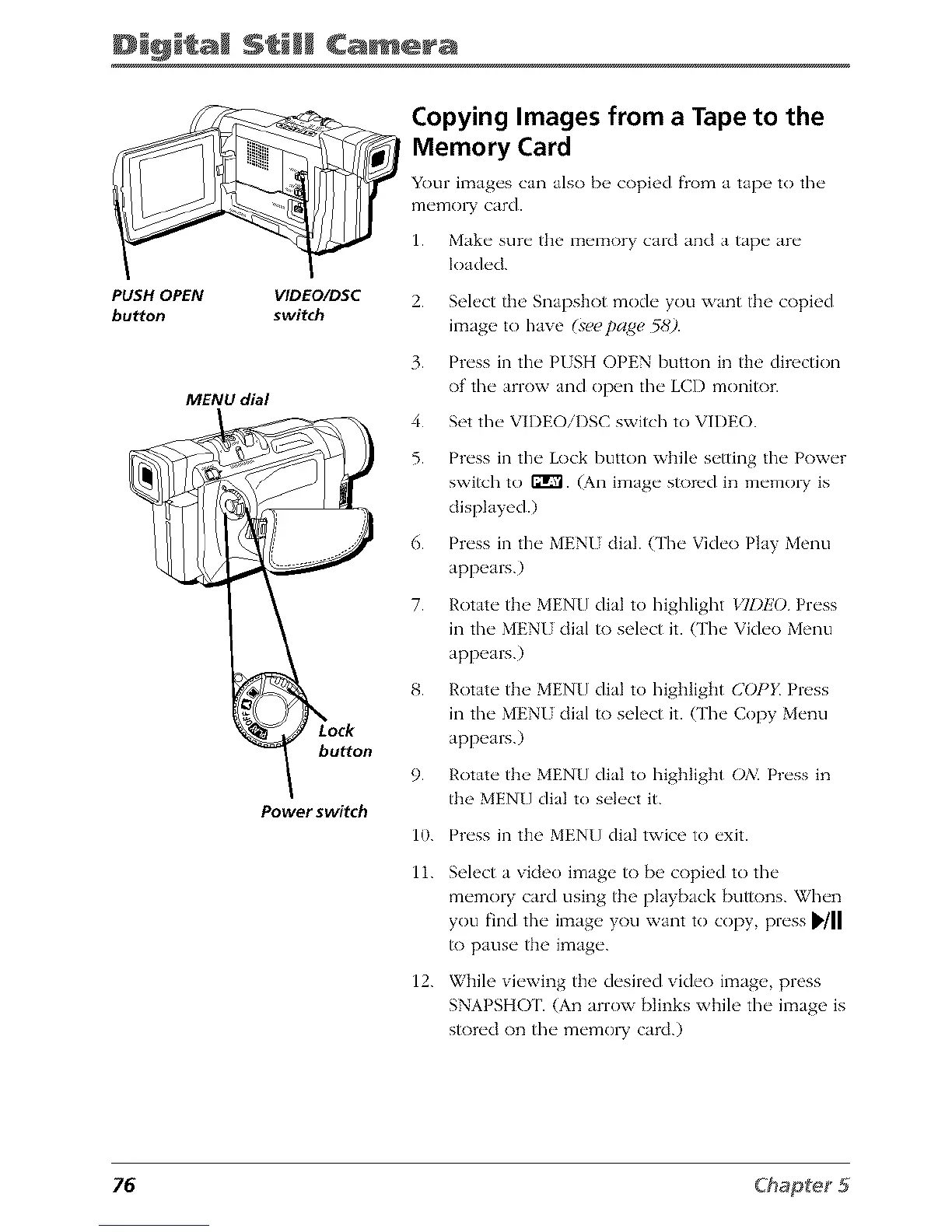
PUSH OPEN VIDEO/DSC
button switch
MENU dial
Power switch
Copying Images from a Tape to the
Memory Card
Your images can also b_, copied flom a tap_, to the
memo] T card.
1. Make sure the memory card and a tape are
loaded.
2.
3.
4.
5.
6.
7.
9.
Select the Snapshot mode you want the copied
ilTtage to have (seepage 5gq).
Press in the P/SH OPEN button in tim directkm
of the arrow and open the LCD monitor.
Set the VIDEOiI)SC switch to VIDEO.
Press in the Lock button while setting the Power
swish to IgrVl. (An image s_)red in memo_ is
displayed.)
Press in the MENI dial. {The Vide() Play Menu
appears.)
Rotate the MENU dial to highlight VII)EO Press
in the MENI dial to select it. (The Vide() Menu
appears.)
Rotate the MENU dial to highlight COPK Press
in the MENU dial to select it. (The Copy Menu
appears.)
Rotate the MENU dial to highlight OA_ Press in
the MENU dial to select it.
10.
11.
12.
Press in the MENU dial twice to exit.
Select a video image to be copied to the
memory card using the playback buttons. When
you find the image you want to copy, press _'/11
to pause the image.
While viewing the desired vide<) image, press
SNAPSHOT. (An arrow blinks while the image is
stored on the memo W card.)
76



 To Next Page