¢@nnec @ns Setup
Using the Power Supply
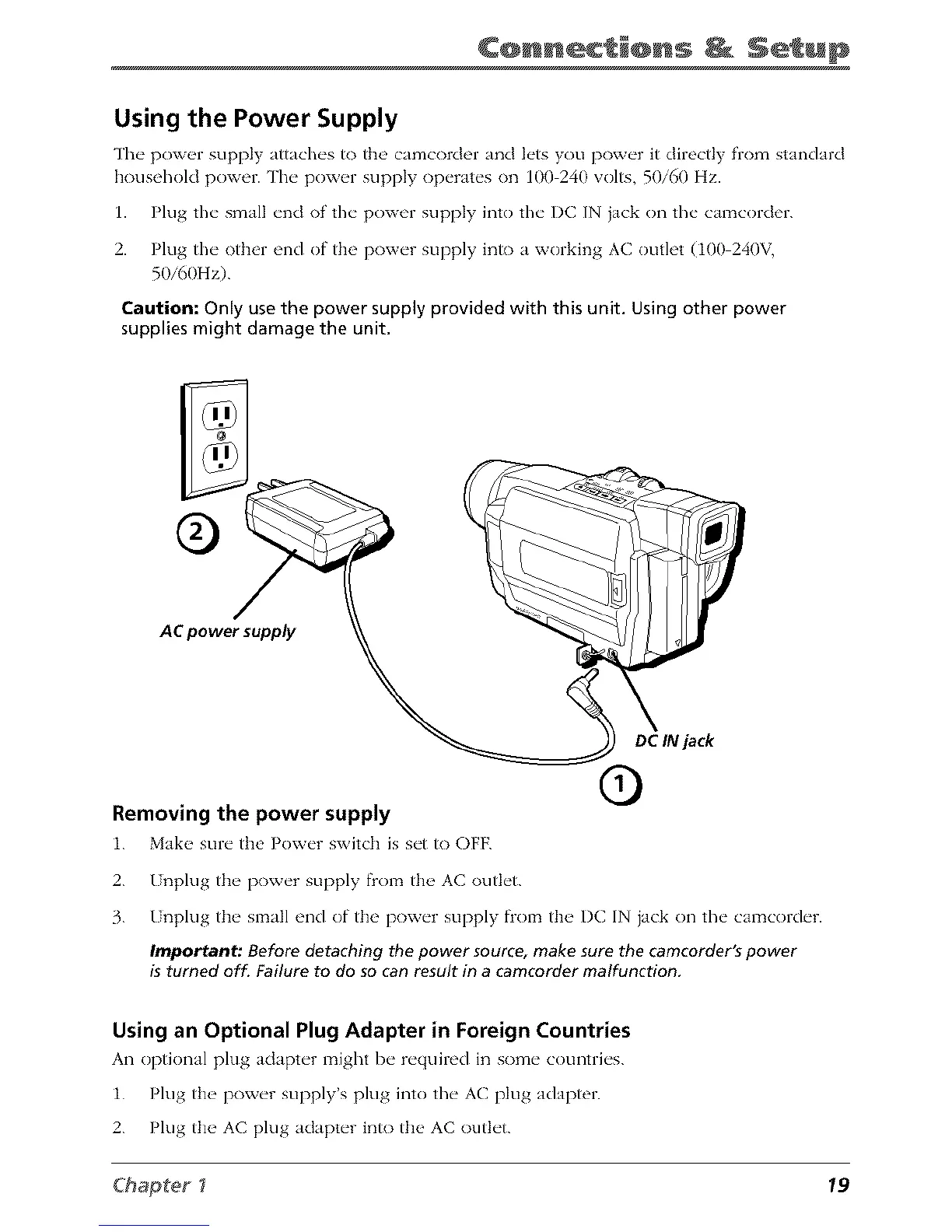
The poxv_q supply attaches to the' camcorder and lets you power it directly from standard
household power. The pow_q" supply operates on 100 240 volts, 50/60 Hz.
1. Plug the small end of the power supply into the DC IN jack on the camcorder.
2. Plug the other end of the power supply into a working AC outlet (100 240V,
50i60Hz).
Caution: Only use the power supply provided with this unit. Using other power
supplies might damage the unit,
©
AC power supply
Removing the power supply
i. Mak_ _ sure the' Power switch is set to OFF.
DC IN jack
2.
3.
I nplug the power supply flom the AC outlet.
I nplug the small end of the power supply flom the I)C IN }ack on the camcorder.
Important: Before detaching the power source, make sure the camcorder's power
is turned off. Failure to do so can result in a camcorder malfunction.
Using an Optional Plug Adapter in Foreign Countries
An optkma] plug adapter might he required in some countries.
i. Plug the power supply's plug into the AC plug adapter.
2. Plug the AC plug adapter into the AC outlet.
Chapter _ 19



 To Next Page