Advanced Features
MENU dial
button
Power switch
White Balance Adjustment
White, balance ref_'rs to tim correcmess of color
reproduction under various ligbting. If the white
balance is correct, all other colors will be accurately
reproduced.
The white balance is usually adjusted automatically.
However. iT1ore advanced camcorder operators
control this function manually to achieve a more
profi'ssional color/tint reproduction.
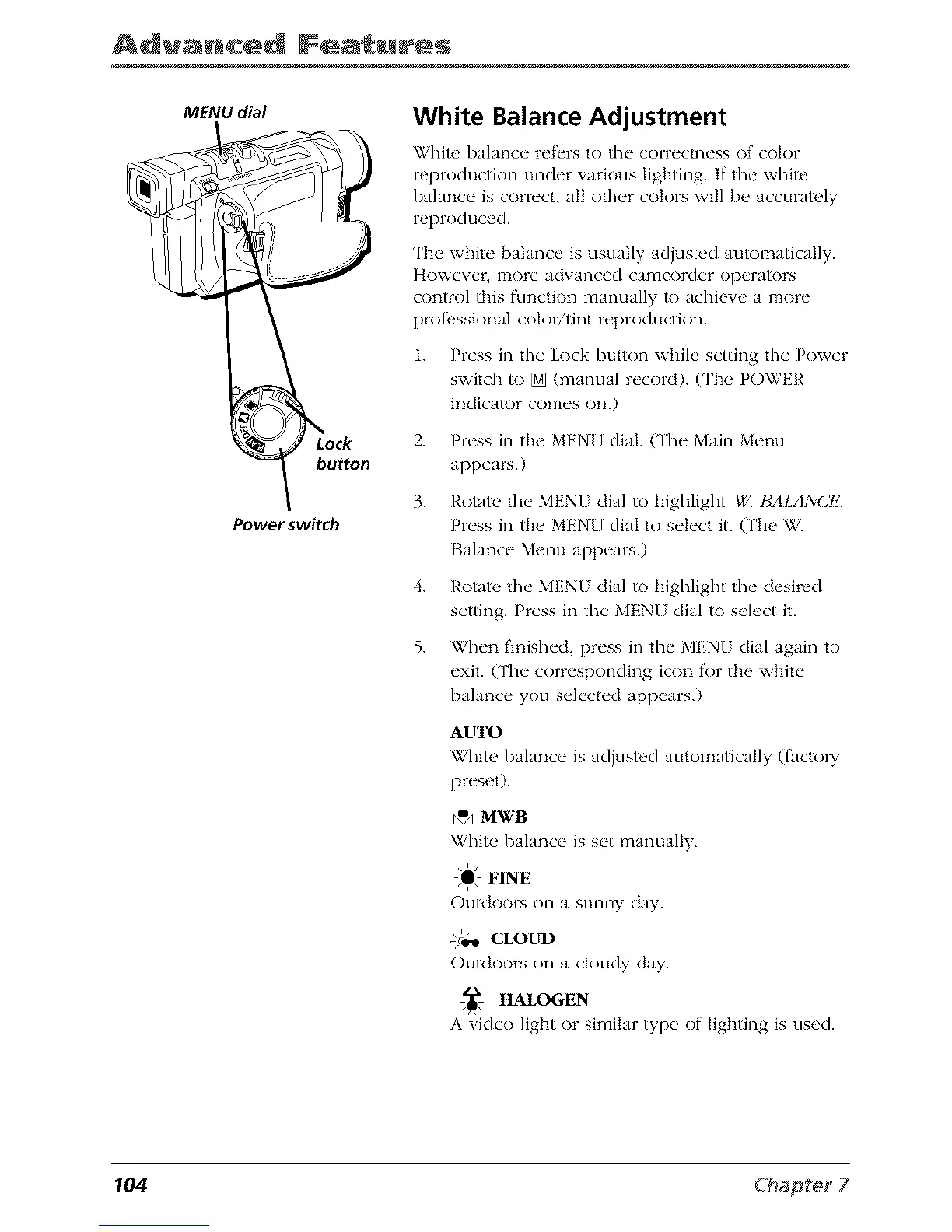
1. Press in the Lock button while setting the Power
switch to [] (manual record). (The POWER
indicator comes on.)
2. Press in the MENUdial. (The Main Menu
appears.)
3. Rotate tim MENU dial to Ilighlight */', BALANCI,2
Press in the MENU dial to select it. (The W.
Balance Menu appears.)
4. Rotate, the MENU dial to highlight the desired
setting. Press in tim MENU dial to select it.
5. When finished, press in tim MENU dial again to
exit. (Tim corresponding icon for the white
balance you selected appears.)
AUTO
White balance is adjusted automatically (facto W
preset).
_"A MWB
White balance is set manually.
O# FINE
Outdoors on a sunny day.
-)4.o CLOUD
Outdoors on a cloudy day.
HALOGEN
A video Iigbt or similar type of lighting is used.
104



 To Next Page