Advanced Fea u s
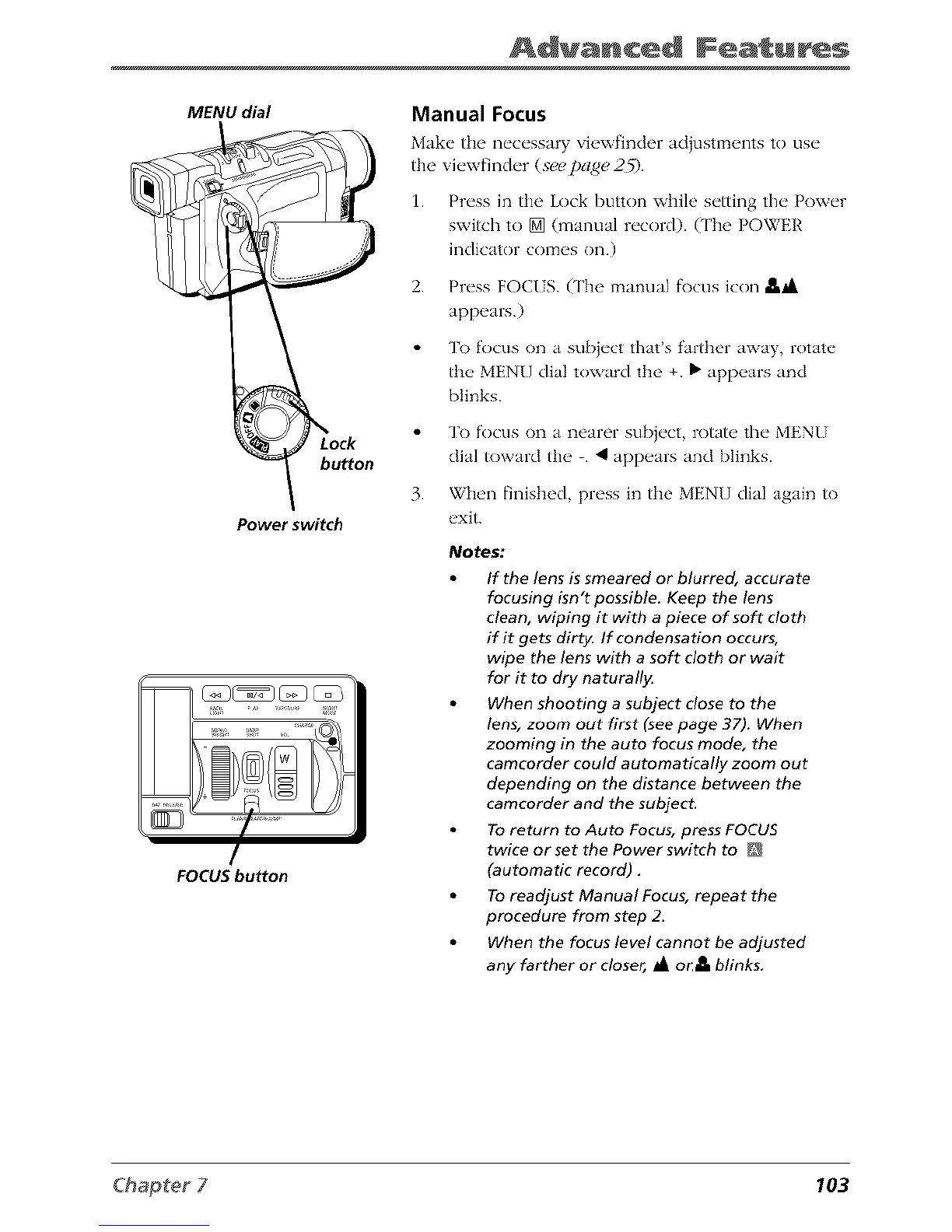
MENU dial
button
Power switch
FOCUS button
Manual Focus
Make the necessary view_nder adiustmems to use
fl_eviewfinder (seepage,2_.
1. Press in the Lock button while setting the Power
switch to [] (manual record). (The POWER
indicator comes on.)
2. Press FOCI S. (The manual f\}cusicon -e._
appears.)
To focus on a sub}ect that's farther away, rotate
the MENU dial toward fl_e +. • appears and
blinks.
To focus on a nearer sub}ect, rotate the MEN[
dial toward the . 4 appears and blinks.
3. When finished, press in the MENU dial again to
exit.
Notes:
If the lens is smeared or blurred, accurate
focusing isn't possible. Keep the lens
clean, wiping it with a piece of soft cloth
if it gets dirty. If condensation occurs,
wipe the lens with a soft cloth or wait
for it to dry naturall}_
When shooting a subject close to the
lens, zoom out first (see page 37). When
zooming in the auto focus mode, the
camcorder could automatically zoom out
depending on the distance between the
camcorder and the subject.
To return to Auto Focus, press FOCUS
twice or set the Power switch to
(automatic record).
To readjust Manual Focus, repeat the
procedure from step 2_
When the focus level cannot be adjusted
any farther or closer, _A or jt blinks.
103



 To Next Page