Choose your Connection
This manual includes inf'ormation f'or some basic types of connections (audio/video,
betow_ and S Video, on the next page). You may also need _) refer to your TV and VCR
user's guides _r specific instructions.
TV or VCR
AudioA/ideo cable(supplied)
Connecting to a TV (or VCR) with Audio/Video Input Jacks
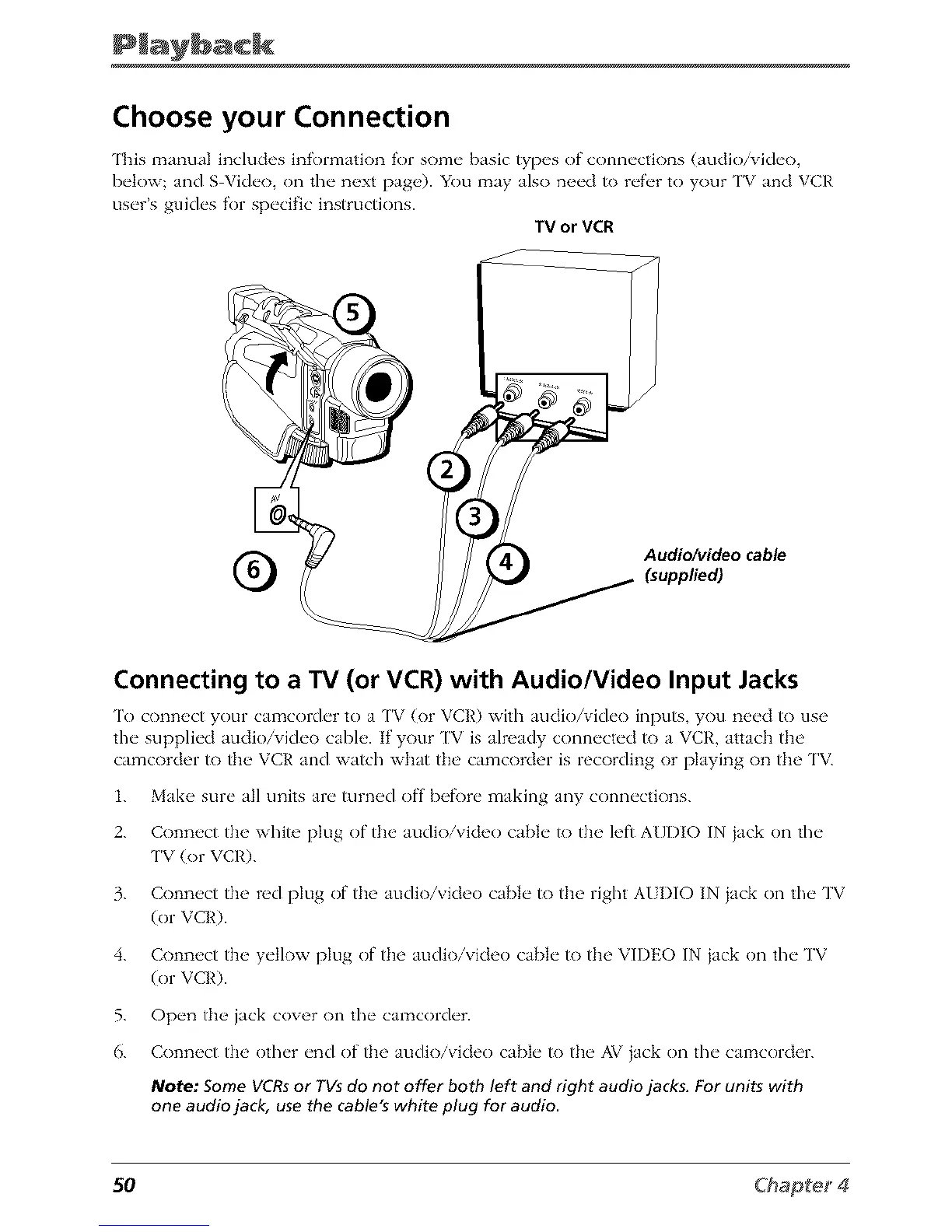
To conn_,ct your camcold_'r to a ['V (or VCR) with audio/vid_'o inputs, you n_'cd to use
the" suppli_'d audio/vich'o cabh,. If your ['V is already conn_'ct_'d to a VCR, attach the'
camcorder to th__ VCR and watch what the' camcorder is recording or playing on the 'I'V_
1. Mak_ _ SUl_" a}] units al_" turn_d off b_f_)r_" making any conn_'cfions.
2. Conn_,ct the white plug of the audio/video cabin" to the left A[/I)IO IN iack on the"
TV (or VCR).
3. Connect the red plug of the audio/video cable to the right AI I)IO IN iack on the TV
(or VCR).
4. Connect the yellow plug of the audio/video cable to the VIDEO IN iack on the TV
(or VCR).
5. Open the jack cover on the calz_corder.
6. Connect the other end of the audio/video cable to the AV iack on the calz_corder.
Note: Some VCRs or YVs do not offer both left and right audio jacks. For units with
one audio jack, use the cable's white plug for audio
50



 To Next Page