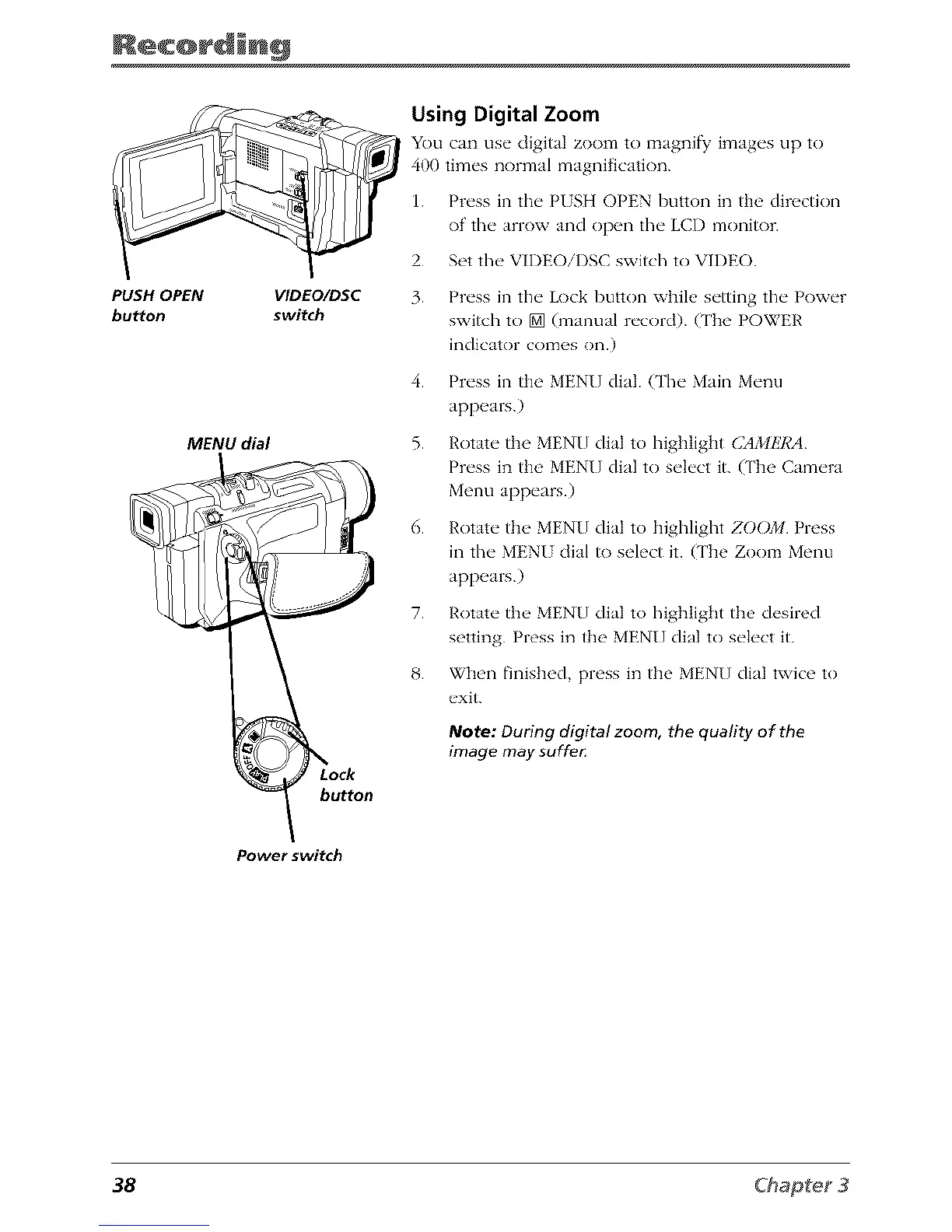
PUSH OPEN
bu_on
VIDEO/DSC
switch
MENU dial
button
Using Digital Zoom
You can use digital zoom to magnify images up to
400 times normal magnification.
1. Press in the PUSH OPEN button in the direction
of the arrow and open the LCD monitor.
2. Set the VIDEOiI)SC switch to VIDEO.
3. Press in the Lock button while setting the Power
switch to [] (manual record). (The POWER
indicator comes on.)
4. Press in the MEN[] dial. (The Main Menu
appears.)
5. Rotate the MEN[} dial to highlight CAMI!7_A
Press in the MEN[] dial to select it. (The Camera
Menu appears.)
6. Rotate the MEN[] dial to highlight ZOOM Press
in the MENU dial to select it. (The Zoom Menu
appears.)
7. Rotate the MEN{] dial to highlight the desired
setting. Press in the MEN[] dial to select it.
8. When finished, press in the MEN[] dial twice to
exit.
Note: During digital zoom, the quality of the
image may suffe_
Power switch
38



 To Next Page