Monitoring and Configuring the Printer
76
2
❖ Deleting community name
msh> snmp “number” clear name
❖ Access type configuration
msh> snmp “number” type “access_type”
❖ Protocol configuration
msh> snmp {ip|ipx} {on|off}
• Use the following command to set protocols “active” or “inactive”: If you
set a protocol “inactive”, all access settings for that protocol are disabled.
• Specify “ip” for TCP/IP or “ipx” for IPX/SPX.
• {on} means “active” and {off} means “inactive”.
• All protocols cannot be turned off concurrently.
❖ Configuration of protocol for each registration number
msh> snmp “number” active {ip|ipx} {on|off}
• To change the protocol of access settings, use the following command.
However, if you have disabled a protocol with the above command, acti-
vating it here has no effect.
❖ Access configuration
msh> snmp “number” {ip|ipx} “address”
• You can configure a host address according to the protocol used.
• The network interface board accepts requests only from hosts that have IP
addresses with access types of “read-only” or “read-write”. Enter “0” to
have network interface board accept requests from any host without re-
quiring a specific type of access.
• Enter a host address to deliver “trap” access type information to.
• To specify TCP/IP, enter “ip” followed by a space, and then the IP address.
• To specify IPX/SPX, enter “ipx” followed by a space, the IPX address fol-
lowed by a decimal, and then the MAC address of the network interface
board.
❖ sysLocation configuration
msh> snmp location
❖ Deleting sysLocation
msh> snmp clear location
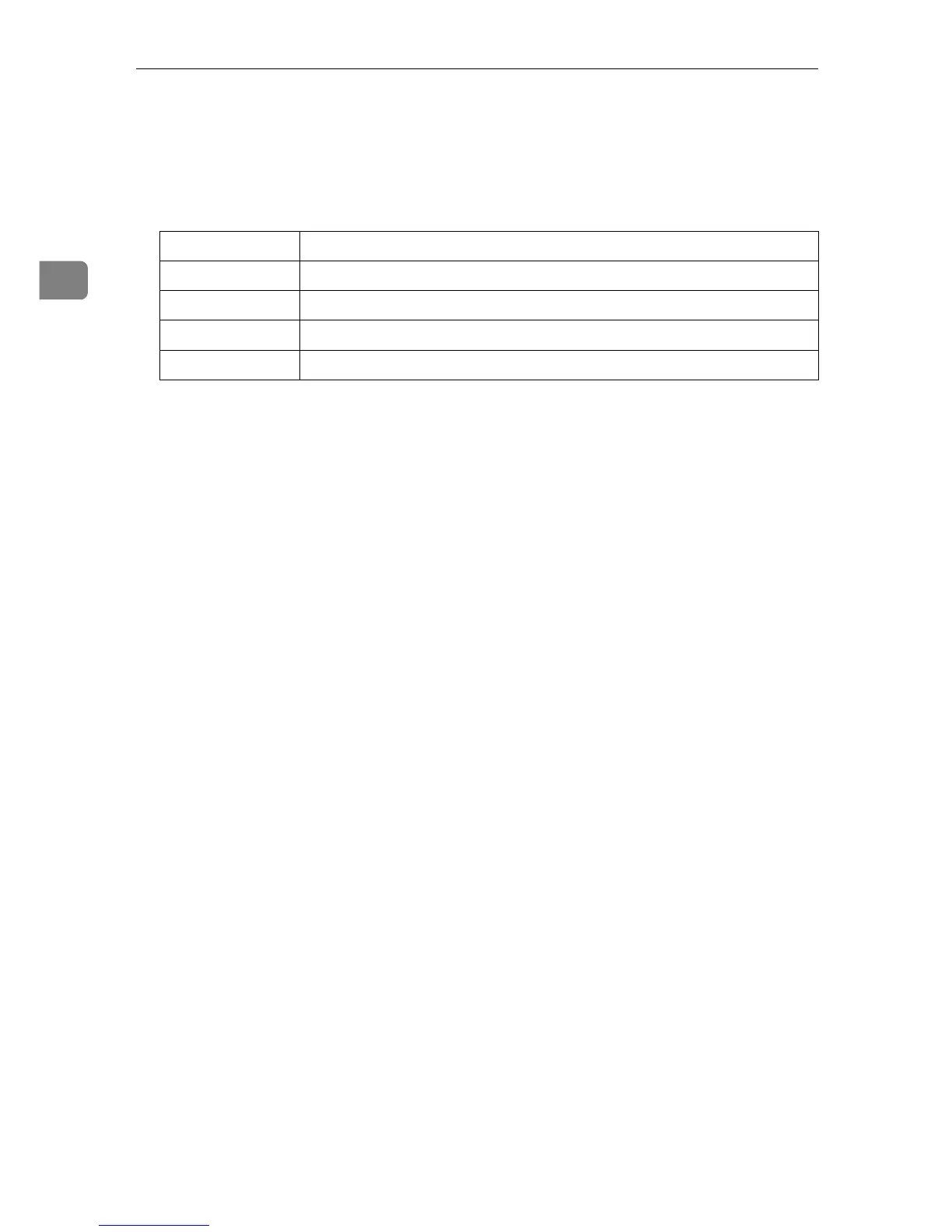
Access type Type of access permission
no not accessible
read read only
write read and write
trap user is notified of trapmessages











 To Next Page