Installing the Access Point
Step 1: Preconfigure the Access Point
ZoneFlex Indoor Access Point 9.8.1 User Guide, 800-70601-001 Rev C 90
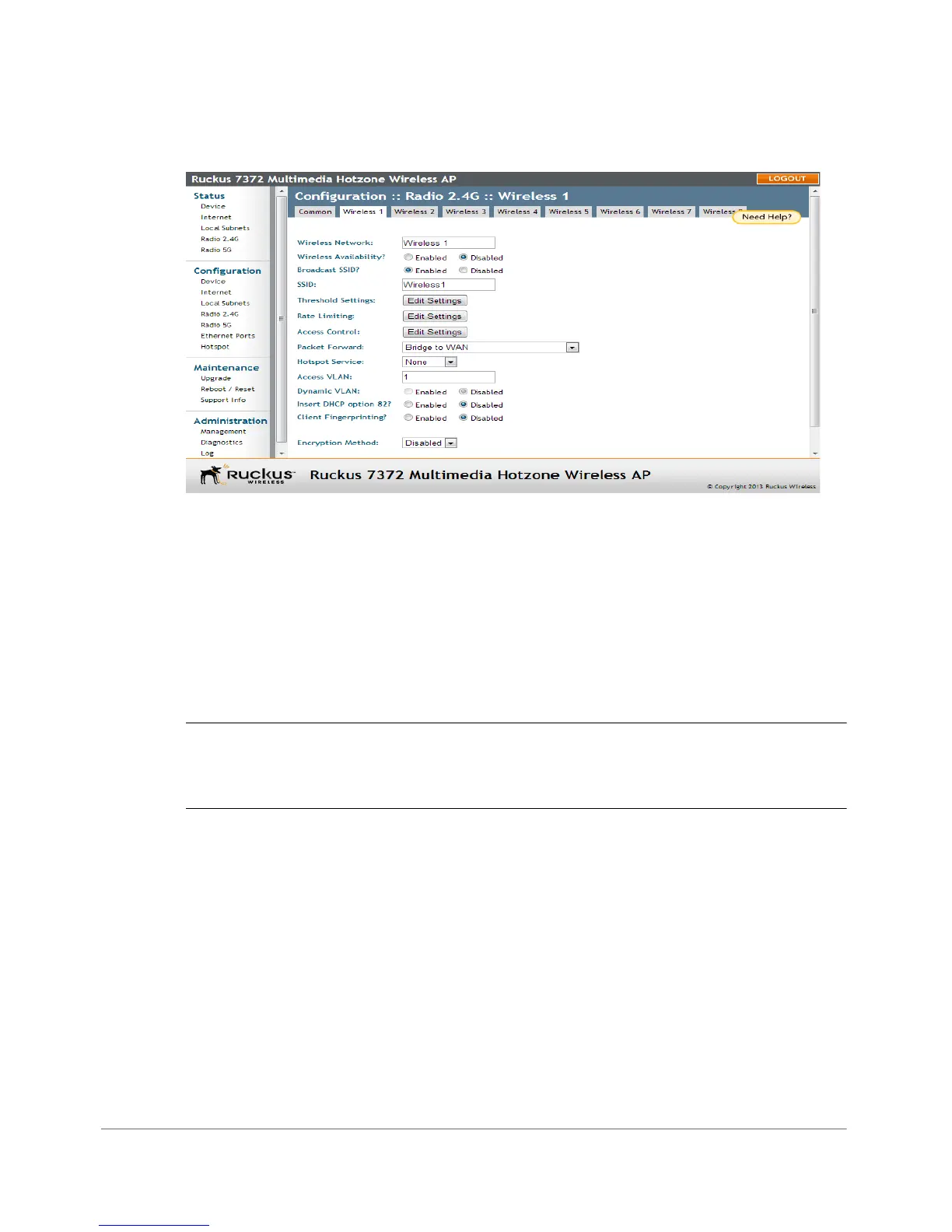
Figure 43. The Configuration > Wireless > Wireless 1 tab
2 In Wireless Availability, click Enabled.
3 In Broadcast SSID, click Enabled.
4 Clear the SSID box, and then type a unique and descriptive name that you want
to call this wireless network.
For example, you can type Ruckus Wireless AP. This SSID is the name that
helps users identify this wireless network in their wireless network connection
application.
NOTE You may also configure other wireless settings on this and other Wireless
# tabs (in addition to the settings described above), although it is not necessary for
completing the Access Point installation.
5 Click Update Settings.
You have completed configuring the basic wireless settings of the Access Point.
(Optional) Set the FlexMaster Server Address
If you have a FlexMaster server installed on the network and you intend to use
FlexMaster to manage the Access Point, you can set the FlexMaster server address
at this point. Before starting this procedure, make sure you obtain the correct
FlexMaster server URL.










 To Next Page