PASCA_TOUCHIT_EN
V02 | 07.2013
139
www.schaerer.comTroubleshooting
Faults without display message
Special software functions
Interrupting the cleaning process
The cleaning process can be interrupted using an invisible [Clear flag] function field.
Beverage contamination is possible. There is a chance that cleaning products were in
the system before the cleaning was interrupted.
After interrupting the cleaning, be sure to start the cleaning process again and com-
plete the procedure without interruption.
This field, which is present but not visible, is active in standby mode.
► Disconnect the power plug of the machine from the power supply.
The machine is switched off.
The cleaning procedure is stopped.
► Reconnect the machine's power plug to the power supply.
The machine starts up.
The machine is in standby mode.
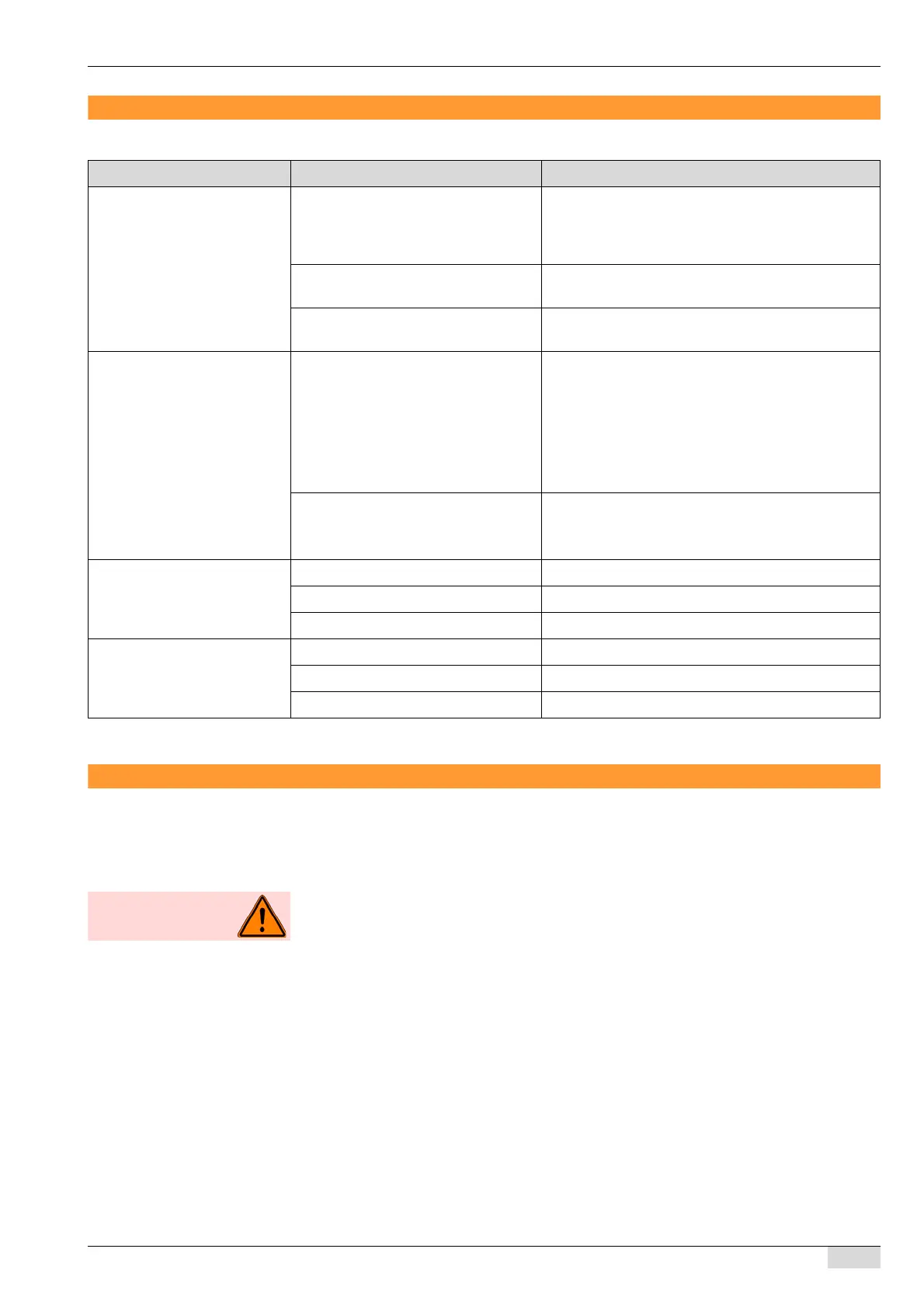
Without a display message Cause What to do
0)TouchIT is dark A display does not appears on the Tou-
chIT for ±1 min after the machine is
connected to the power supply using
the power plug.
► Wait for the machine to start up completely.
The machine is not connected to the
power supply.
► Connect the machine to the power supply.
The power connection is missing a
phase.
► Check the supply voltage and correct the fault.
1)TouchIT does not display be-
verages for selection
The self mode is activated but no bev-
erage group has been selected for dis-
playing a selection.
► Switch on the "5 Screen for tabs active" parameter
in the "Self mode settings" menu.
► Switch on the beverages that should be selectable
using the appropriate parameter in the "Self mode
settings" menu.
See "Service technician menu" - "Configuration" -
"Self mode settings" for further information.
No beverages have been defined yet. ► Configure the desired beverages.
See "Service technician menu" - "Configuration" -
"Self mode settings" for further information.
2) No milk The milk container is empty. ► Fill the milk container.
The milk system is clogged. ► Perform the "daily cleaning" routine.
The milk system is not activated. ► Activate the milk system in the system parameter.
3) No milk foam The milk container is empty. ► Fill the milk container.
The milk system is clogged. ► Perform the "daily cleaning" routine.
The milk system is not activated. ► Activate the milk system in the system parameter.














 To Next Page