PASCA_TOUCHIT_EN
V02 | 07.2013
115
www.schaerer.comSystem
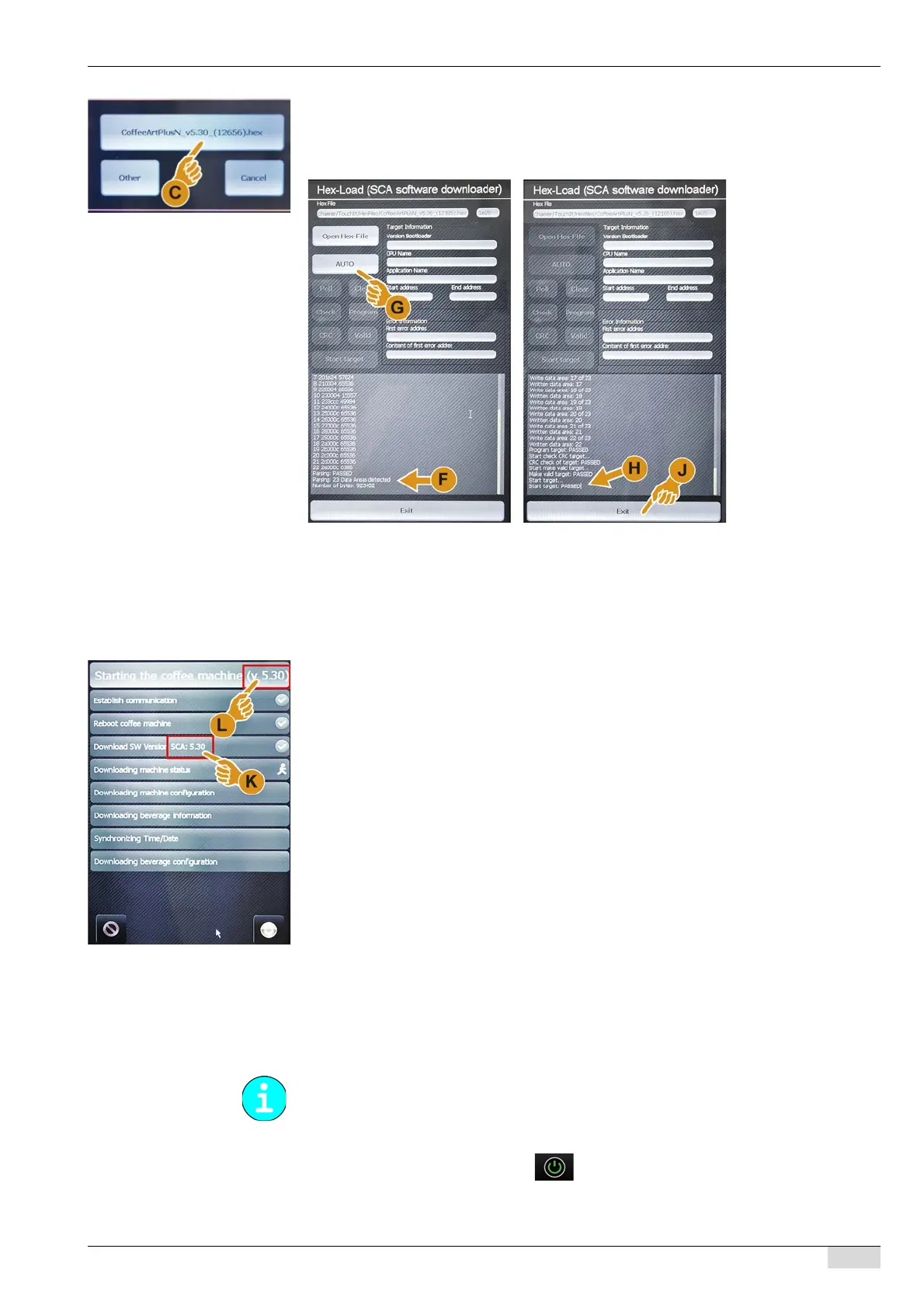
The "CoffeeArtPlusN_v5.30_(12656).hex" window opens.
► Select the (C) "CoffeeArtPlusN_v5.30_(12656).hex" field.
The data are loaded, see (F).
The [Auto] (G) field is activated.
► Select the [Auto] (G) field.
More data are loaded and listed in the next ca. 5 min.
After the data download is finished, message (H) appears.
► Wait for message (H) on the touch screen and select the [Exit] (J) field which is now active.
The touch screen display changes back to the "Bootloader TouchIT".
► Select the "Start TouchIT" field.
► While the machine is restarting, check the indicated software versions (K) and (L).
The machine restarts and then switches to standby mode and is ready for use.
Update of TouchIT
The "Update TouchIT Software" function loads the software for the TouchIT. Since version
V5.31, the machine control software and the TouchIT software are contained in a single pack-
age.
Option 1: Starting with the SERVICE card
► Switch on the machine using the field.
► Insert the SERVICE card and enter the PIN.
The data source for a TouchIT software update is always a USB stick.














 To Next Page