www.schaerer.com Troubleshooting
PASCA_TOUCHIT_EN
V02 | 07.2013
142
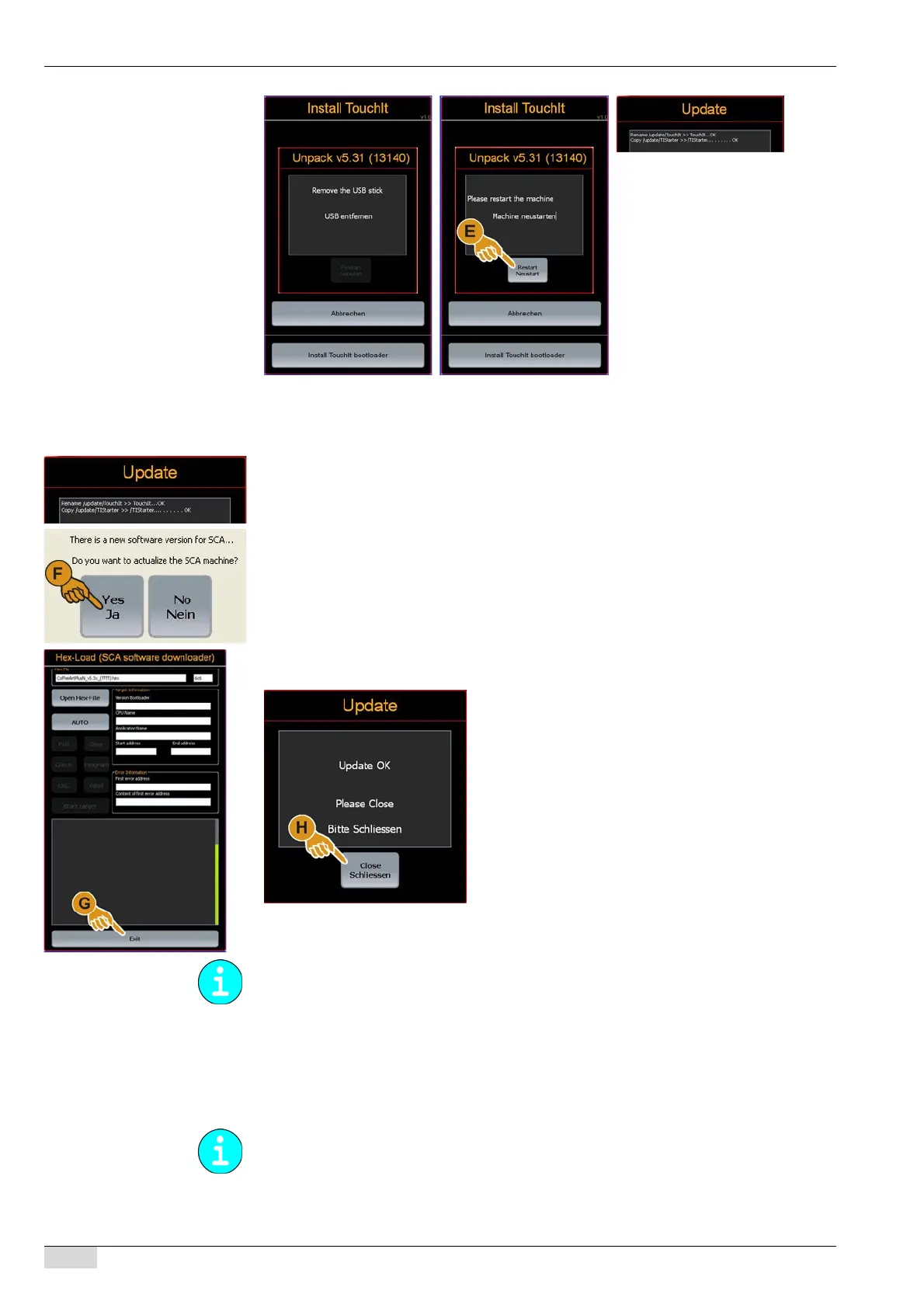
► Remove the flash drive.
The instruction to restart the machine is displayed.
► Select the [Restart] (E) field.
The "Update" window opens.
The instruction to confirm the software update appears.
► Select [YES] (F) for an update. Select [NO] to close the procedure.
The "Hex Load" window opens.
Data are loaded and listed in the window.
The data download is confirmed.
► Select the [Exit] (G) field in the "Hex Load" window.
The "Update" window opens.
► Select the [Schliessen/Close] field.
The current TouchIT software is loaded and the machine is ready for use.
Troubleshooting when installing the touch screen
Troubleshooting after a touch screen installation:
If the machine does not start after the software was installed, take the following steps.
Further information on storing and transferring data can be found under "Basic operation"-
"Overview of data transfer".
When the machine is restarted, it hangs up in the "Reboot coffee Machine" process (1).














 To Next Page