PASCA_TOUCHIT_EN
V02 | 07.2013
119
www.schaerer.comInfo
Info
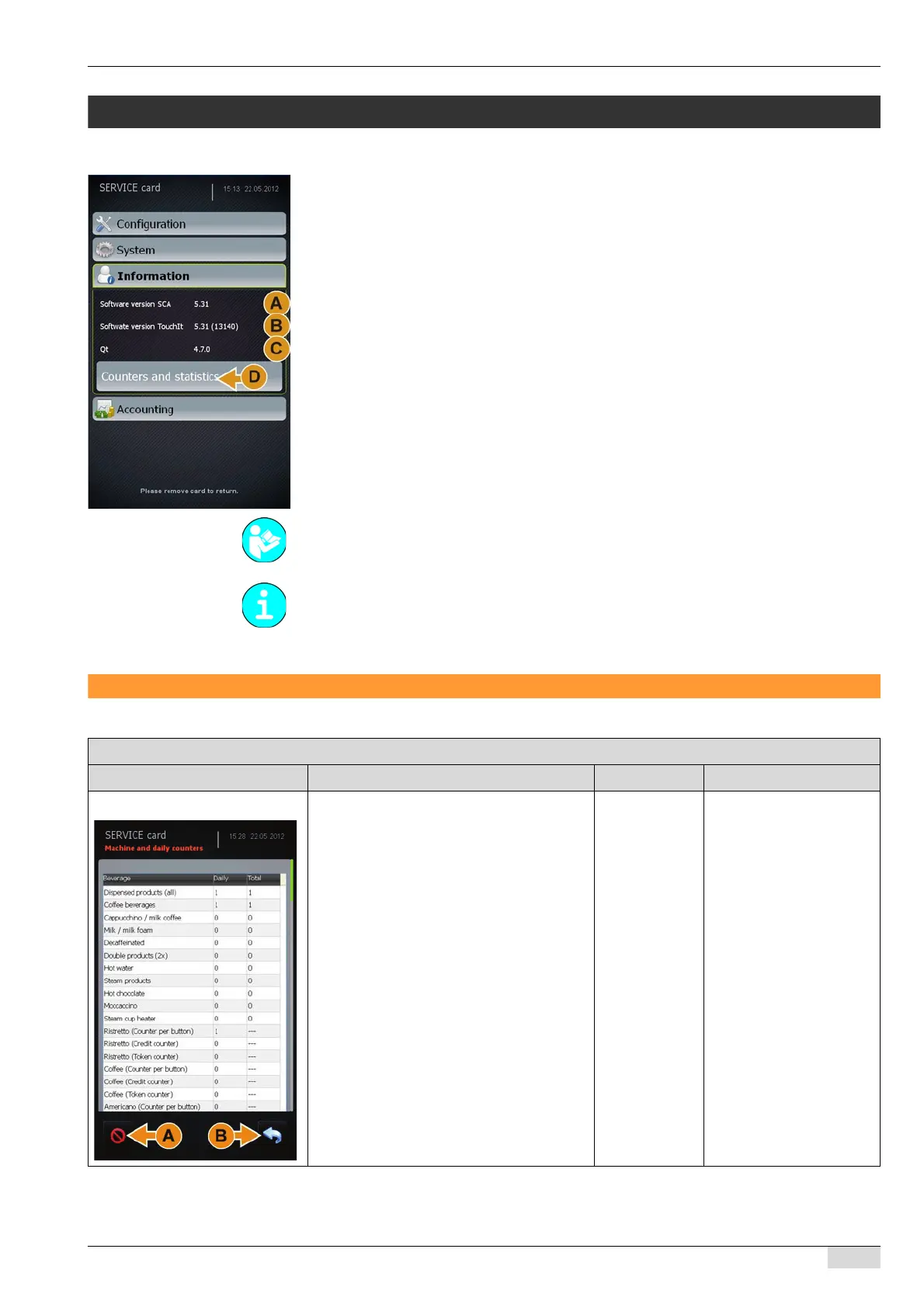
The "Info" menu contains the following menu items and information:
• Info on the SCA machine software version (A)
• Info on the SCA TouchIT software version (B)
• Info on Qt is internal developer software information (C)
• Counters and statistics submenu (D)
Counters and statistics
The contents of the submenu are described in this chapter.
Changes are activated after: 1) the save button is pressed, 2) the SERVICE card is removed,
and 3) the software is automatically reloaded during startup.
Parameters: Counters and statistics
Display text Description Setting range Notes
Machine and daily counter Displays the machine and daily counters.
The display is divided into three columns:
• Description of the function or beverage
being counted.
• Daily counter.
• Total count.
► Select the [Clear] (A) field.
All counters are reset to (0).
► Select the [Back] (B) field.
This takes you back to the "Counters
and statistics" menu.
See "Service technician menu" - "System" -
"Restore / Backup" for additional information
on restoring counters and statistics.
- Machine and daily coun-
ters can only be cleared
using the SERVICE card.
The machine and daily
counters can be displayed
using the SERVICE card
and the CHEF card.














 To Next Page