PASCA_TOUCHIT_EN
V02 | 07.2013
109
www.schaerer.comSystem
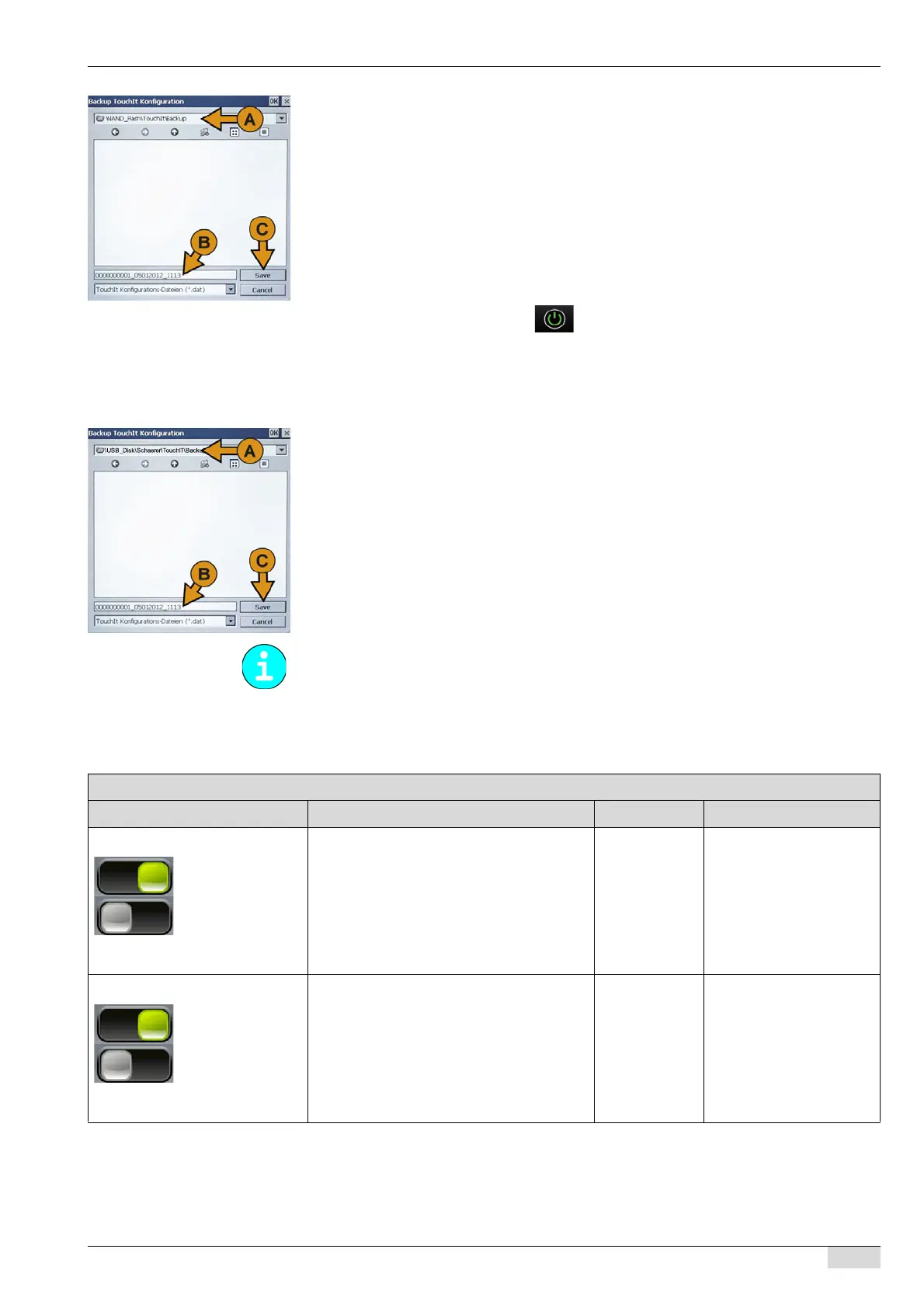
The window is automatically displayed with the correct path selection (\NAND_-
Flash\TouchIT\Backup) (A).
► Adjust the automatic backup file name with the machine number, date and time (B) as
needed using the miniature keypad that opens.
► Store the backup file using the [Save] (C) field.
The backup is created with the current machine configuration and stored on the Tou-
chIT under a file name such as 0000000001_05012012_1113.
The display returns to the "Restore / Backup" menu.
Option 2: Execute a backup on the USB stick.
The machine is in "Standby" mode or has already been switched on.
► Switch on the machine using the field.
► Remove the cover under the TouchIT concealing the USB port.
► Insert the USB stick under the TouchIT.
The "Restore / Backup" menu is displayed automatically.
► Select the "Backup" menu.
The window is automatically displayed with the correct path selection (\US-
B_Disk\Schaerer\TouchIT\Backup) (A).
► Adjust the backup file name with the serial number, date and time (B) as needed using the
miniature keypad that opens.
► Store the backup file using the [Save] (C) field.
The backup is created with the current machine configuration and stored on the USB
stick under a file name such as 0000000001_05012012_1113.
0000000001_05012012_1113.
The display returns to the "Restore / Backup" menu.
► Remove the USB stick again.
The display returns to the menu or user interface used last.
Restore
The USB stick directory structure with the backup folder is described in "Basic operation"-
"USB port" - "Basic USB configuration".
Parameters: Restore
Display text Description Setting range Notes
0) Restore machine configuration "ON" setting:
After a [Restore] is started, the machine con-
figuration consists of the system parameter
settings in the selected backup file.
"OFF" setting:
The machine configurations are not taken
from the backup file.
On/off For example, changed
machine settings can be
restored from a backup.
The data and settings are
stored via a "backup".
See "System" - "Restore" -
"Backup".
1) Restore product configuration "ON" setting:
After a [Restore] is started, the product con-
figuration consists of the "Product configura-
tion" settings in the selected backup file.
"OFF" setting:
The product configurations are not taken
from the backup file.
On/off For example, deleted be-
verage recipes can be re-
stored from a backup.














 To Next Page