74
5.3.6.3 Modifying the Receiver’s Local Wi-Fi Settings
ScreenBeam 960’s local Wi-Fi is used to manage the receiver only.
Note: The receiver’s local Wi-Fi settings are available when the receiver is in NGO mode.
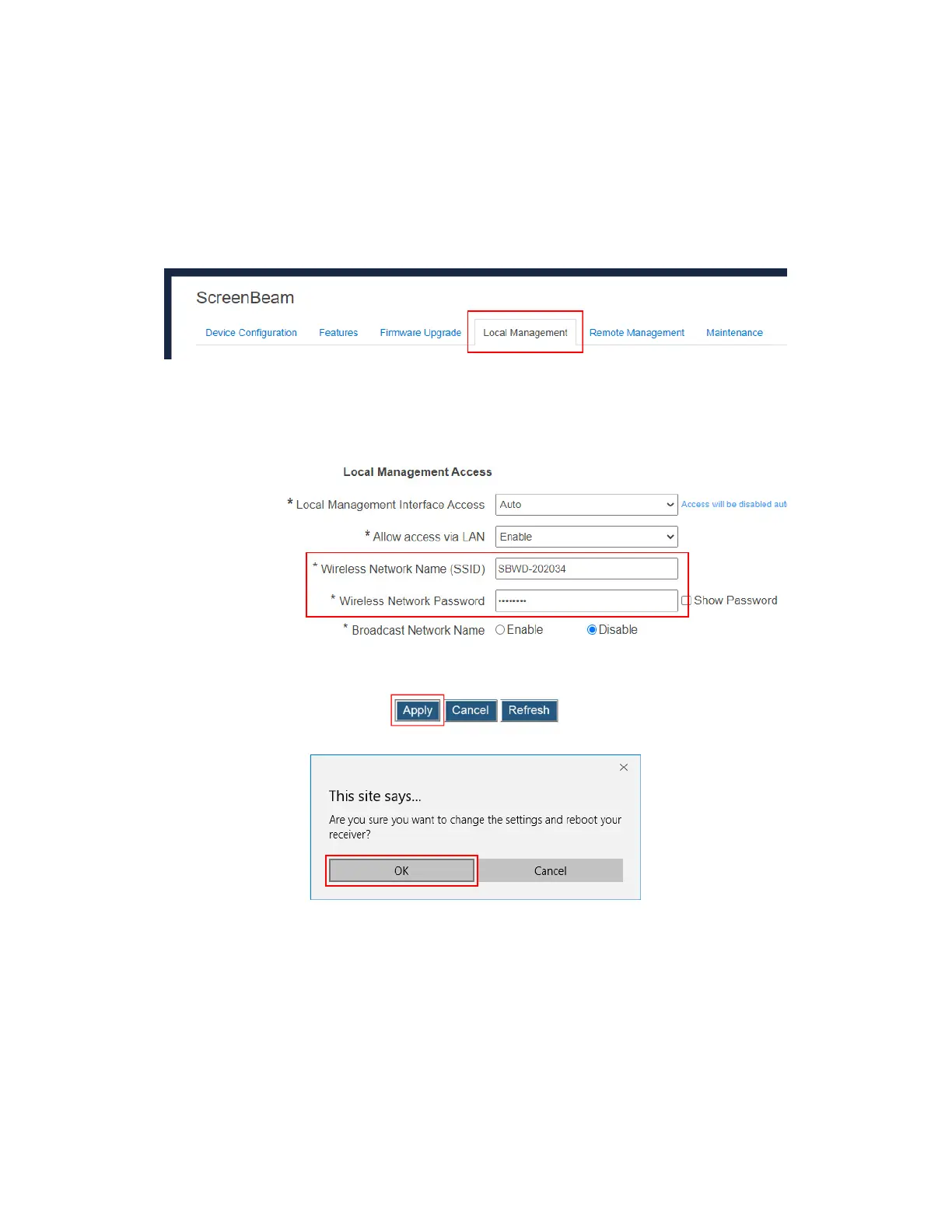
Users are allowed to set up the receiver’s wireless network name (SSID) and password.
To modify the receiver’s local Wi-Fi settings, follow this procedure:
1. Go to the Local Management tab page by clicking the Local Management tab.
2. Go to the Local Management Access section, and type a new name in the Wireless
Network Name (SSID) box and a new password in the Wireless Network Password
box.
Note: The password will display in plain text when Show Password is enabled.
3. Click the Apply button, and then click OK on the pop-up message box to confirm.
4. The receiver reboots, and the local Wi-Fi’s new settings take effect after the reboot.



 To Next Page