82
5.3.7.5 Setting up UPnP Discovery
The UPnP discovery feature is used to discover ScreenBeam 960 on the network.
ScreenBeam 960 can connect to CMS automatically with the UPnP Discovery method.
Refer to the CMS user manual for details on how to connect a receiver to CMS using the
UPnP Discovery method.
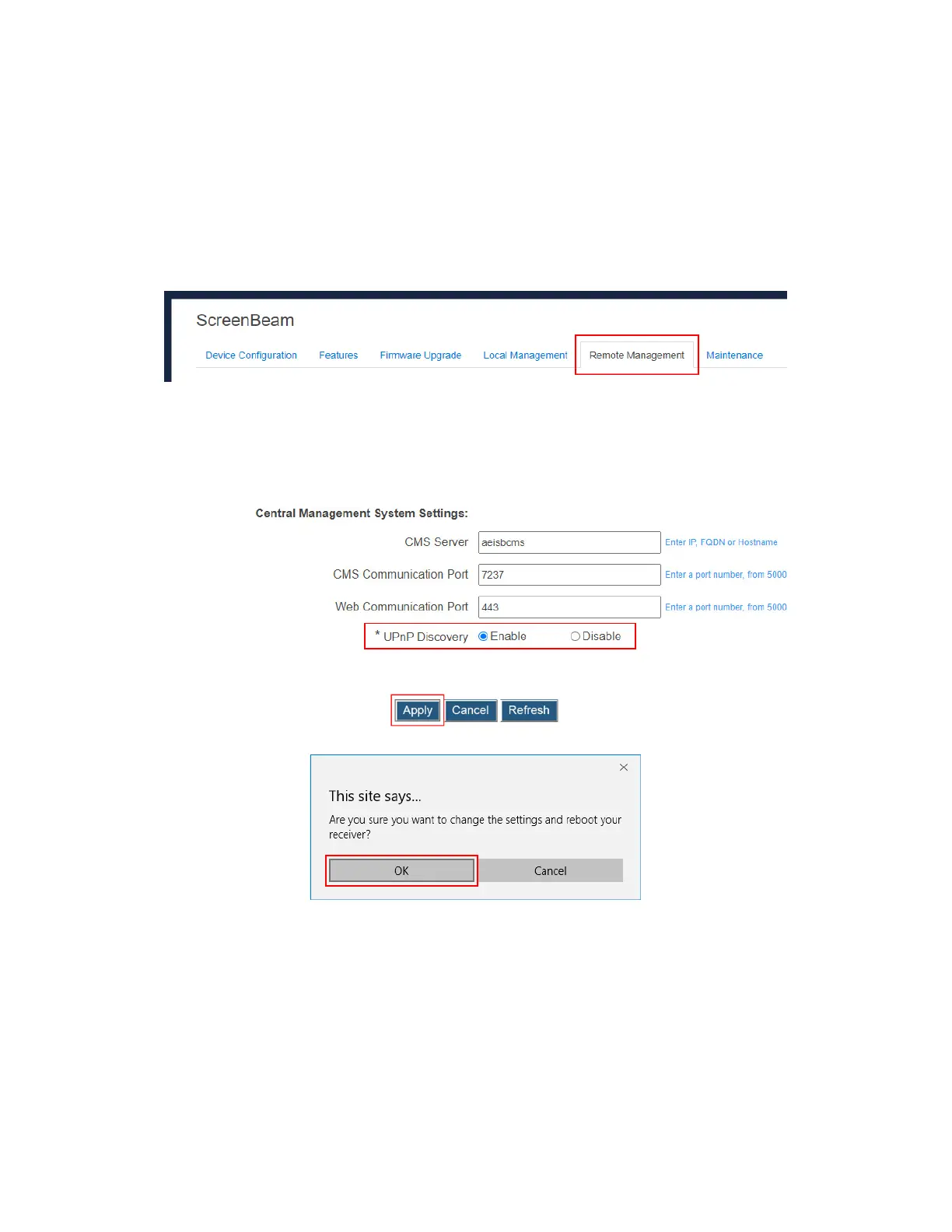
To set up UPnP Discovery for the receiver, follow this procedure:
1. Go to the Remote Management tab page by clicking the Remote Management tab.
2. Go to the Central Management System Setting section, and set UPnP Discovery to
Enable or Disable.
Enable: The receiver is allowed to discover on the network using the UPnP protocol.
Disable: The receiver is not allowed to discover on the network using the UPnP
protocol.
3. Click the Apply button, and then click OK on the pop-up message box to confirm.
4. The receiver reboots, and new setting takes effect after the reboot.



 To Next Page