83
5.4 Updating Firmware for the Receiver
Users are allowed to update the receiver’s firmware wirelessly through the LMI or locally
using a USB flash drive.
5.4.1 Updating Firmware Wirelessly
Users can wirelessly upgrade firmware for the receiver through the Local Management
Interface.
To upgrade your receiver using the receiver’s LMI, follow this procedure:
1. Download the latest firmware from ScreenBeam’s website:
https://support.screenbeam.com.
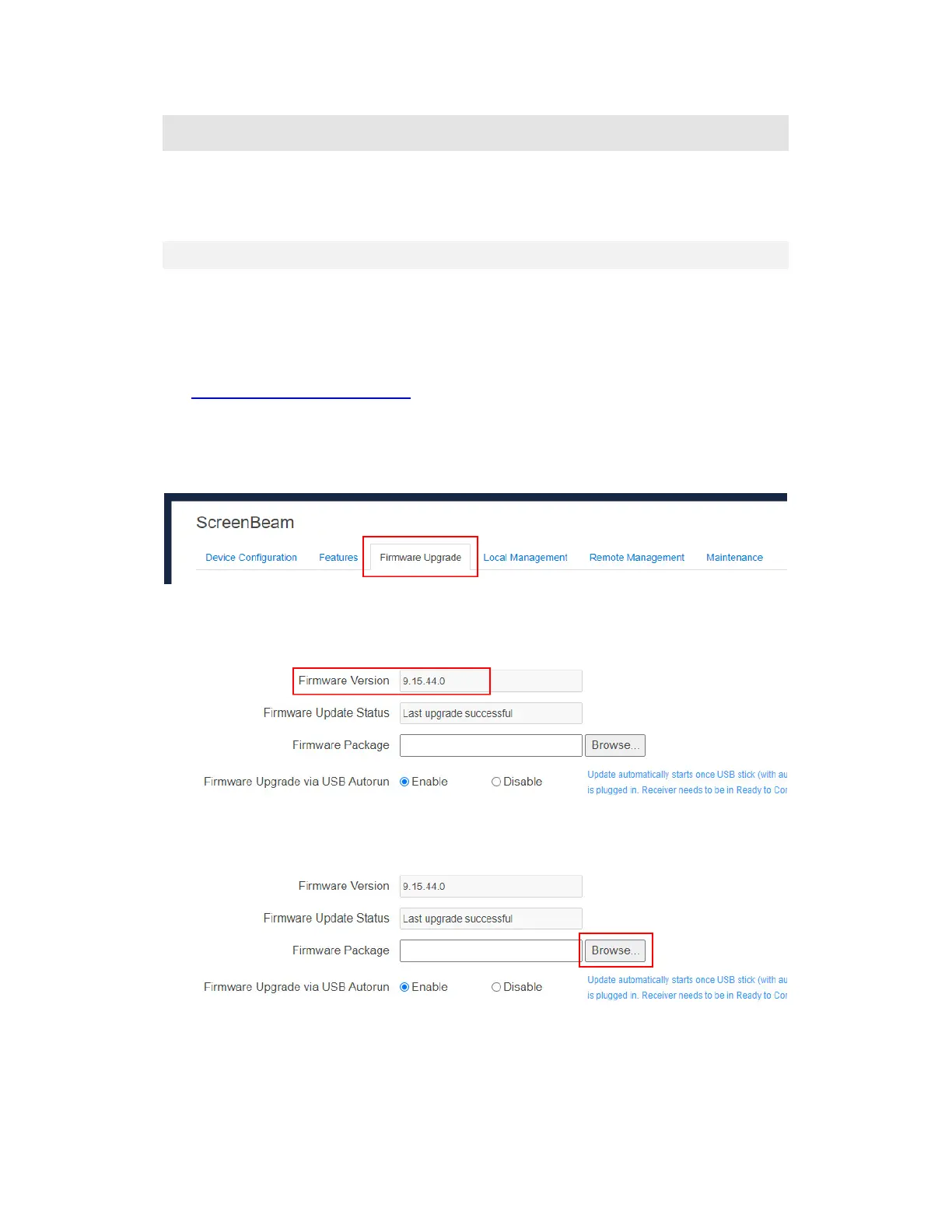
2. Log into ScreenBeam 960’s Local Management Interface, and go to the Firmware
Upgrade tab page by clicking the Firmware Upgrade tab.
Note: Refer to Section 5.2 Using Local Management on ScreenBeam for details on
how to use the receiver’s Local Management Interface.
On the Firmware Upgrade tab page, you can check the current firmware version in the
Firmware Version section.
Note: You can update the receiver’s firmware to a higher version only.
3. Click the Browse button next to the Firmware Package box to display the Open dialog
box.



 To Next Page