91
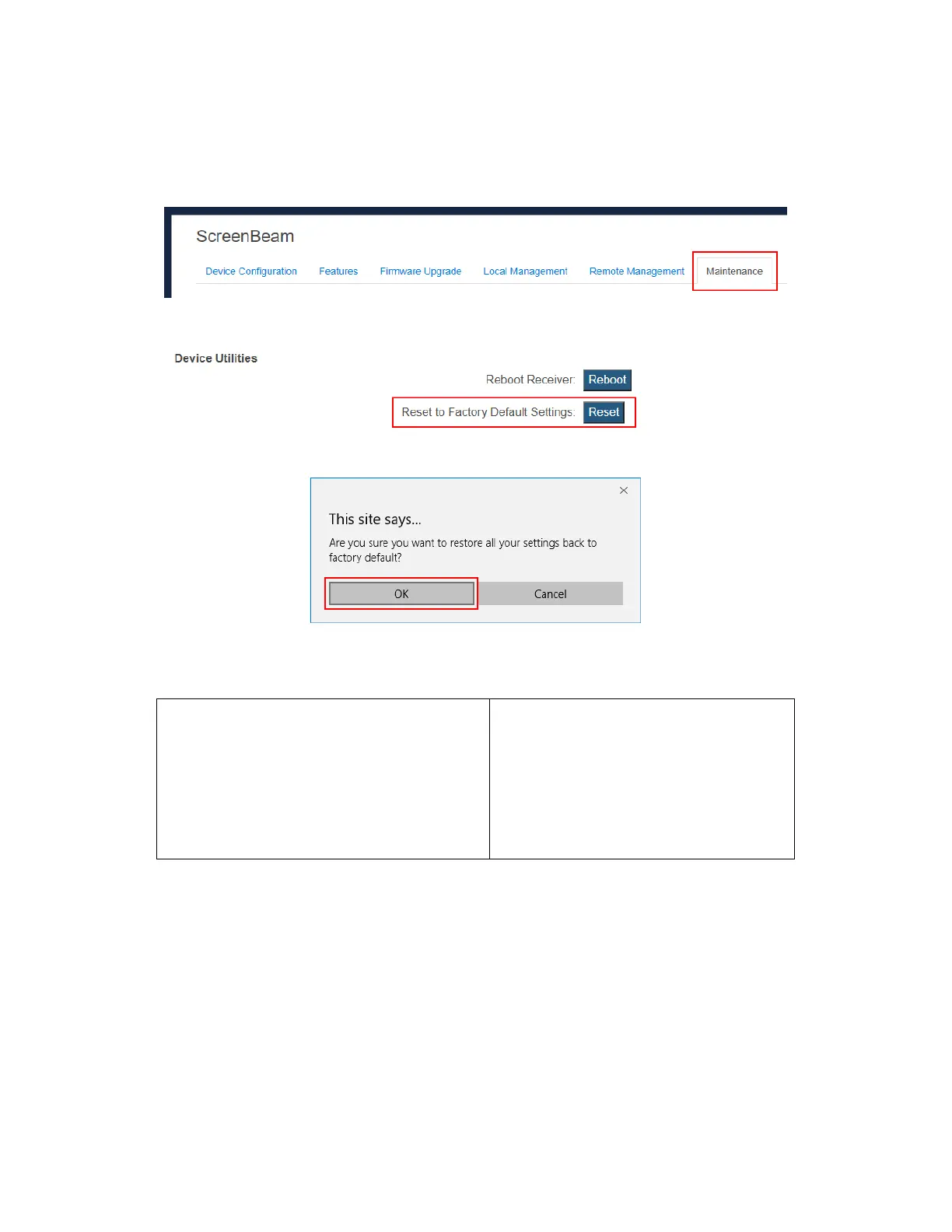
If you can’t access the receiver locally, you can reset the receiver through the receiver’s LMI.
Follow the procedure below:
1. Log into the receiver’s LMI, and go to the Maintenance tab page.
2. Click the Yes button next to “Reset Settings to Factory”.
3. Click OK on the pop-up message box to confirm.
4. The receiver reboots, and the receiver is reset to factory defaults after the reboot.
When you reset your receiver through the LMI, the following settings will be retained:
CMS Server IP address
CMS communication port
Receiver IP setting (DHCP or Static IP)
Receiver IP address
Receiver Subnet Mask
Receiver Gateway
Receiver DNS setting (Dynamic or Static)
Primary DNS
Secondary DNS
Host Name
Wireless connection settings
Timezone
Daylight save time



 To Next Page