SEEDMASTER 2023
94
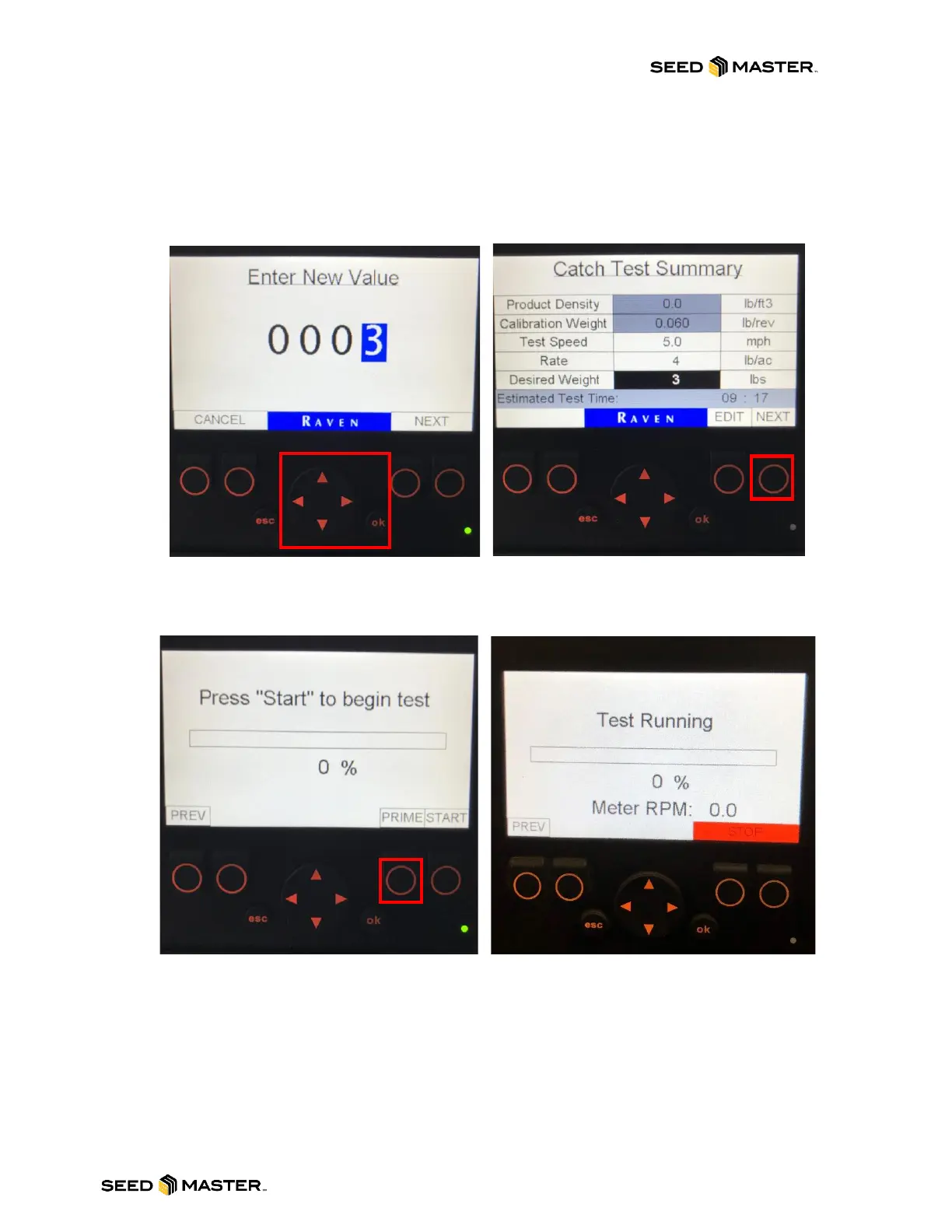
16. Using the LEFT/RIGHT and UP/DOWN arrow enter a new value for the Rate or Desired weight.
When the desired value is entered press the “ok” button. The Catch Test Summary will be
displayed with the new values. If the values are satisfactory, continue by pressing the NEXT
button.
NOTE: If the Estimated Test Time is greater than 10 mins, the NEXT button will not appear.
Adjust the calibration values accordingly.
17. If no product has been metered though the meters, please use the “PRIME” button to prime the
meters. Repeat as necessary. Please make sure the pail is empty before proceeding to the next
step.
18. Press the START button to begin metering product into the pail. The test will begin and display
the Meter RPM in addition to the catch test’s progress.
19. If the product being expelled does not fit in the pail, press the STOP button to stop the catch
test. Then, continue to the next step. Please note that the meter will shut off when the test
reaches 100%.



 To Next Page