10-41
Use printer menus
10
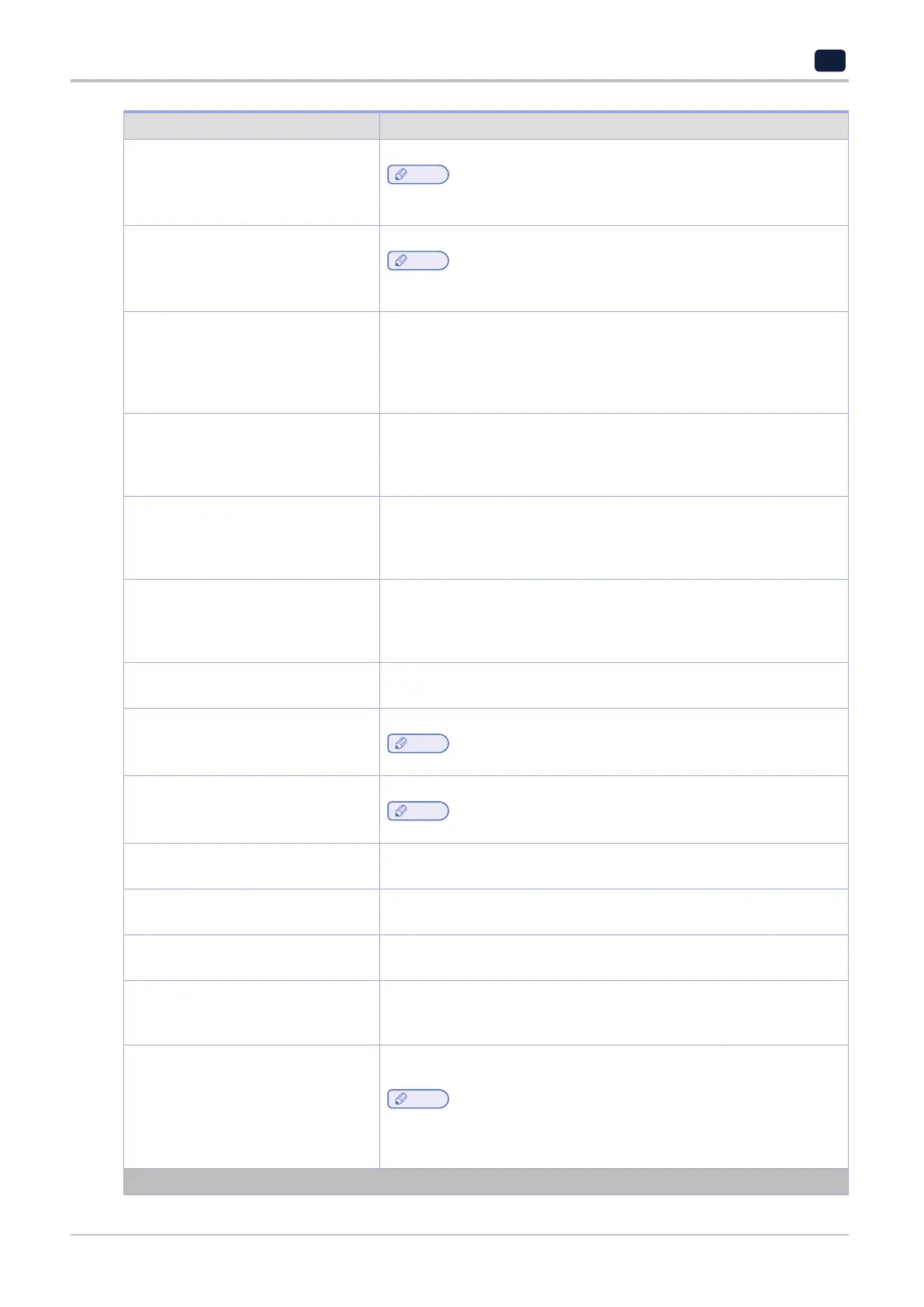
Menu Item Description
802.1x Encryption Mode
WPA+
WPA2*
Enable wireless security through 802.1x standard.
Note
‑
This menu item appears only when Wireless Security Mode is set to
802.1x ‑ Radius.
IPv4
Enable DHCP
On*
Off
Enable Dynamic Host Configuration Protocol (DHCP).
Note
‑
DHCP is a standard protocol that allows a server to distribute IP
addressing and configuration information dynamically to clients.
IPv4
Set Static IP Address
IP Address
Netmask
Gateway
Set the static IP address of your printer.
IPv6
Enable IPv6
On*
Off
Enable IPv6 in the printer.
IPv6
Enable DHCPv6
On
Off*
Enable DHCPv6 in the printer.
IPv6
Stateless Address Autoconfiguration
Off
On*
Set the network adapter to accept the automatic IPv6 address
configuration entries provided by a router.
IPv6
DNS Address
Specify the DNS server address.
IPv6
Manually Assigned IPV6 Address
Assign the IPv6 address.
Note
‑
This menu item appears only in some printer models.
IPv6
Manually Assigned IPV6 Router
Assign the IPv6 router address.
Note
‑
This menu item appears only in some printer models.
IPv6
Address Prefix 0–128 (64*)
Specify the address prefix.
IPv6
All IPv6 Addresses
Show all IPv6 addresses.
IPv6
All IPv6 Router Addresses
Show all IPv6 router addresses.
Network Address
UAA
LAA
View the network addresses.
PCL SmartSwitch
On*
Off
Set the printer to switch automatically to PCL emulation when a print job
requires it, regardless of the default printer language.
Note
‑
If PCL SmartSwitch is off, then the printer does not examine incoming
data and uses the default printer language specified in the Setup
menu.
Note: An asterisk (*) next to a value indicates the factory default setting.



 To Next Page