2-7
Learn about the printer
2
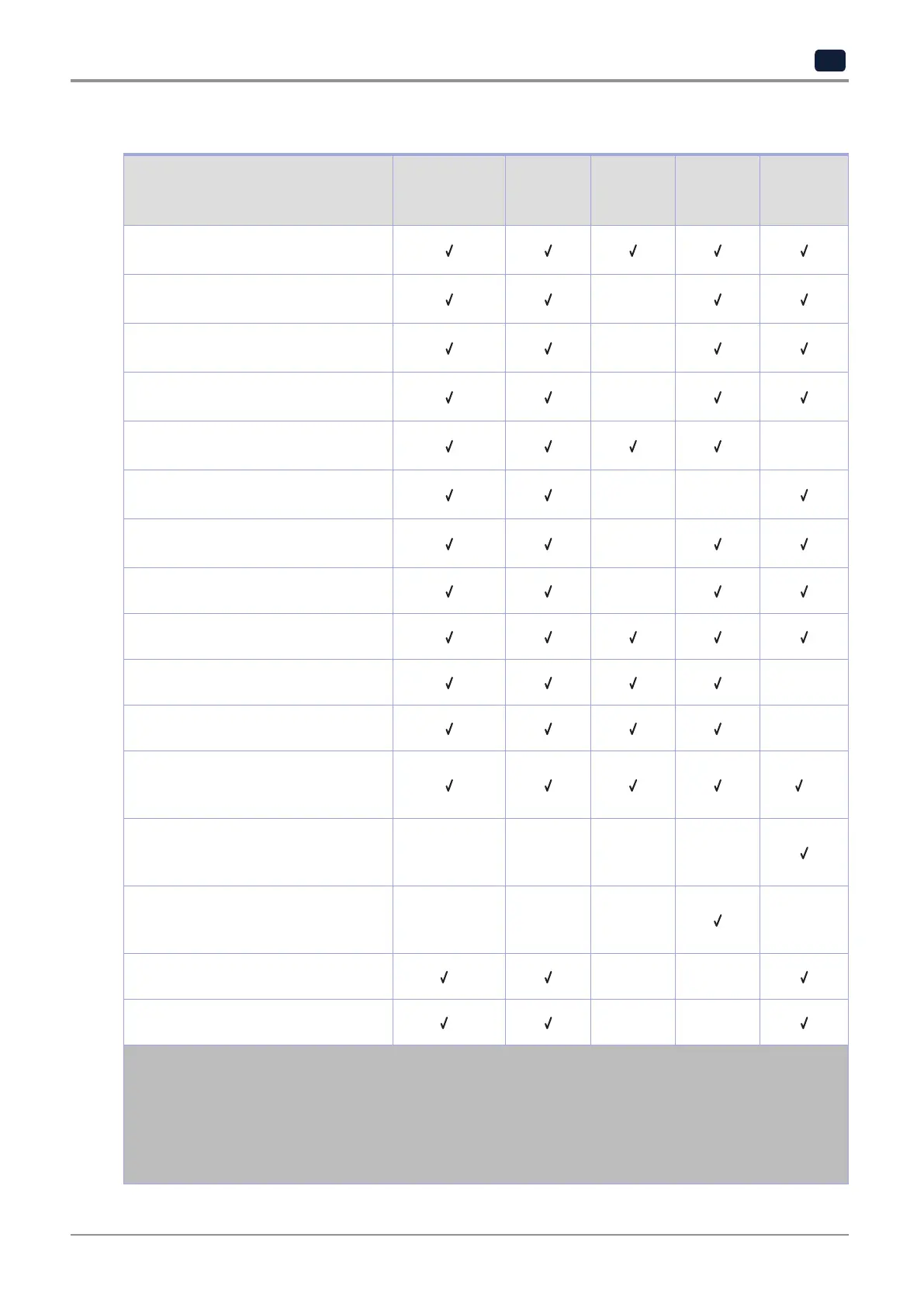
Supported paper sizes
Paper size
Standard or
optional
250-sheet tray
Manual
feeder
Two-sided
printing
ADF
Scanner
glass
A4
210 x 297 mm (8.27 x 11.7 in.)
A5
1
148 x 210 mm (5.83 x 8.27 in.)
×
A6
105 x 148 mm (4.13 x 5.83 in.)
×
JIS B5
182 x 257 mm (7.17 x 10.1 in.)
×
Oficio (Mexico)
215.9 x 340.4 mm (8.5 x 13.4 in.)
×
Hagaki
100 x 148 mm (3.94 x 5.83 in.)
× ×
Statement
139.7 x 215.9 mm (5.5 x 8.5 in.)
×
Executive
184.2 x 266.7 mm (7.25 x 10.5 in.)
×
Letter
215.9 x 279.4 mm (8.5 x 11 in.)
Legal
215.9 x 355.6 mm (8.5 x 14 in.)
×
Folio
215.9 x 330.2 mm (8.5 x 13 in.)
×
Universal
2, 3
98.4 x 148 mm (3.86 x 5.83 in.) to
215.9 x 355.6 mm (8.5 x 14 in.)
4
Universal
2, 3
25.4 x 25.4 mm (1 x 1 in.) to
215.9 x 297 mm (8.5 x 11.69 in.)
× × × ×
Universal
2, 3
105 x 148 mm (4.13 x 5.83 in.) to
215.9 x 355.6 mm (8.5 x 14 in.)
× × ×
×
7 3/4 Envelope
98.4 x 190.5 mm (3.875 x 7.5 in.)
5
× ×
9 Envelope
98.4 x 225.4 mm (3.875 x 8.9 in.)
5
× ×
1 The default support is long-edge feed. When running on short-edge feed, A5 is treated as narrow paper.
2 When selected, the page is formatted for 215.90 x 355.60 mm (8.5 x 14 in.) unless specified by the software
application.
3 Load narrow paper with the short edge entering the printer first.
4 Supports paper size only up to 216 x 297 mm (8.5 x 11.7 in.).
5 The standard 250-sheet tray supports only up to five envelopes at a time. The optional 250-sheet tray supports
up to 40 envelopes at a time.



 To Next Page