Operation 5
Driving
Observe the information in the chapter entitled
"Safety regulations when driving".
The driver’s seat is equipped with a seat
switch. In the event of an operating error
or malfunction, see the chapter entitled
"Enabling truck functions using the foot switch
and seat switch".
– Lift the fork carriage until
the necessary
ground clearance is achieve
d.
– Tilt the lift mast backwards.
– Release the parking brake.
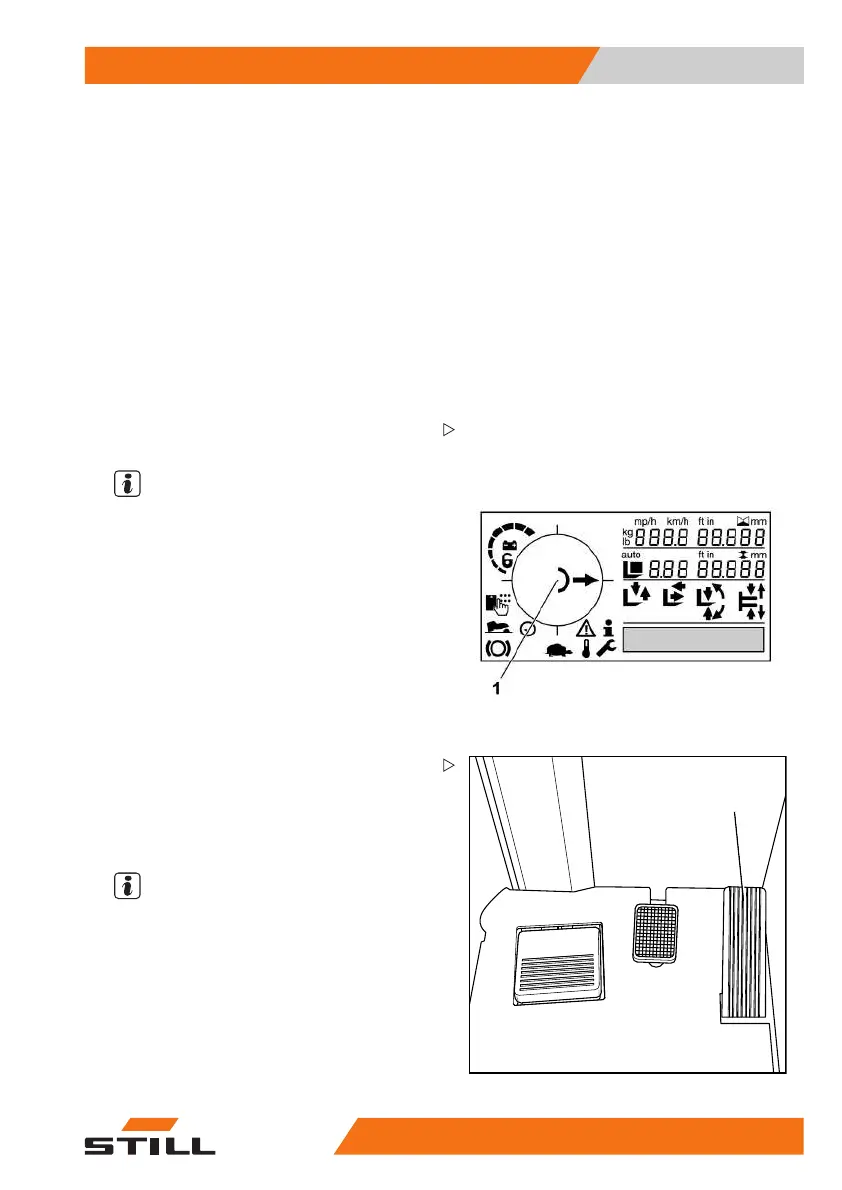
– Select the desired drive di
rection.
The selected drive direction is shown on the
display and operating unit (1).
NOTE
Depending on the equipm
ent, an acoustic or
visual warning signal i
s issued in relation to
the drive direction (va
riant).
2
– Actuate the accelerator pedal (2).
The truck will tr
avel in the selected drive direc-
tion. The speed i
s controlled by the accelera-
tor pedal positi
on. When the accelerator pedal
is released, the
truck decelerates.
NOTE
The truck can be held at a standstill briefly
on upward or downward gradients without
actuating the parking brake (anti-roll brake
for slopes). The truck will then begin to creep
downhill slowly.
Changing the drive direction
– Remove foot from accelerator pedal.
50
988078001 [EN] 93



 To Next Page