5 Operation
Commissioning
1
Checking the "automatic tilting
centre position" (variant) for correct
function
NOTE
The "automatic tilting centre position" lift mast
function (variant) must be executed whenever
the truck is commissioned.
The driver can use the "automatic tilting centre
position" function to position the tilt of the fork
arms to 0° automatically. Depending on the
truck version, either the fork carriage (fork tilt
device) alone or the entire lift mast (mast tilt
device) is positioned. In order to do this, the
push button must be pushed until the function
switches off automatically.
– Tilt the fork carriage
or the entire lift mast
towards the drive side
.
The fork carriage or the entire lift mast must tilt
fully to the drive side and move gently as far as
the end stop.
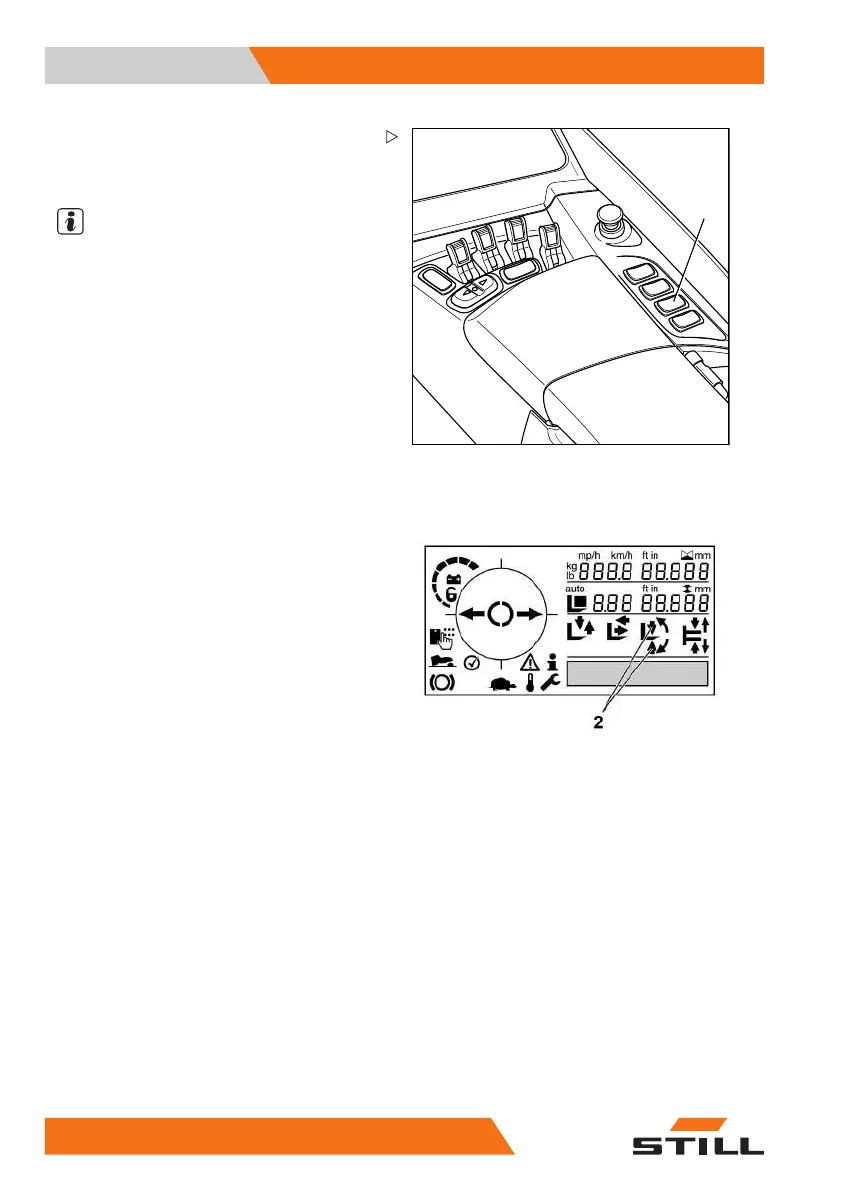
– Push the transition shift/tilt centre position
push button (1) on the right-hand side.
In the display and op
erating unit, the arrows
(2) pointing toward
the "transition shift" symbol
must flash until the c
entre position is reached
Once the function has switched off automati-
cally, the tilt of the fork arms must be in the 0°
position.
– Tilt the fork carriage or the entire lift mast
towards the load side.
The fork carriage or the entire lift mast must tilt
fully to the load side and move gently as far as
the end stop.
82
50988078001 [EN]



 To Next Page