Operation 5
Commissioning
Setting the drive programme
Setting
The driving and braking characteristics of the
drive can be set on the display and operating
unit.
Four different drive progr
ammes can be set.
Depending on the drive prog
ramme selected,
different driving charact
eristics are applied in
relation to the maximum spe
ed, acceleration
behaviour* and decelerati
on behaviour**.
Essentially, the higher th
e number of the drive
programme, the greater the
driving dynamics.
When a truck is delivered, it is set to drive
programme 4 (P4).
The factory-set parameters are shown in the
table.
Code123
4
V
max
(km/h)
10 12 14 14
*m/s
2
0.6 1.1 1.4 1.8
**m/s
2
0.8 1.0 1.0 1.2
NOTE
Only the drive progr
amme can be changed.
The characteristic
for the relevant drive pro-
gramme can only be c
hanged by authorised
service personnel
.
Adjustment proces
s
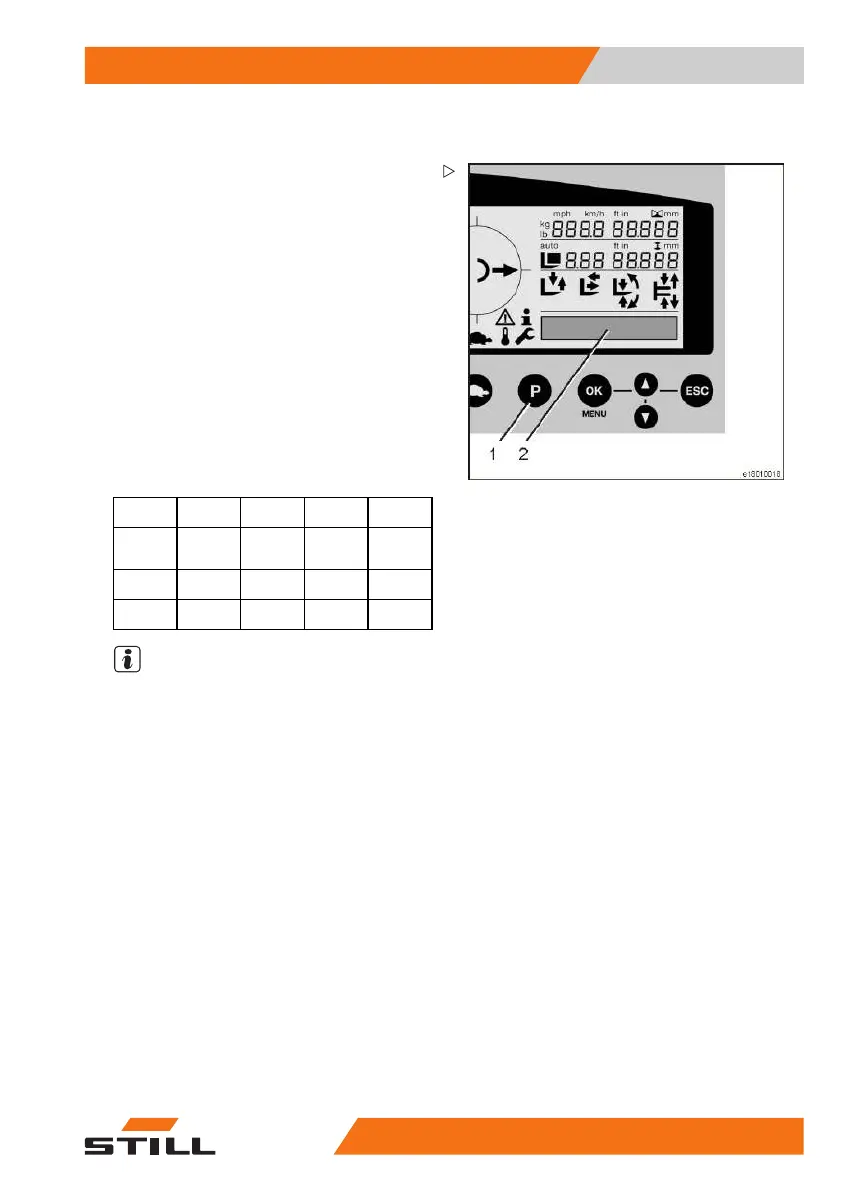
– The drive profile changes each time the "P"
button (1) is pressed (P1 - 4).
– The selected drive programme is indicated
on the display (2).
Creep speed drive programme
– Push the "tortoi
se" button on the display
and operating un
it.
– The "tortoise" symbol appears on the
display and the "creep speed" drive pro-
gramme is selected.
50
988078001 [EN] 83



 To Next Page