5 Operation
Blue-Q efficiency mode
Item no.
Display
Comment
25
Battery water level display too low (variant)
-
26
Battery not locked
-
.
Blue-Q efficiency mode
Functional description
The Blue-Q efficiency mode affects both the
drive unit and the activation of the additional
consumers, and reduces the truck’s energy
consumption.
If the efficiency mode has been activated, the
acceleration behaviour of the truck changes to
make acceleration more moderate.
Blue-Q has no influence on:
• Maximum speed
• Climbing capability
•Tractiveforce
• Braking characteri
stics
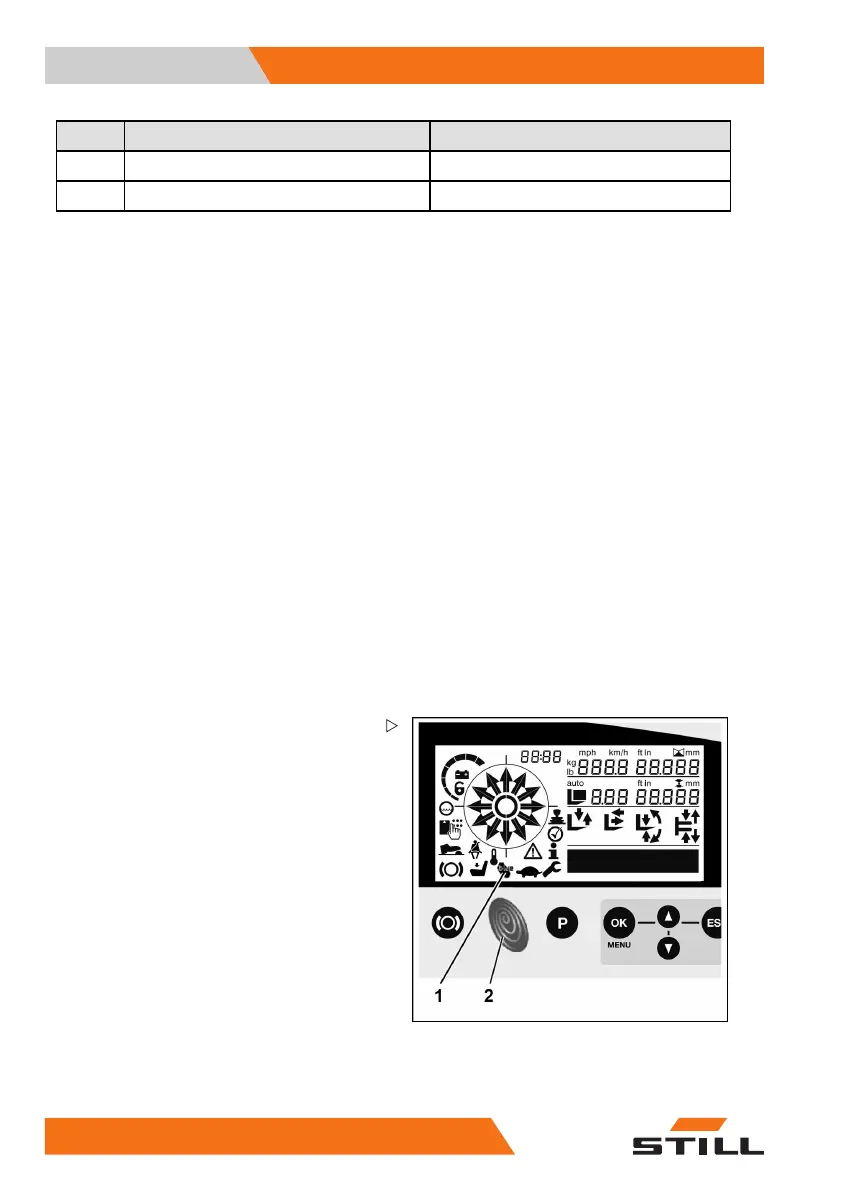
Switching the Blue
-Q efficiency
mode on and off
–PresstheBlue-Qb
utton (2).
The Blue-Q symbol (1) appears in the display
and operating unit, which means that the
Blue-Q efficiency mode is switched on.
Pressing the Blue-Q button once again turns
the Blue-Q efficiency mode off again.
18
0 50988078001 [EN]



 To Next Page