Operation 5
Lifting
1
Automatic centre position (variant)
Automatic transition shift centre position
(variant)
The driver can use the "automatic transition
shift centre position" function to position the
transition shift in the centre automatically.
In order to do this, the push button must be
pushed until the function switches off auto-
matically. Depending on the truck version,
either only the fork carriage (sideshift) or the
entire lift mast (mast traversing) is positioned.
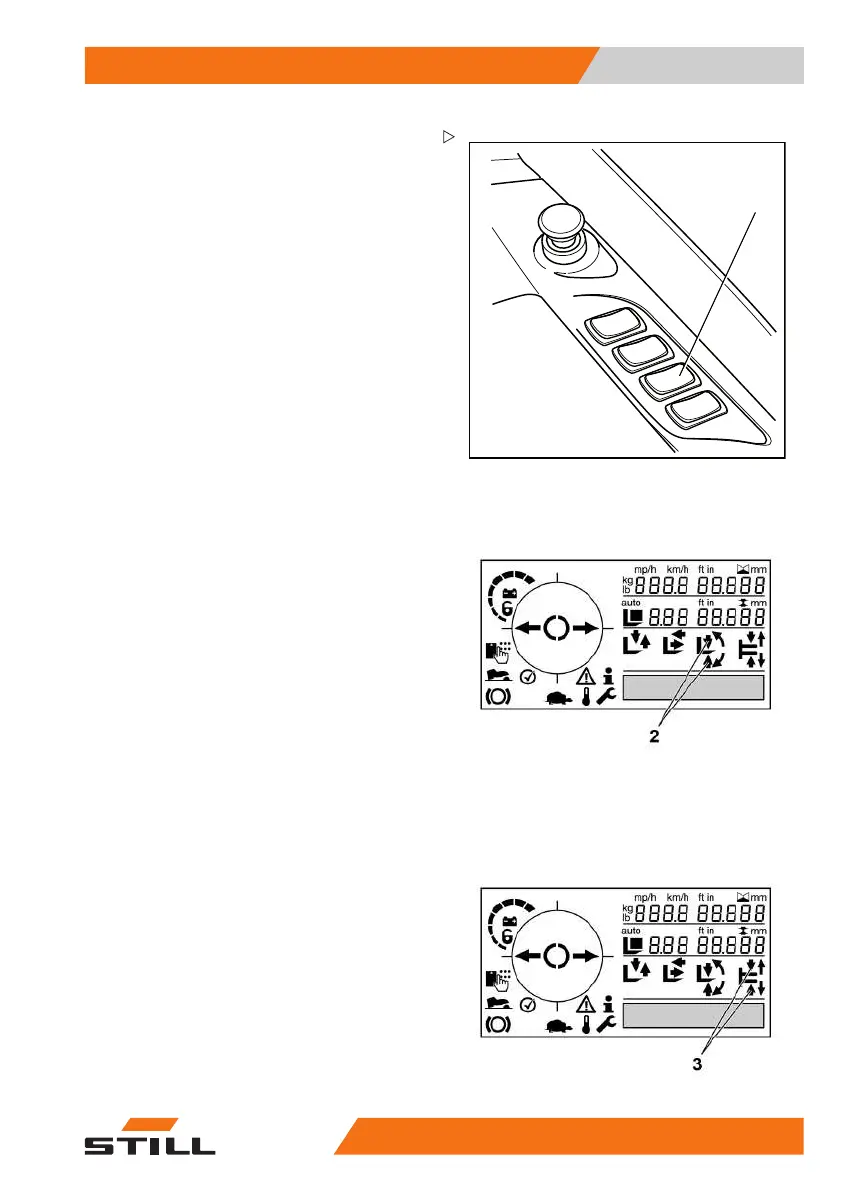
– Push the "transition shif
t/tilt centre position"
push button (1) on the righ
t-hand side until
the function switches of
f automatically.
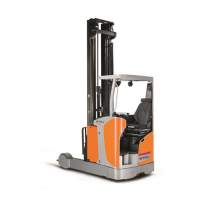
The arrows (2) on the display and operating
unit flash until the end position is reached.
The truck positions the transition shift in the
centre position.
Automatic tilting centre position (variant)
The driver can use the
"automatic tilt to centre
position" function t
o change the tilt of the fork
arms to 0° automatica
lly.Todothis,thepush
button must be actuat
ed until the function
switches off automat
ically. Depending on
the truck version, ei
ther only the fork carriage
(fork tilter) or the e
ntire lift mast (mast tilter) is
positioned.
– Push the "transition shift/tilt centre position"
push button (1) on the left-hand side until
the function switches off automatically.
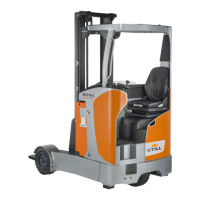
The arrows (3) on the display and operating
unit flash until the end position is reached.
The truck tilts the
fork arms to the 0° position.
50
988078001 [EN] 105



 To Next Page