Operation 5
Handling the battery
Setting the battery data
Adjustment instructions
To enable the truck controller to determine the
residual capacity of the battery correctly, the
technical data for the installed battery must
be entered using the following buttons on the
display:
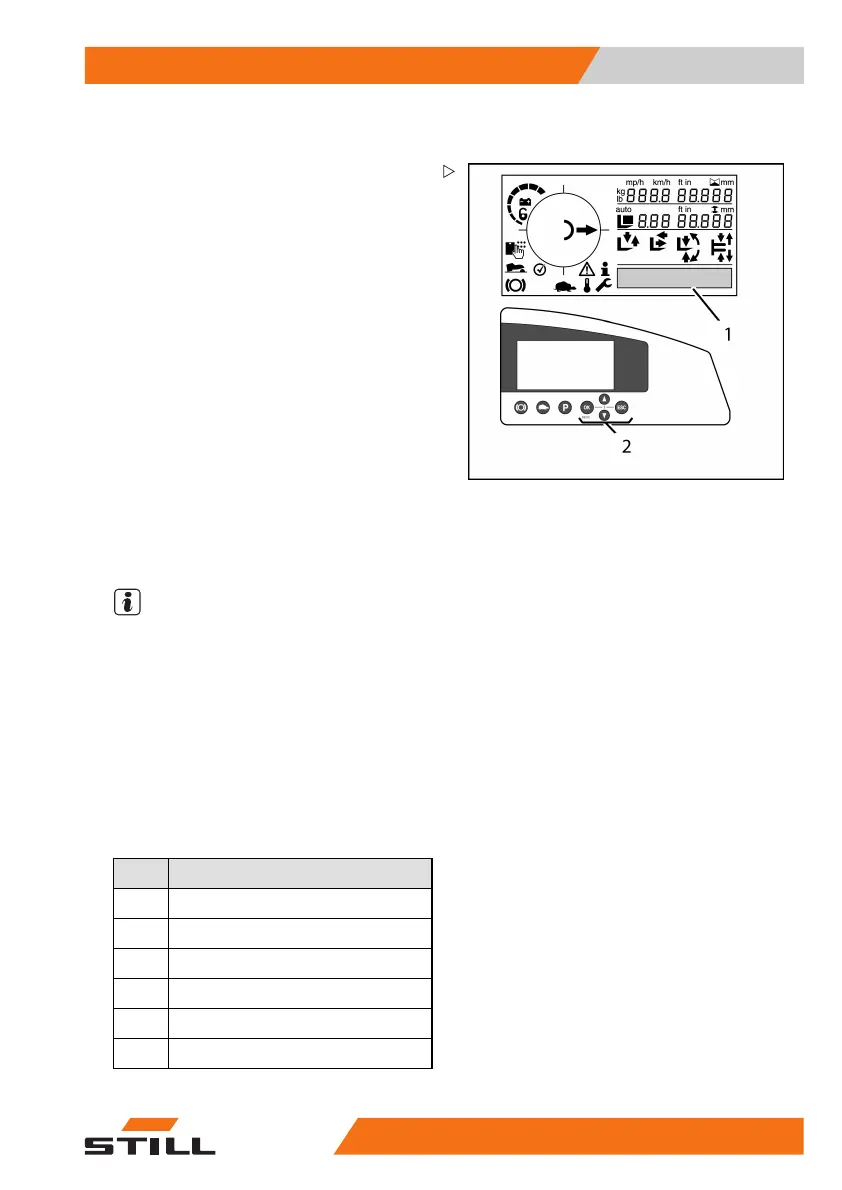
– Push the "OK" button on the ke
ypad (2)
for approx. 2 seconds. This c
alls up the
onboard diagnostics functi
on.
– The display (1) provides information on the
selected menu item.
– Push the arrow buttons on the keypad (2) to
scroll within the menus. The selected menu
items are highlighted on the display.
The following menu items
are available:
• Information
• Parameter
• Diagnosis
NOTE
The height preselection option also offers the
Teach in menu item.
– Select the Parameter
menu.
– Push the "OK" button on the keypad (2) to
confirm the selection.
The correct battery type (batt_type) and
capacity (batt_cap) for the installed battery
can now be selected from the six options
by entering the number that represents the
capacity value.
Value
Battery type
0
Lead–acid battery (wet battery)
1
Performance-enhanced battery
2
Gel battery
3
Special battery/reserve
4
Special battery/reserve
5
Special battery/reserve
50
988078001 [EN] 213



 To Next Page