Operation 5
Lift height preselector (variant)
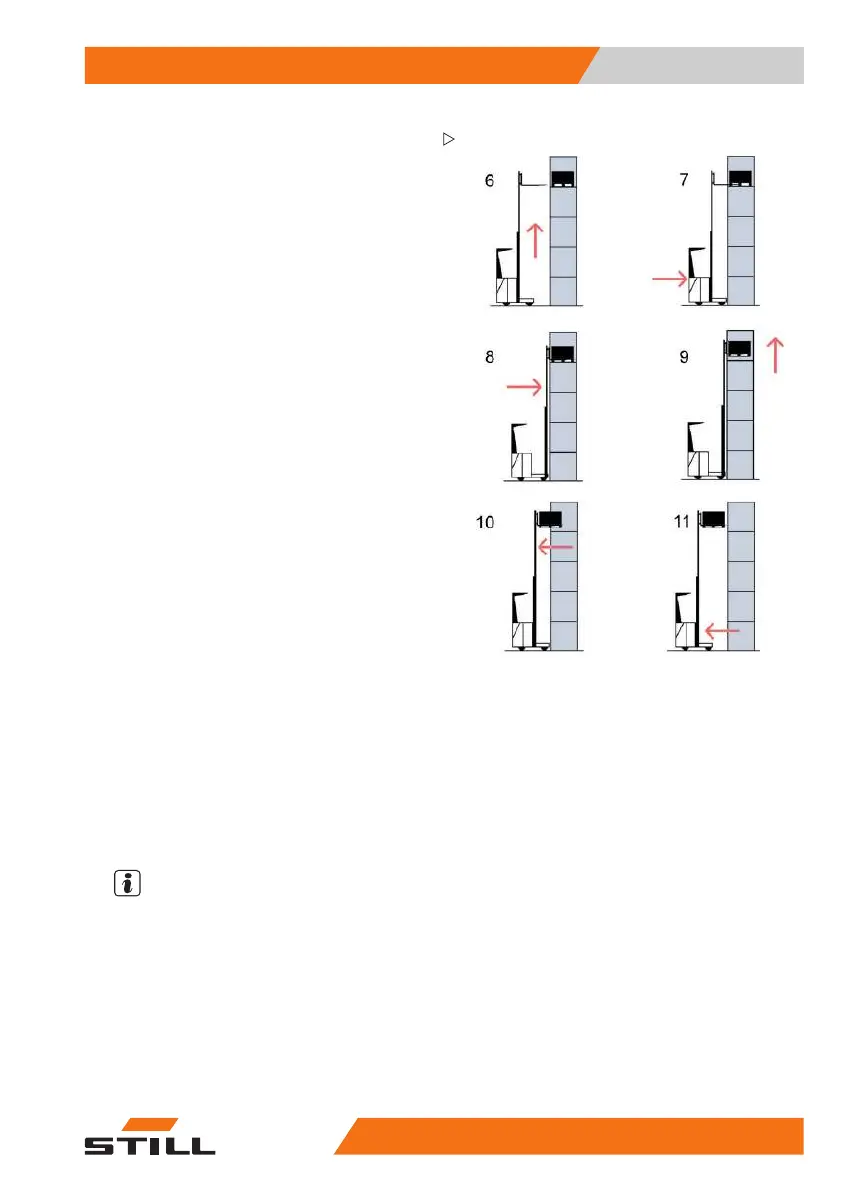
– Activate the lift function (displayed by the
assistant). The exact selected height is
reached and the automatic stop is per-
formed (6). The display (5) shows a dis-
tancetothetarget≤ 6 mm.
– Drive up to the racking (7).
– Activate the LS shifting fun
ction (shown on
the assistant) and insert th
e fork arms all the
way into the pallet (8).
– Activate the lift function (displayed by the
assistant). The forks are raised by the pallet
free lift height; the load is picked up (9).
– Activate the DS shifting function and retract
the reach carriage completely (shown by
the assistant) (10).
– Back the truck away (11).
The automatic routine is complete. All func-
tions are available again (= manual operation).
Teach-in, general
The teach-in for height preselection is carried
out using the truck display.
In order to
carry out the teach-in, the user must
be logged i
n to the truck with a PIN code with
authorisa
tion level "2" or "3".
NOTE
Before a
new height can be set via the display,
arefere
nce drive must be carried out. Heights
that are
below the reference height can be
saved by
entering them manually. However,
if such a
level is selected, automatic operation
cannot b
e used.
Only preset heights can be changed via
the display. No other truck-specific height
preselection parameters can be changed.
50
988078001 [EN] 165



 To Next Page