Operation 5
Handling the battery
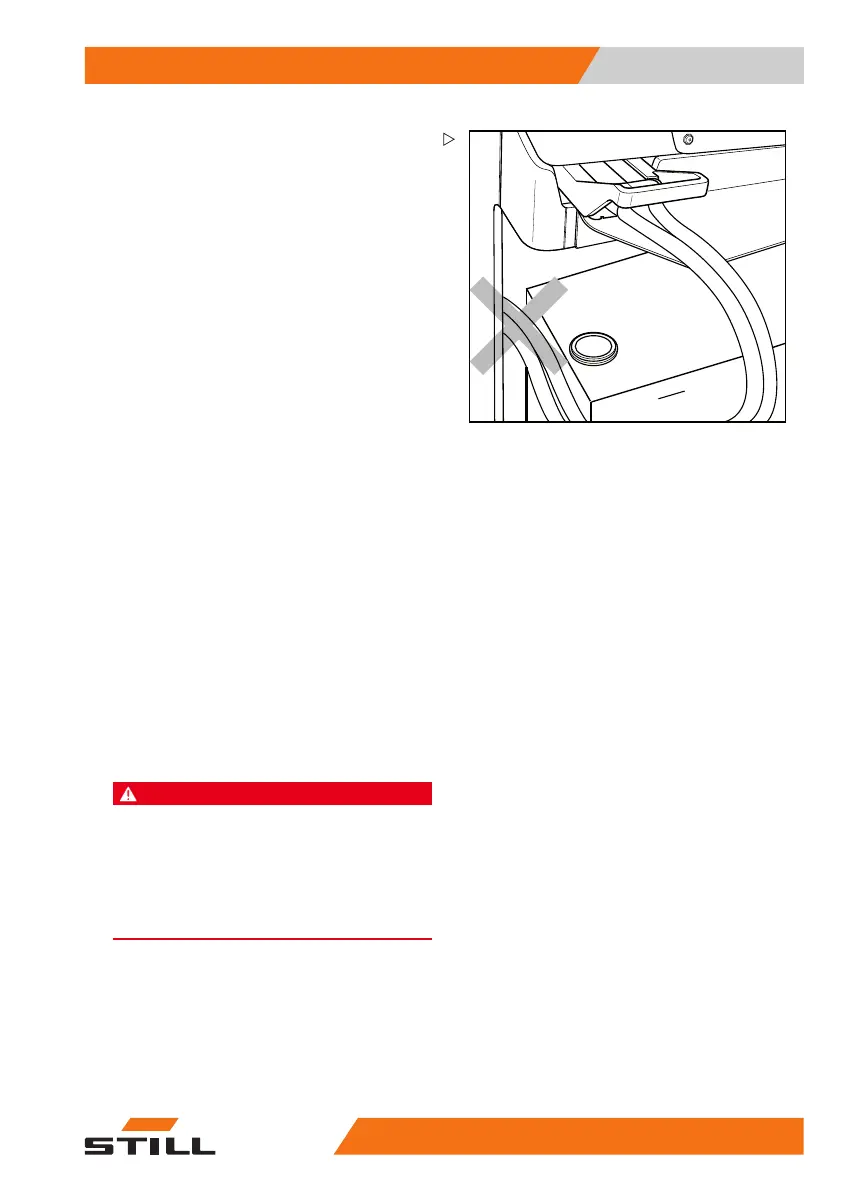
– Make sure that the battery cable cannot
become trapped when the reach carriage is
retracted with the battery.
– Unlock the emergency off switch.
– Switchonthetruck.
– Press the foot switch.
– Retract the reach carriage with the battery
fully until the battery lock engages.
The lock must audibly engag
e. Push the
release lever down if neces
sary. If the battery
frame is locked incorrectl
y, traction is reduced
and the message A3405 is sho
wn on the
display and operating uni
t. This status can
also be caused by the use of
a non-standard
battery or by a technical f
ault.
If the battery is not included in the scope of
delivery of the truck, the battery lock must be
adjusted by the authorised service centre.
– Check or re-enter the battery data (battery
type and battery capacity) on the display
and operating unit; see the chapter entitled
"Setting the battery data".
Changing the battery using the
internal roller channel (variant)
As an option, this truck can also be equipped
with a roller channel for battery replacement at
the side.
DANGER
The battery weight and its dimensions affect the
stability of the truck.
When replacing the battery, the weight ratios
must not be changed. The battery weight must
remain within the weight range specified on the
nameplate. The location of ballast weights must not
be changed.
50
988078001 [EN] 205


 To Next Page