Operation 5
Operating auxiliary equipment
For this reason, load measurement is disabled
during the following truck activities:
•Driving
• Lifting
•Lowering
Once the fork has been in the inactive posi-
tion for two seconds, load measurement is
enabled. Load measurement is now possible.
The measured weight of the lo
ad is shown on
the display and operating un
it.
If the button for load measurement is pressed
while load measurement is disabled, "--
--"is displayed instead of the measured
weight. After a maximum of ten seconds,
the display returns to the speed indicator.
If load measurement is possible within ten
seconds because the fork has moved into the
inactive position, the measured load weight is
displayed.
NOTE
The displayed value of
the load measurement
is invalid if the fork c
arriage is positioned
exactly between the fr
ee lift height and main
lift height during the
measurement. In this
case, the measurement
must be repeated at
a different position.
In addition, the load must
be lifted completely o
ff the ground during the
measurement.
1
Performing the load m
easurement
– Slightly lower the fork with the load. This will
increase the accuracy of the measurement.
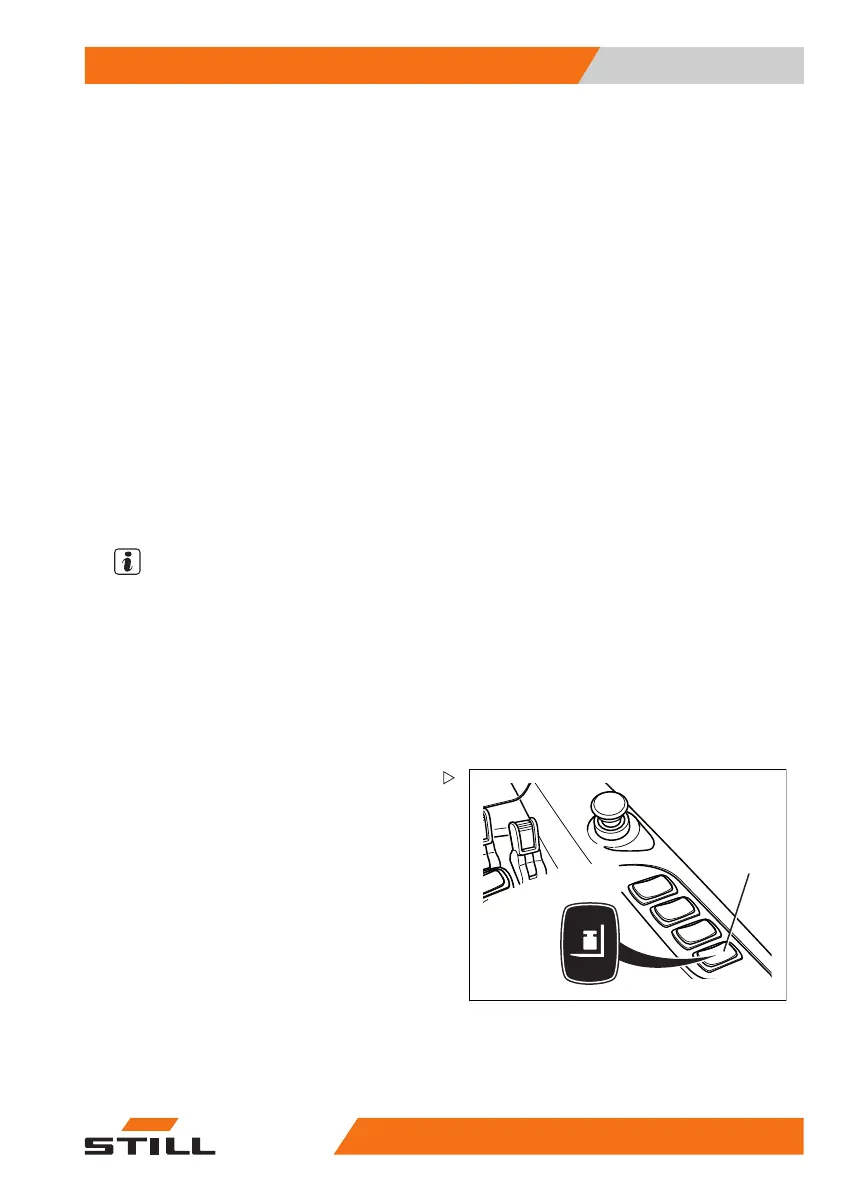
– Press the (1) button to start the load mea-
surement.
The measurement is
performed once the load
is in the inactive p
osition.
On the display and operating unit (2), the
measurement result is now displayed instead
of the speed indicator. The displayed value
relates only to the completed measurement
and is not updated.
50
988078001 [EN] 151



 To Next Page