5 Operation
Handling the battery
3
– Move the actuating lever into th
ezero
position once
– Actuate the actuating lever again and
retract the reach carriage to the drive side
into the end position
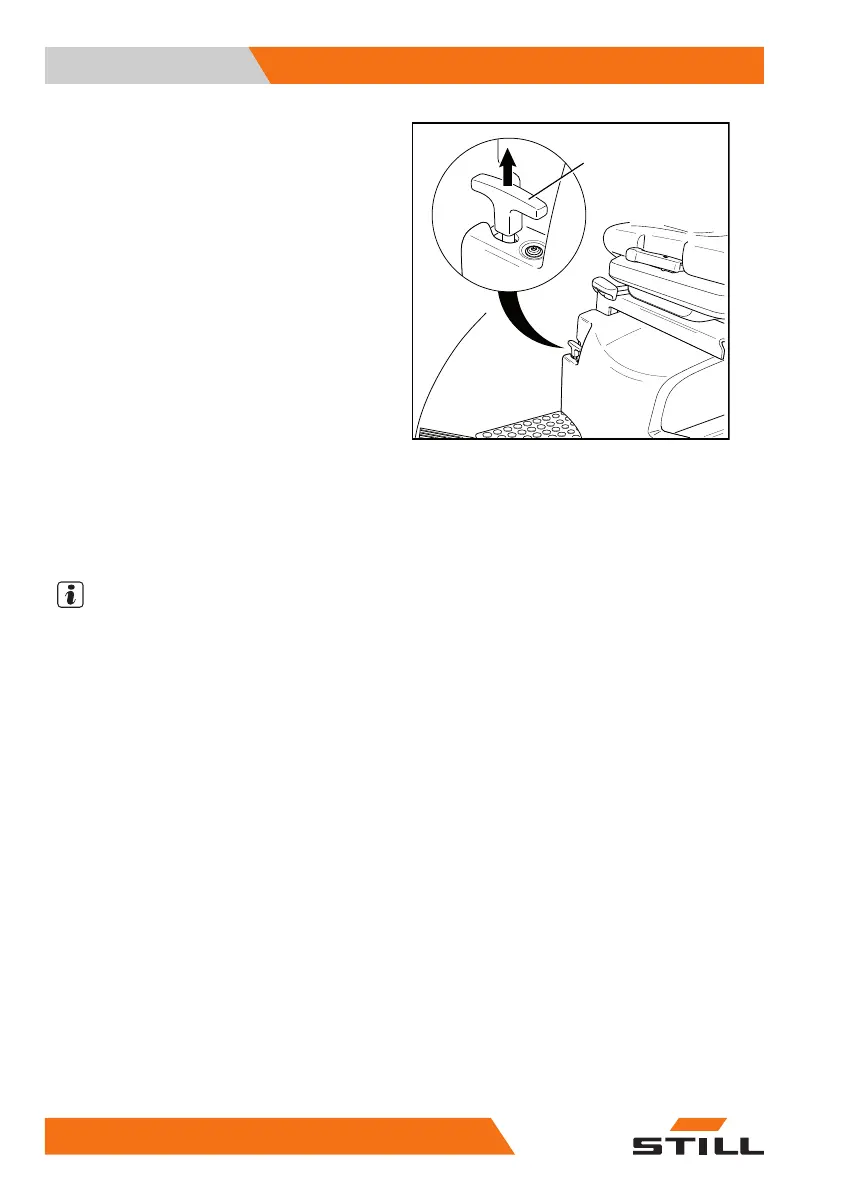
– Pull the release lever (3) for the battery lock
upwards
The battery is unlocked and ca
n be extended
totheloadsidetogetherwith
the reach
carriage.
While the battery lock is released, an acoustic
warning signal sounds. The "creep speed"
symbol (2) appears on the display and operat-
ing unit. This symbol indicates that the truck
can only be driven at walking speed while the
battery lock is released and that the hydraulic
functions are restricted.
– Once unlocked, extend the battery to the
load side by at least one third of the reach
travel to complete the unlocking process
NOTE
Once unlocked, the battery must be exten-
ded to the load side by at least one third of
the reach travel to complete the unlocking
process. Only then can the battery be locked
again by retracting the battery together with
the reach carriage.
Locking the battery
– Press and hold the foot switch
– Use the actuating lev
er (joystick or fingertip
switch) to retract th
e reach carriage to-
gether with the batte
ry to the drive side into
the end position.
The battery lock audibly engages. The battery
is locked.
The acoustic warning signal stops. The "creep
speed" symbol on the display and operating
unit disappears. The truck can be driven
at a normal operating speed again and the
hydraulic functions are no longer restricted.
19
8 50988078001 [EN]



 To Next Page