Operation 5
Commissioning
Entering operating data in the main menu
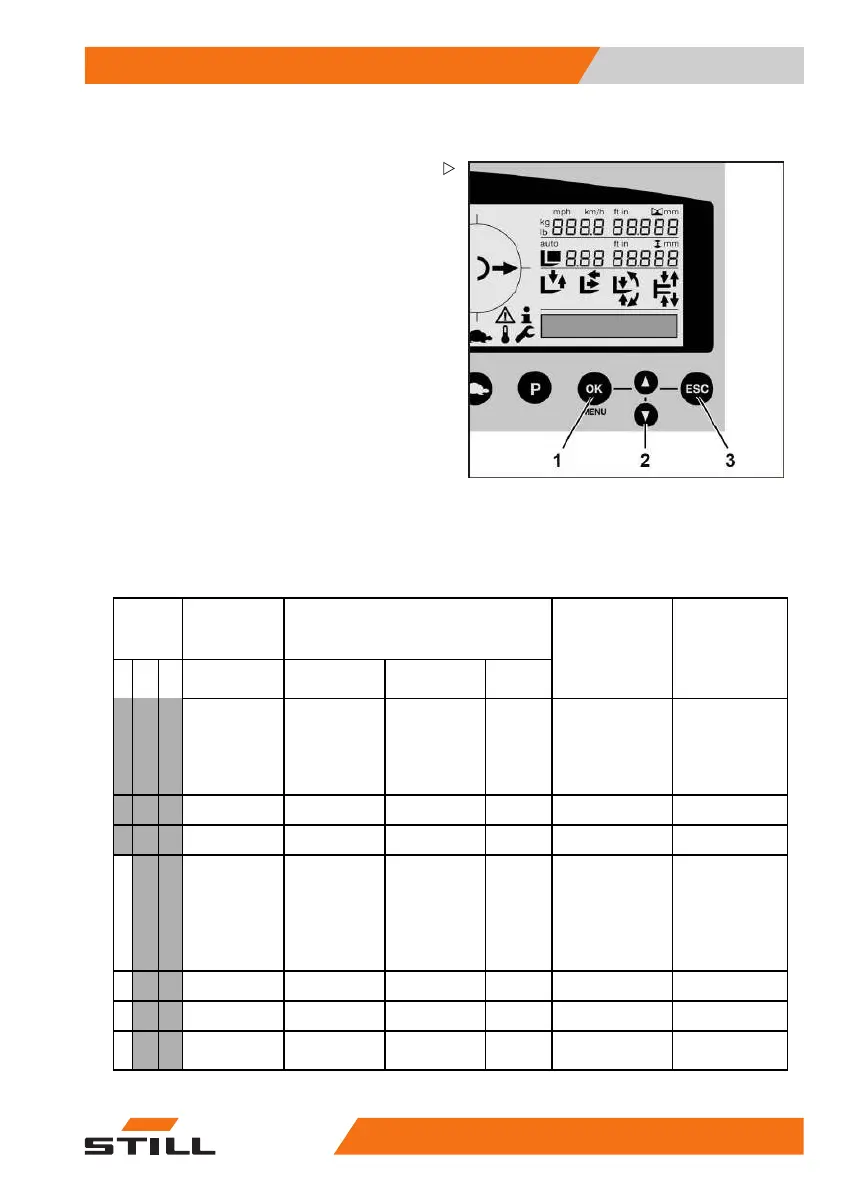
The menus on the display and operating unit
are controlled using the OK button (1), ESC
button (3) and arrow buttons (2).
– Press the arrow buttons to navi
gate through
the menus
– Press the OK button to select a menu item
– PresstheESCbuttontomoveupthemenu
structure
If a displayed value or status can be edited,
the corresponding display flashes.
• Press the arrow buttons to e
dit a value or
status
• Briefly press the ESC button to return to
the previous input position (to make a
correction)
• Press and hold the ESC button for two
seconds to cancel the current entry
• PresstheOKbuttontoconfi
rm the entry
Overview of the menu structure
Authori-
sation
(level)
Main menu Submenu
12 3
CONFIGU-
RATION
123
Edit/select
Comment
LANGUAGE
List of available
languages
Language
selection for
the display
and operating
unit
TIME HH : MM
DATE YY : MM : DD
BATTERY TYPE
LEAD
CSM
GEL
GEL_SO
SPEC. 1
SPEC. 2
CAPACITY
XXX Ah
VERSION DEVICE
X
COM-
PUTER
X
50
988078001 [EN] 77



 To Next Page