168
CLEANING THE OVEN DOOR GLASS SURFACES
Required Tools
• 2.5 mm hex wrench
Accessing the Oven Door Glass
1. Power off the printer. See “Powering Off” on page 169.
2. Allow the oven to cool.
3. Open the oven door.
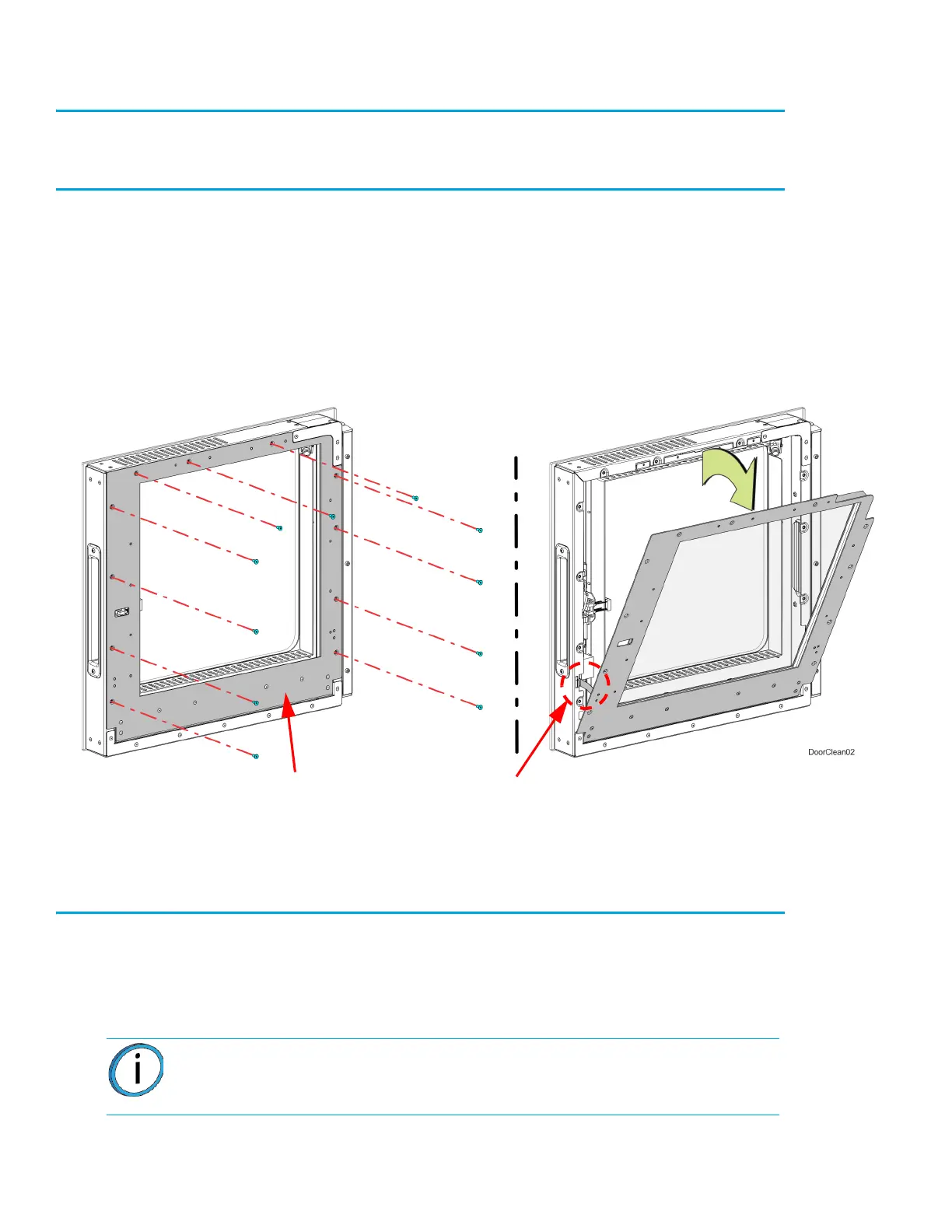
4. Using a 2.5 mm hex wrench, remove the inside door panel mounting screws (11). See Figure 7-
38.
Figure 7-9: Inside door panel mounting screw locations
5. Pivot the inside door panel away from the door assembly. The pivot arms will prevent the door
panel from fully separating. See Figure 7-9.
6. Clean the glass surfaces with a commercial glass cleaner.
Installing the Door Panel
1. Push the top of the door panel toward the door assembly.
2. Close the door panel and make sure that the panel and frame mounting holes are aligned.
3. Using a 2.5 mm hex wrench, install the inside door panel mounting screws (11). See Figure 7-9.
4. Close the oven door.
Note: Do not over-tighten the inside door panel mounting screws.
Pivot arm (2)
Inside
door panel














 To Next Page