162
EXPORTING SYSTEM CONFIGURATION (.CFG) FILE
If your system is receiving fault determination codes, you may need to export a configuration (.cfg) file from your
system to send to Customer Support.
GrabCAD PRINT METHOD
For detailed instructions on exporting a system configuration file navigate to http://help.grabcad.com/article/196-
printer-firmware-management and follow the procedure for “Exporting the printer configuration”.
INSIGHT SOFTWARE METHOD
1. From your workstation PC’s Start Menu, navigate to All Programs > Insight (installed version)
> Control Center (installed version) or double-click the Control Center shortcut (if available).
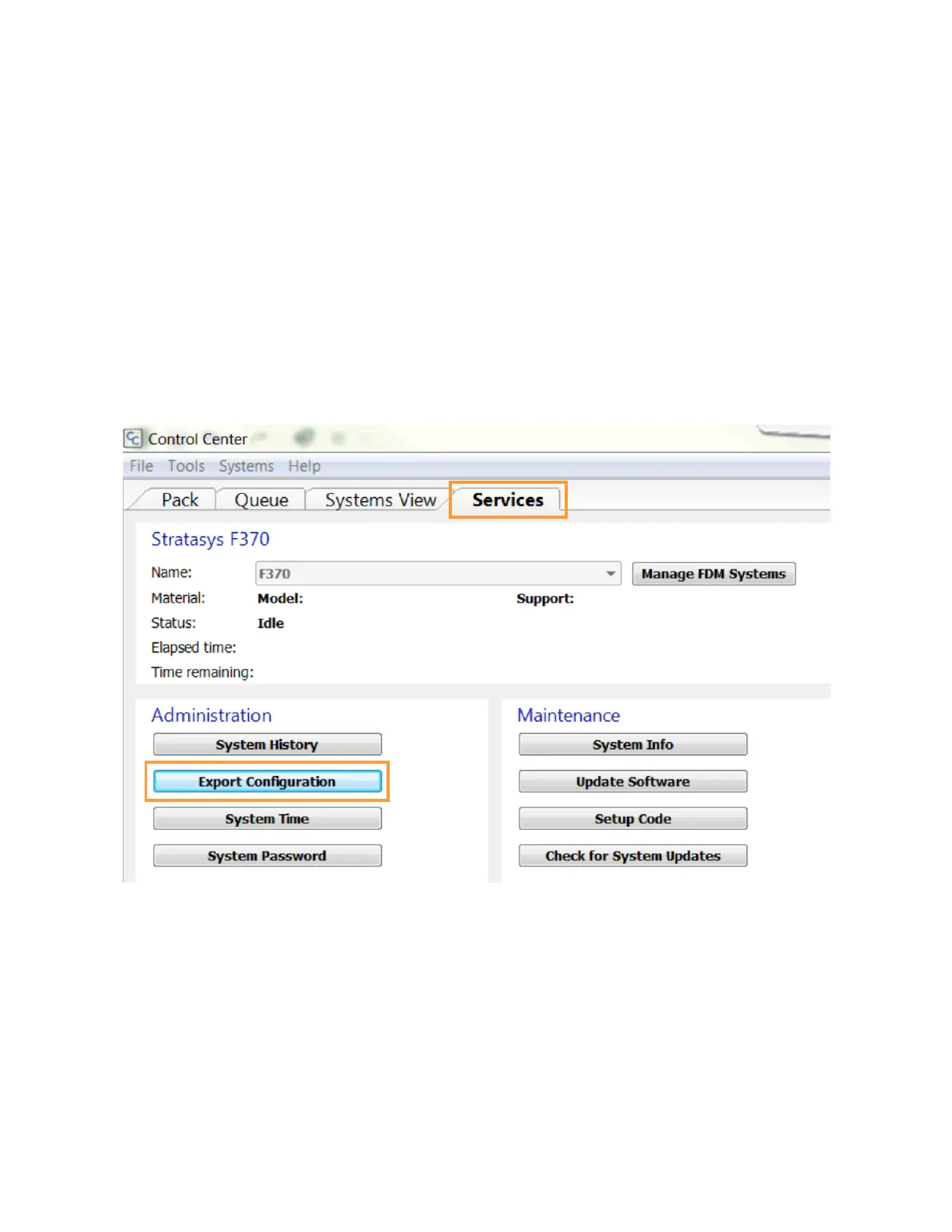
2. Within Control Center, select the Services tab. Ensure that your F370 Series printer is selected
from the drop-down menu then click the Export Configuration button.
Figure 7-6: Control Center Export Configuration
3. Browse to the directory where you wish to save the configuration file.
4. Click on the Save button.
5. Close Control Center.














 To Next Page